

The 3-2-1 backup rule means keeping three copies of your data on two different types of storage, with one copy off-site. If you do nothing else today, automate your backups and make sure one copy stays offline or immutable, out of reach from ransomware that hunts for connected backups to destroy along with your files.
TL;DR:
- Using immutable cloud storage with object lock and offline backups helps prevent ransomware from overwriting or deleting backup copies.
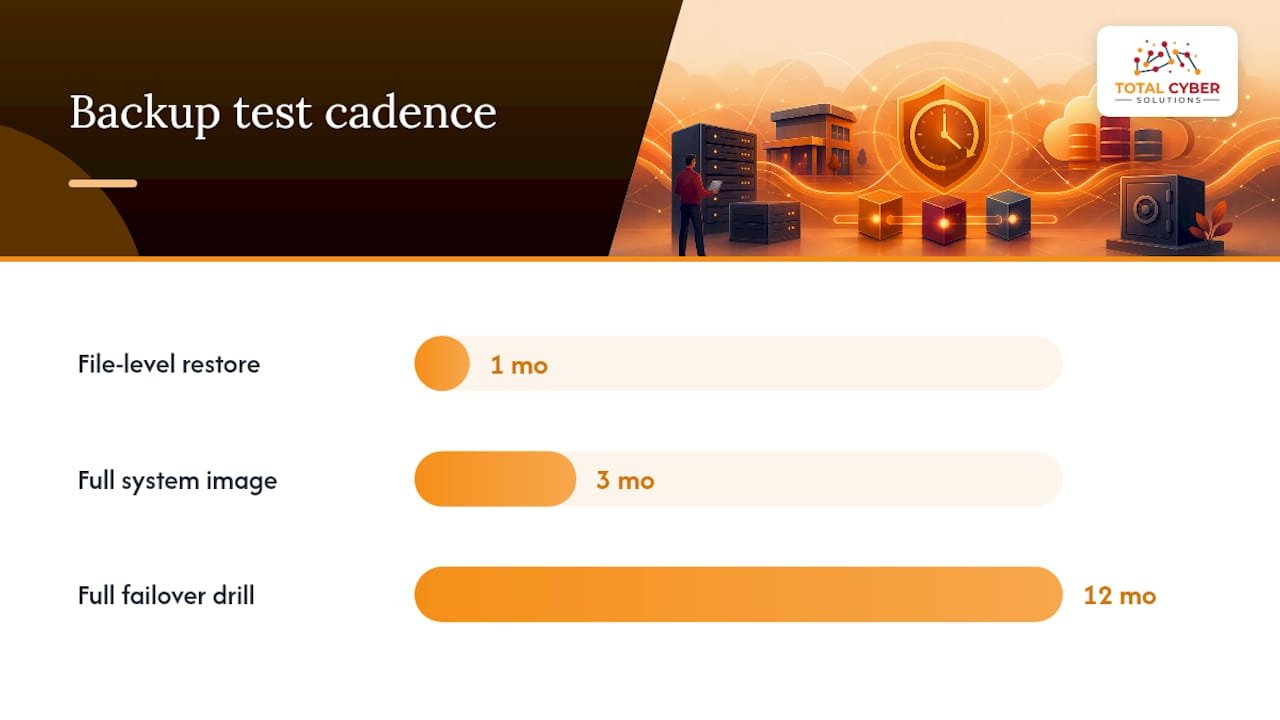
- Regular testing of restore processes, including monthly file restores and annual full system failovers, verifies backup reliability.
- Prioritizing critical data such as financial, customer, and system configuration files ensures the most important information is protected first.
- Automating backups, encrypting data, and securing accounts with MFA significantly reduce the risk of backup failure or compromise.
- Implementing extra offline or air-gapped copies, along with longer retention periods, strengthens resilience against dormant ransomware attacks.
Table of Contents
- What the 3-2-1 backup rule means in plain terms
- How to implement 3-2-1: step-by-step checklist for individuals and SMBs
- Cloud backups, immutability, and why cloud-only can fail against modern ransomware
- Testing, RTO/RPO, and recovery drills: make sure backups actually restore
- Common mistakes, limits of 3-2-1, and modern adaptations
- How Total Cyber Solutions helps implement 3-2-1 reliably
- An editorial take on where SMBs get backups wrong
- Get help making your backup strategy ransomware-resilient
- Sources
- FAQ
What the 3-2-1 backup rule means in plain terms
Three copies. Two media types. One off-site. That’s the whole rule, and it works because it removes single points of failure.
Picture your setup. Your original file lives on your work PC. That’s copy one. Copy two might sit on a network-attached storage device, or NAS, in your office. Copy three lives somewhere else entirely: cloud object storage, or a physical drive stored at a different location. Three copies, and already two different media types (local disk and NAS, or NAS and cloud), with one of them off-site.
Here’s where people trip up. Syncing a folder to Dropbox or Google Drive is not automatically a backup. If ransomware encrypts your files and the sync tool faithfully copies those encrypted versions to the cloud, you haven’t protected anything. Cloud only counts as a real second location when it’s a separate, versioned, and ideally immutable copy, not a live mirror of your desktop.
Not every file deserves equal attention. Prioritize:
- Financial records and accounting data, since these are hardest to reconstruct from scratch.
- Customer and patient records, especially anything tied to compliance obligations.
- Line-of-business databases, the systems that would stop operations if lost.
- System configurations and credentials, which speed up rebuilding after an incident.
Back those up first, then expand coverage to everything else.
How to implement 3-2-1: step-by-step checklist for individuals and SMBs
You don’t need an enterprise budget to do this right. You need a plan and the discipline to automate it.
- Inventory your data. List what you have, where it lives, and how much you’d lose in a bad week without it.
- Map criticality to backup frequency. Your accounting database probably needs daily backups; old marketing files might be fine monthly.
- Choose your media mix. A common SMB pattern: local NAS for fast recovery, cloud storage for off-site protection, and a removable drive rotated offline for ransomware resistance.
- Automate everything. Manual backups get skipped. Scheduled jobs don’t.
- Encrypt backups in transit and at rest, and store encryption keys separately from the backups themselves.
- Lock down backup accounts with MFA. Backup credentials are a favorite ransomware target because compromising them lets an attacker delete your safety net.
- Rotate the offline copy on a fixed schedule, weekly or biweekly depending on how much data you can afford to lose.
For scheduling, a workable SMB baseline looks like daily incremental backups (capturing only what changed) with a weekly full backup, and a recovery point objective, or RPO, of 24 hours for critical systems. That means if disaster strikes, you’re only ever losing a day’s work at most. Some businesses tighten that to four or six hours for their most sensitive databases, but that comes with more infrastructure and cost.
Pro Tip: Set a recurring calendar reminder to physically disconnect and store your offline backup drive. Automation handles the copy, but a human still has to unplug it.
Cloud backups, immutability, and why cloud-only can fail against modern ransomware
Cloud storage solves the off-site requirement neatly, but cloud-only strategies have a blind spot. If your production files get encrypted and a sync tool pushes those encrypted versions into your cloud backup, the “backup” is now just as useless as the original. CISA has specifically warned against relying solely on cloud-to-cloud backups for exactly this reason: without immutable or isolated copies, ransomware can overwrite your cloud safety net without you noticing until it’s too late.

This is where immutability earns its place. Immutable storage, sometimes called WORM (write once, read many) or object lock, prevents a file from being altered or deleted for a set retention period, even by someone with admin credentials. Major cloud providers offer this as a configurable setting, not a default, so it has to be turned on deliberately.
A resilient setup usually combines a few patterns:
- Cloud storage with object lock enabled, so backups can’t be deleted within their retention window.
- A separate offline or air-gapped copy, disconnected from the network entirely.
- Retention periods long enough to catch ransomware that sits dormant before triggering, often 30 days or more.
One of the most consistent recommendations from federal guidance is to pair encrypted, immutable backups with offline copies rather than trusting either alone, according to CISA’s StopRansomware guide. Skip that pairing, and shared admin credentials or thin retention windows become the crack an attacker walks through.
Testing, RTO/RPO, and recovery drills: make sure backups actually restore
A backup you’ve never restored is a guess, not a plan. Recovery time objective, or RTO, is how long you can tolerate being down. Recovery point objective, or RPO, is how much data loss you can tolerate, measured in time since the last good backup. For most small businesses, an RTO of 4 to 24 hours for core systems is realistic without heavy investment, and our guide on mapping RTO and RPO with a buffer walks through setting those numbers honestly rather than aspirationally.
Testing turns those targets from theory into something you can trust.
- Run file-level restore tests monthly. Pull back a handful of files and confirm they open correctly.
- Test a full system image quarterly. Boot it in an isolated environment and check that it actually starts.
- Simulate a full failover annually. This is the drill that reveals whether your RTO is realistic or wishful thinking.
Practitioners routinely find that backup images fail to boot when tested for real, according to the CISA MS-ISAC Ransomware Guide, which is exactly why the drill matters more than the backup job itself. When a test fails, adjust: increase backup frequency, fix corrupted jobs, or revise your RTO to match reality instead of hope.
Keep golden images, clean, verified system builds, along with offline installer media for critical software. Some restores require reinstalling software that’s no longer available from the vendor or that won’t run on newer hardware, so having that media on hand saves days during an actual incident.
Pro Tip: Document every restore test with a timestamp and outcome. That log becomes your proof of due diligence if a client, auditor, or insurer ever asks.
For a deeper walkthrough of building this into a repeatable process, see our piece on proving disaster recovery testing works.
Common mistakes, limits of 3-2-1, and modern adaptations
The classic rule is a floor, not a ceiling, and ransomware has exposed its gaps.
Frequent failure points:
- Backups that stay network-connected, letting ransomware reach and encrypt them.
- No testing, so failures surface only during a real emergency.
- Shared or reused credentials on backup systems, giving attackers an easy path in.
- Retention windows too short to outlast dormant ransomware.
That’s why many practitioners now recommend 3-2-1-1, adding one immutable or air-gapped copy on top of the original three, and 3-2-1-1-0, which adds a requirement of zero errors on every recovery test. The extra “1” is your ransomware insurance; the “0” is proof that insurance actually pays out.
You don’t need enterprise tools to adopt this. A rotated set of external drives kept offline covers the air-gapped requirement cheaply. Object-lock storage tiers from mainstream cloud providers cover immutability without a big budget jump. The goal is layering protection, not buying the most expensive option available.
How Total Cyber Solutions helps implement 3-2-1 reliably
Building a ransomware-resilient backup strategy takes more than buying storage. It takes mapping RTO and RPO to what your business can actually tolerate, configuring immutable and offline copies correctly, and testing restores on a schedule you’ll actually keep.
Total Cyber Solutions handles this as part of Managed IT Services, including backup management, Cloud Services with disaster recovery integration, and recovery testing that produces documented proof your backups work, not just a checkbox. The team maps RTO and RPO to specific operations, configures immutable storage where it fits the budget, and runs the restore drills most businesses skip until it’s too late.
An engagement typically starts with a review of your current backup setup, a remediation plan for the gaps we find, and ongoing managed execution from there. If you want a second set of eyes on your current backup strategy, request a review through our MSP form.
An editorial take on where SMBs get backups wrong
Most small businesses treat backups like insurance they bought once and never think about again. That’s backward. A backup is only worth what it restores, and the businesses that get burned by ransomware usually had backups. They just never tested them.
If I had to boil this down to three moves this week: inventory what you’d actually lose, automate a daily backup instead of relying on memory, and create one offline or immutable copy, then run a restore test to prove it works.
A printable version to tape near your desk:
- Inventory critical data and rank it by impact if lost.
- Automate daily incremental backups and weekly full backups.
- Create one offline or immutable copy, rotated on a fixed schedule.
- Enable MFA on every backup account.
- Test a file-level restore monthly.
- Run a full failover drill at least once a year.
— Alden
Get help making your backup strategy ransomware-resilient
Reading about the 3-2-1 rule is one thing. Configuring immutable storage correctly, mapping RTO and RPO to your actual operations, and keeping restore tests on schedule while running a business is another. That’s the gap managed backup support closes.

Total Cyber Solutions builds backup and recovery programs around tested restores, immutable storage configured for your budget, and documentation that holds up if a client or auditor ever asks. Onboarding starts with a review of what you have now, followed by a remediation plan and managed execution so the backups stay tested instead of forgotten. Explore Managed Cybersecurity Services or start a review through our MSP form.
Sources
A few primary sources back the recommendations in this piece and are worth reading directly if you want the full detail.
The CISA StopRansomware guide covers offline and immutable backup practices in depth. The CISA MS-ISAC Ransomware Guide walks through backup testing and incident recovery steps. The IC3 Annual Report tracks ransomware trends federal investigators respond to each year. CISA’s guidance for small and medium businesses summarizes 3-2-1 specifically for smaller operations.
- CISA StopRansomware guide (2025)
FAQ
Is cloud-only backup enough to protect against ransomware?
No. Cloud-only backup can fail if ransomware encrypts your files and a sync tool copies those encrypted versions into your cloud storage, according to CISA’s StopRansomware guidance. You need at least one isolated or immutable copy that ransomware can’t reach or overwrite.
How often should I test my backup restores?
Test file-level restores monthly, full system images quarterly, and a complete failover at least once a year. Federal guidance from the CISA MS-ISAC Ransomware Guide treats regular restore testing as a core defense, not an optional step.
What does an immutable backup actually mean?
An immutable backup can’t be altered or deleted for a set retention period, even by someone with admin access to the system. This protects against ransomware or attackers who gain valid credentials and try to erase your recovery options, a scenario CISA guidance specifically flags as a risk when immutability isn’t configured.
What’s the most budget-friendly way to keep an offline backup copy?
Rotating a set of external hard drives that you disconnect after each backup covers the offline requirement without major cost. Pairing that with a low-cost cloud tier that offers object lock adds immutability on a small budget, giving you both protections the CISA StopRansomware guide recommends.
What is 3-2-1-1-0 and do small businesses need it?
3-2-1-1-0 adds one immutable or air-gapped copy on top of the standard 3-2-1 rule, plus a requirement of zero errors on every recovery test. Small businesses handling sensitive customer data or compliance obligations benefit most from adopting it, since the extra copy and verification step close the exact gaps that let ransomware destroy connected backups.