

If you run a small or mid-sized business in Virginia and your IT is held together with duct tape and good intentions, the answer is simple: hire a managed IT provider now. A qualified MSP delivers 24/7 monitoring, remote and on-site helpdesk, automated patching, endpoint protection, backups, and Microsoft 365 management, under one monthly agreement. Start your discovery call with Total Cyber to get a scope estimate and onboarding timeline the same day.
Virginia SMBs face compliance drivers that make a managed approach more than convenient. Key laws such as the Virginia Consumer Data Protection Act (VCDPA) and HIPAA for healthcare practices impose documentation, response, and safeguard requirements that are difficult to meet without a dedicated IT partner. Total Cyber Solutions, a veteran-owned Microsoft Cloud partner, is built specifically for this environment.
- Core services in scope: monitoring, helpdesk, patching, endpoint detection and response (EDR), backups, Microsoft 365 support
- Compliance touchpoints: VCDPA data protection assessments, HIPAA business-associate agreements (BAAs), incident response planning
- Typical onboarding window: 3–6 weeks to full coverage, with a 90-day optimization review
Pro Tip: Before your first MSP call, write down your three biggest IT pain points and your top compliance concern. That 10-minute exercise cuts discovery time in half and gets you to a proposal faster.
Key Takeaways
Hiring a managed IT provider is the right move for most Virginia SMBs, and the setup process takes 3–6 weeks when you arrive prepared with credentials, a device inventory, and your compliance obligations identified.
| Point | Details |
|---|---|
| Hire for compliance and Microsoft 365 expertise | Confirm VCDPA and HIPAA experience, Microsoft Cloud partner status, and written SLAs before signing. |
| Clarify MSA scope and SLA response times | Get exclusions in writing; P1 critical response targets and escalation paths must be contractually defined. |
| Prepare onboarding artifacts in advance | Admin credentials, device inventory, network diagrams, and compliance docs cut weeks off the setup timeline. |
| Budget for setup plus monthly recurring fees | Plan for a one-time onboarding fee plus per-user or per-device monthly charges and separate project fees. |
| Total Cyber for Virginia SMBs | Total Cyber delivers compliance-first managed IT with Microsoft 365 expertise and a documented 90-day onboarding path. |
Table of Contents
- What does a managed IT services setup actually include for Virginia SMBs?
- How does the onboarding process work, step by step?
- What security controls and Virginia compliance requirements should you plan for?
- What should your managed services agreement include on pricing and SLAs?
- How do you choose the right IT service provider in Virginia?
- How Total Cyber sets up managed IT for Virginia SMBs
- Why outsourcing your IT setup to an MSP beats doing it yourself
- Total Cyber’s managed IT and cybersecurity services for Virginia SMBs
- Sources
What does a managed IT services setup actually include for Virginia SMBs?
Understanding what you’re buying prevents the most common disappointment in managed IT: expecting everything and getting a narrower scope than you assumed. Core managed IT services typically cover the following deliverables.
| Deliverable | What to expect in practice |
|---|---|
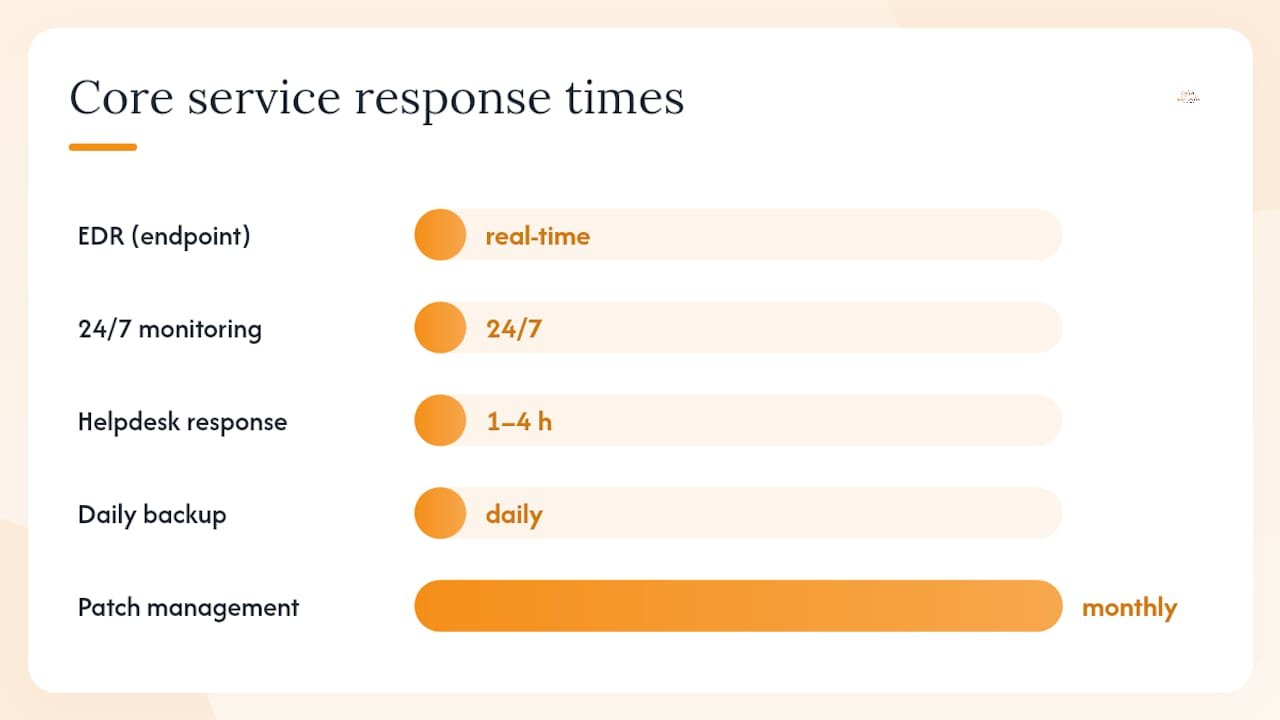
| 24/7 infrastructure monitoring | Continuous alerts on servers, network devices, and endpoints; automated ticket creation |
| Remote and on-site helpdesk | Business-hours or 24/7 support depending on tier; response target typically 1–4 hours |
| Patch management | Monthly OS and application patching; emergency patch capability for critical CVEs |
| Endpoint detection and response (EDR) | Real-time threat detection, isolation, and remediation on all managed devices |
| Backup and disaster recovery | Daily encrypted backups with tested restores; retention period defined in SLA (commonly 30–90 days) |
| Microsoft 365 management and backup | License provisioning, secure configuration, and third-party backup for point-in-time restore |
| Network and firewall management | Firewall rule reviews, VPN configuration, and network health monitoring |
| Asset and inventory management | Hardware and software inventory maintained and updated quarterly |
| Vulnerability scanning | Scheduled scans with remediation tracking; feeds directly into patching cadence |
Microsoft 365 customers have a specific gap to close. Microsoft’s native licensing does not guarantee point-in-time restore capability. Your MSP must configure a separate backup solution to cover Exchange Online, SharePoint, and Teams data. Audit logging and retention labels also need deliberate setup, not just default settings.
Add-on and project services billed separately (confirm these are excluded from your base fee):
- Cloud migrations and major infrastructure refreshes
- Penetration testing and vulnerability assessments
- HIPAA or VCDPA compliance assessments and documentation
- Advanced incident response beyond standard helpdesk scope
- Hardware procurement and on-site cabling work
How does the onboarding process work, step by step?
The first 90 days of an MSP engagement are decisive. A documented onboarding checklist and an early quarterly business review (QBR) materially reduce early churn and set the tone for the entire relationship. Here is what a well-run setup looks like.
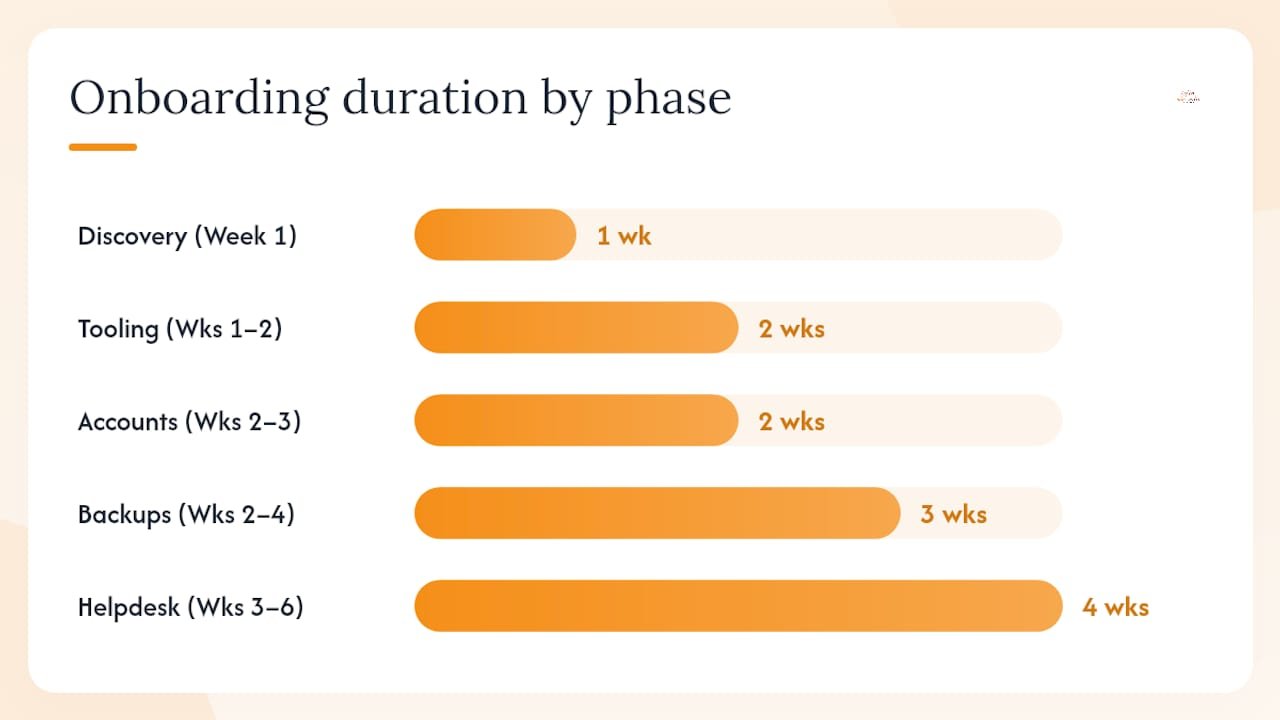
- Week 1: Discovery and documentation. The MSP conducts a network and asset discovery, collects admin credentials, reviews your current software inventory, and maps your compliance obligations. You provide network diagrams, a key contact list, and your business priorities.
- Weeks 1–2: Tooling and monitoring deployment. Remote monitoring and management (RMM) agents and EDR software are deployed across all managed endpoints. Monitoring baselines are established.
- Weeks 2–3: Account and license configuration. Microsoft 365 secure baseline configurations are applied. Multi-factor authentication (MFA) is enforced. User accounts are audited and provisioned correctly.
- Weeks 2–4: Backups and baseline patching. Backup agents are installed and first full backups are verified. A baseline patching run closes the most critical open vulnerabilities.
- Weeks 3–6: Helpdesk cutover and SOPs. Staff are introduced to the new helpdesk ticketing system. Escalation paths and standard operating procedures (SOPs) are documented and distributed.
- Day 90: First QBR. The MSP reviews open tickets, patch compliance rates, backup test results, and any compliance gaps. You agree on priorities for the next quarter.
What you need to prepare before kickoff:
- Admin credentials for all systems (Active Directory, Microsoft 365, firewall, key applications)
- A current or best-effort hardware and software inventory
- Network diagrams or a topology overview
- A list of key contacts (HR, finance, operations leads) for helpdesk routing
- Any existing compliance documentation (data maps, prior assessments, BAAs)
Virginia employers should also confirm payroll registration timing. Virginia requires employers to register with the Virginia Employment Commission within 30 days of paying their first employee, and local BPOL tax rules vary by city and county. These timelines affect when vendor invoices can be processed and should be factored into your onboarding schedule.
Pro Tip: Create a dedicated service account for the MSP’s discovery tools with least-privilege access before kickoff. It takes 20 minutes and prevents the single most common delay: waiting on IT access approvals mid-deployment.
What security controls and Virginia compliance requirements should you plan for?
Security and compliance are not separate workstreams. They overlap directly in the MSP setup process, and gaps in one create liability in the other.
Top security controls your MSP should deliver from day one:
- EDR on every managed endpoint
- MFA enforced across Microsoft 365 and all remote access points
- Managed backups with documented, tested restore procedures
- Scheduled vulnerability scanning with a defined remediation SLA
- Patching cadence with emergency patch capability
- Security monitoring with a documented incident response plan
Virginia-specific compliance obligations:
The VCDPA applies to for-profit businesses that process personal data for 100,000 or more Virginia consumers per year, or 25,000 or more consumers if more than 50% of revenue comes from selling personal data. If you meet either threshold, you must honor five consumer rights (access, correction, deletion, portability, and opt-out), respond to rights requests within the legally specified timeframe with possible extensions, and obtain consumer consent before processing sensitive data.
VCDPA compliance also requires documented data protection assessments before initiating high-risk processing activities such as targeted advertising, data sales, or profiling. These assessments must be retained for regulatory review. SMBs are commonly caught off-guard by this requirement during audits. Your MSP onboarding deliverables should include a data map and a processor agreement that covers your MSP’s role as a data processor.
For healthcare practices, HIPAA requires covered entities and their business associates to implement administrative, physical, and technical safeguards to protect individually identifiable health information. Any MSP handling systems that touch protected health information (PHI) must sign a business-associate agreement (BAA) before work begins.
Local business licensing requirements also vary across Virginia localities, so confirm your MSP’s local operating status and any permit requirements specific to your city or county before contracting.
Compliance documentation checklist for setup:
- Data map identifying personal data flows and storage locations
- Data protection assessments for any high-risk processing
- Processor agreement with your MSP covering VCDPA obligations
- HIPAA BAA (healthcare practices only)
- Privacy notice updated to reflect current data practices
- Incident response plan with defined notification timelines
- Microsoft 365 audit logging enabled and retention labels configured
For a deeper look at IT security best practices tailored to Virginia SMBs, Total Cyber’s published guide covers the specific controls and frameworks most relevant to your environment.
What should your managed services agreement include on pricing and SLAs?
The managed services agreement (MSA) is where most SMBs either protect themselves or leave themselves exposed. A well-structured MSA defines scope precisely, sets measurable SLAs, and limits ambiguity that leads to billing disputes.
Pricing models and when each fits:
- Per-user pricing works well when your headcount is stable and each user has roughly the same device footprint. Typically $100–$175 per user per month for full-stack managed IT.
- Per-device pricing suits environments with shared workstations or high device-to-user ratios. Expect $30–$75 per managed device per month.
- Tiered bundles (basic, standard, advanced) let you match spend to risk tolerance, but read the exclusions carefully. The base tier often omits EDR or backup.
Contract checklist — negotiate these before signing:
- Scope of services with explicit exclusions listed
- Response time SLA (e.g., P1 critical: 1 hour; P2 high: 4 hours; P3 standard: next business day)
- Resolution time targets and escalation path
- Liability cap and insurance requirements (ask for a certificate of insurance)
- Data ownership clause confirming your data stays yours
- Confidentiality and non-disclosure terms
- Change management process for scope additions
- Termination clause with transition assistance and data return timeline
Budget line items to expect:
- One-time setup or onboarding fee (often $500–$2,500 depending on environment size)
- Monthly management fee (per user or per device)
- Per-license software fees (Microsoft 365, EDR, backup, RMM tooling)
- Project fees for migrations, compliance assessments, or major refreshes
- Emergency or after-hours support rates if outside standard SLA
Pro Tip: Ask the MSP to attach a service exclusions addendum to the MSA. If it is not in writing, assume it is not included. Vague scope is the root cause of most MSP billing disputes.
Red flags in an MSA:
- No written SLAs or response time commitments
- Unlimited liability language (or no liability cap at all)
- Missing data return and retention terms at contract end
- No escalation path beyond a generic support email
- Absence of performance metrics or reporting cadence
How do you choose the right IT service provider in Virginia?
Picking the wrong MSP costs more than the contract. It costs you the time to re-onboard, the risk exposure during the gap, and the compliance documentation you have to rebuild. Use this framework to shortlist providers confidently.
Evaluation criteria (score each 1–5):
- Local Virginia presence and on-site response capability
- Microsoft Cloud and Microsoft 365 expertise (ask for partner status)
- Security capabilities: EDR, SOC-level monitoring, incident response
- Compliance experience: VCDPA, HIPAA, NIST, CMMC as relevant
- Certifications: CompTIA Managed Services, CISSP, Azure Administrator
- Pricing transparency and written SLA commitments
- References or case studies from similar Virginia industries
- Documented tooling stack (RMM, PSA, EDR, backup platform)
Interview questions to ask every candidate:
- Walk me through your standard onboarding process and timeline.
- What RMM and EDR platforms do you use, and why?
- How do you handle a ransomware incident at 2 AM on a Saturday?
- Can you show me a backup restore demo before we sign?
- How do you document and retain compliance assessments for VCDPA or HIPAA?
- What is your escalation path when a ticket exceeds its SLA?
- Who is my named account manager and how often will we meet?
Red flags to walk away from:
- No documented onboarding plan or written SLAs
- Opaque pricing with no itemized breakdown
- No local Virginia references or case studies
- Reluctance to sign a BAA for healthcare environments
- No proof of certifications or Microsoft partner status
- Inability to describe their incident response process in plain terms
You can also run a quick AI search audit on a prospective MSP’s public web presence to check what data they expose and how they handle their own digital hygiene. A provider that neglects their own security posture online is a signal worth noting.
How Total Cyber sets up managed IT for Virginia SMBs
Total Cyber Solutions follows a structured setup path built around the same phases described above: discovery, tooling deployment, compliance configuration, and a 90-day QBR. What differentiates the process is the compliance-first orientation from day one.
During discovery, Total Cyber maps your Microsoft 365 environment, identifies open vulnerabilities, and flags any VCDPA or HIPAA documentation gaps before a single tool is deployed. That sequence matters. Most SMBs discover compliance gaps during an audit, not during onboarding. Getting ahead of it during setup means the documentation is in place before it is ever requested.
Trust signals you can verify:
- Microsoft Cloud partner with Microsoft 365 migration and management expertise
- Veteran-owned business with a local Virginia focus
- Services span managed cybersecurity, compliance consulting (HIPAA, NIST, CJIS, CMMC), vCSO leadership, and penetration testing
- Policy compliance support built into the managed services scope, not sold as a separate add-on
After you submit the MSP discovery form, you receive a discovery call, a scope estimate, and a proposed onboarding timeline. No vague proposals. No waiting weeks for a quote.
Pro Tip: Bring your Microsoft 365 admin credentials and a rough device count to the discovery call. That information alone lets Total Cyber produce a same-session scope estimate rather than scheduling a follow-up.
Why outsourcing your IT setup to an MSP beats doing it yourself
Most Virginia SMBs that try to manage IT in-house underestimate the hidden costs. Failed migrations, missed backups, and compliance fines are not hypothetical. They are the predictable outcomes of under-resourced IT. A single missed VCDPA data protection assessment can expose your business to regulatory scrutiny during the cure period before enforcement kicks in. A missed backup means a ransomware event becomes a data loss event.
The honest case for DIY is narrow: a team with a dedicated, certified internal IT professional who has bandwidth to manage patching, backups, compliance documentation, and helpdesk simultaneously. For most SMBs in Virginia, that person does not exist. The owner or office manager is handling IT on the side, and the gaps accumulate quietly.
An MSP converts unpredictable IT costs into a fixed monthly line item, compresses onboarding from months to weeks, and puts compliance documentation in place before it is needed. The opportunity cost of not doing this is real. Every month without monitored backups or enforced MFA is a month of open exposure.
Total Cyber’s managed IT and cybersecurity services for Virginia SMBs
Virginia SMBs that need fast, compliance-ready IT coverage without building an internal team get exactly that with Total Cyber. The managed IT offering pairs Microsoft 365 expertise with built-in cybersecurity compliance support, so you are not buying security and compliance as separate line items after the fact.

- Fast onboarding: full coverage in 3–6 weeks with a documented checklist
- Microsoft 365 migration, backup, and secure configuration included
- VCDPA and HIPAA compliance documentation support from day one
- Managed security services with EDR, monitoring, and incident response
Request your scope estimate and onboarding timeline by completing the MSP discovery form. You will receive a discovery call, a clear scope proposal, and a proposed start date.
Sources
These sources shaped the compliance and contract guidance in this guide. Consult them directly to verify current thresholds, requirements, and contract best practices.
- HIPAA | HHS
- Virginia LLC Annual Registration & BPOL Tax Guide 2026 | Small Business Compliance Guy
- Virginia Business License: Requirements & Application | Wolters Kluwer