

A BYOD security policy is the set of rules that governs when and how personal devices, phones, laptops, tablets can touch corporate data and systems, and what happens to that data when the device or the employee leaves. A policy worth the name guarantees four things: authenticated access, clean separation between personal and work data, a minimum bar for device hygiene, and an offboarding process that actually removes corporate data when someone quits or a phone gets stolen. NIST’s guidance on enterprise telework and BYOD security treats this as core infrastructure planning, not an HR afterthought, and Canada’s national cybersecurity center backs the same conclusion in its own BYOD deployment guidance.
A well-built policy commits to specific outcomes, not vague intentions. Here’s what it needs to guarantee:
- Secure, verified access through multi-factor authentication and identity checks before any corporate resource loads on the device.
- Data segregation so personal photos, texts, and apps never mix with company files, email, or credentials.
- Minimum device hygiene such as current OS versions, screen locks, and encryption enabled before a device gets approved.
- Enforceable offboarding, meaning corporate data can be pulled off a device the moment someone leaves or a phone goes missing.
- Documented privacy boundaries that tell employees exactly what IT can see and what stays private.
The NIST NCCoE’s mobile device security practice guide shows what this looks like in practice: containerized workspaces, least-privilege access, and encryption applied without IT ever touching personal photos or messages. That balance, between real security and real privacy, is the whole game.
Key Takeaways
A BYOD security policy works only when it pairs enforceable technical controls, MFA, encryption, selective wipe, with clear, written privacy boundaries that employees actually trust.
| Point | Details |
|---|---|
| Define outcomes first | Secure access, data separation, device hygiene, and enforceable offboarding are non-negotiable goals. |
| Match controls to risk | Use MAM/ZTNA for most roles and reserve full MDM for high-risk data access. |
| Disclose privacy limits | Put in writing exactly what IT can and cannot see on an enrolled device. |
| Pilot before scaling | Run a four to six week pilot to catch enrollment friction before a full rollout. |
| Consider managed support | Total Cyber Solutions builds and monitors BYOD programs for organizations without the internal bandwidth to run them 24/7. |
Table of Contents
- What Does BYOD Actually Mean for a Security Team?
- What Belongs in a BYOD Security Policy?
- Which Technical Controls Actually Enforce a BYOD Policy?
- What Governance and Privacy Rules Should Guide a BYOD Policy?
- How Do You Roll Out a BYOD Policy Without Breaking Everything?
- What Should the Enrollment Checklist and Sample Clauses Look Like?
- When Should You Handle BYOD In-House vs. Bring in a Managed Partner?
- How Total Cyber Solutions Supports Your BYOD Program
- Where to Go for Deeper BYOD Guidance
- Frequently Asked Questions
- Sources
What Does BYOD Actually Mean for a Security Team?
BYOD stands for “bring your own device,” but the term undersells what it actually creates: a permanent expansion of your attack surface that you don’t own, can’t fully inspect, and can’t easily replace. Every personal phone accessing your email is now part of your security perimeter, whether you planned for it or not.
Organizations allow it anyway because the upside is real. Employees work from devices they already know how to use, companies avoid buying and maintaining fleets of hardware, and remote or hybrid teams get flexibility that boosts retention. A 2026 practitioner guide on BYOD security frames this as an identity problem more than a device problem, arguing that user access, not device ownership, should drive most control decisions.
The risks are just as concrete:
- Unmanaged endpoints that may run outdated software, jailbroken operating systems, or malware from unrelated apps.
- Data leakage when employees forward work files to personal cloud storage or leave company email open on a shared family device.
- Shadow IT, where staff adopt unsanctioned apps to get work done, invisible to your monitoring entirely.
- Privacy tension, since employees are often (rightly) wary of employers gaining visibility into a device that also holds their personal life.
Pro Tip: Before reaching for full mobile device management, ask whether identity controls alone solve the problem. A well-configured single sign-on with conditional access policies often stops more threats than heavy-handed device enrollment, and employees resist it far less.
What Belongs in a BYOD Security Policy?
A policy is only as strong as its clauses. Vague language like “employees must keep devices secure” creates nothing enforceable. Every core section needs specific, measurable requirements.
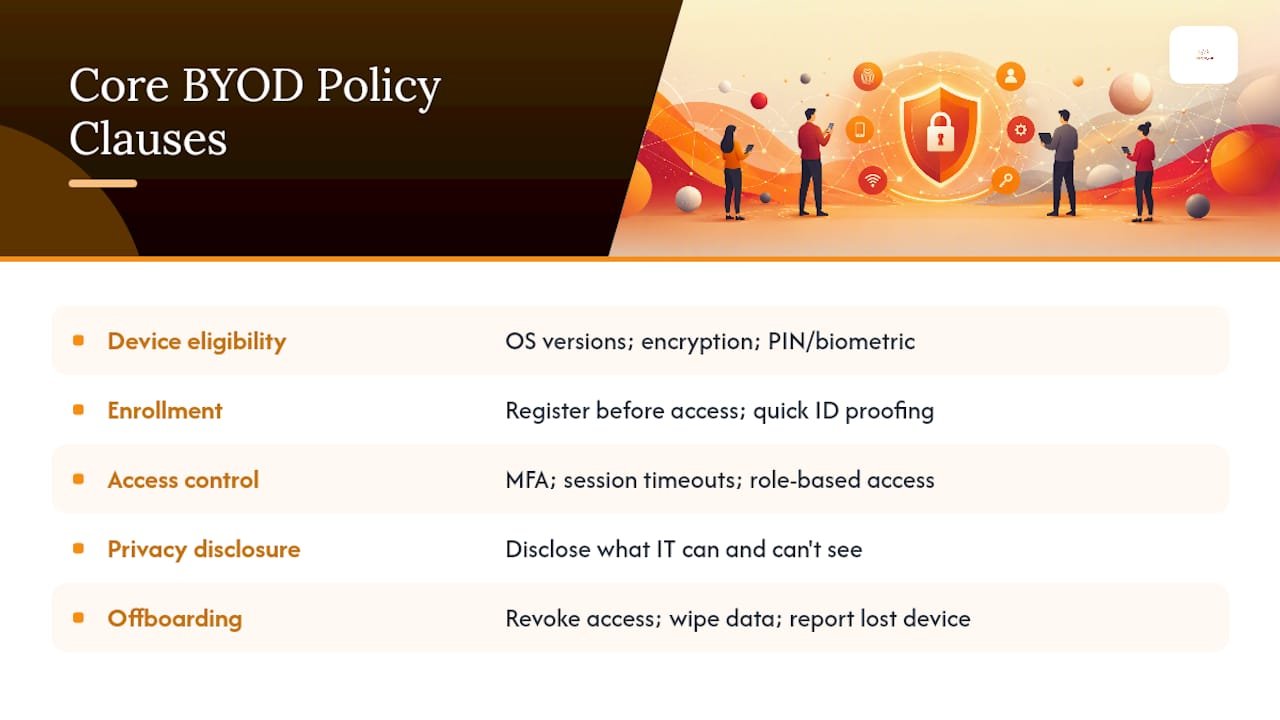
Device eligibility and baseline standards. Spell out which operating system versions qualify (for example, iOS N-2 or the last two major Android releases), require encryption to be enabled, and mandate a screen lock with a PIN or biometric. Devices that fail a compliance check should lose access automatically, not sit in a gray zone.
Enrollment and registration. Define who must register a device before connecting to any corporate resource, what identity proofing looks like, and what the device owner agrees to as a condition of access. This is the “price of admission,” and it should take minutes, not days.
Access control rules. Require multi-factor authentication on every login, set session timeouts appropriate to data sensitivity, and build role-based access so a warehouse employee and a finance director aren’t working under the same rules.
Privacy and monitoring disclosures. State plainly what IT can see (app inventory in a managed container, compliance status, location of the container) and what it cannot (personal texts, photos, browsing history, call logs). This single disclosure often determines whether employees trust the program at all.
Offboarding and incident reporting. Specify how corporate access gets revoked and data gets removed the day someone leaves, and what an employee must do immediately if a device is lost or stolen.
Sample clauses worth adapting directly:
Pro Tip: Employees accept monitoring far more easily when the scope is visibly limited. Put the privacy boundary in writing, in plain language, in the same document as the technical requirements, not buried in a separate legal appendix nobody reads.
Which Technical Controls Actually Enforce a BYOD Policy?
Writing the policy is the easy part. Enforcing it requires choosing the right mix of technical controls, and the wrong choice either leaves gaps or drives employees to work around the system entirely.
Mobile Device Management (MDM) and Unified Endpoint Management (UEM) give IT full visibility and control over the entire device: apps, settings, remote wipe of everything, not just corporate data. Powerful, but invasive, and it’s the control most likely to trigger employee pushback on a personally owned phone.
Mobile Application Management (MAM) and containerization wrap corporate apps and data in an encrypted workspace on the device, leaving the rest of the phone untouched. The NCCoE’s practice guide highlights this as the preferred middle ground when privacy concerns rule out full device enrollment.
Mobile Threat Defense (MTD) scans for malicious apps, network attacks, and jailbreak or root indicators without taking over the device.
Virtual desktops (VDI) stream a full corporate desktop to the personal device so no data ever actually lands locally, useful for high-sensitivity roles but costly to run at scale and prone to latency complaints.
Network Access Control (NAC) checks a device’s compliance posture before granting network access at all.
VPN versus Zero Trust Network Access (ZTNA)/SASE: traditional VPNs grant broad network access once connected, which is exactly the exposure NIST warns against. ZTNA grants access to individual applications based on identity and device posture, session by session, without ever placing the device on the internal network.
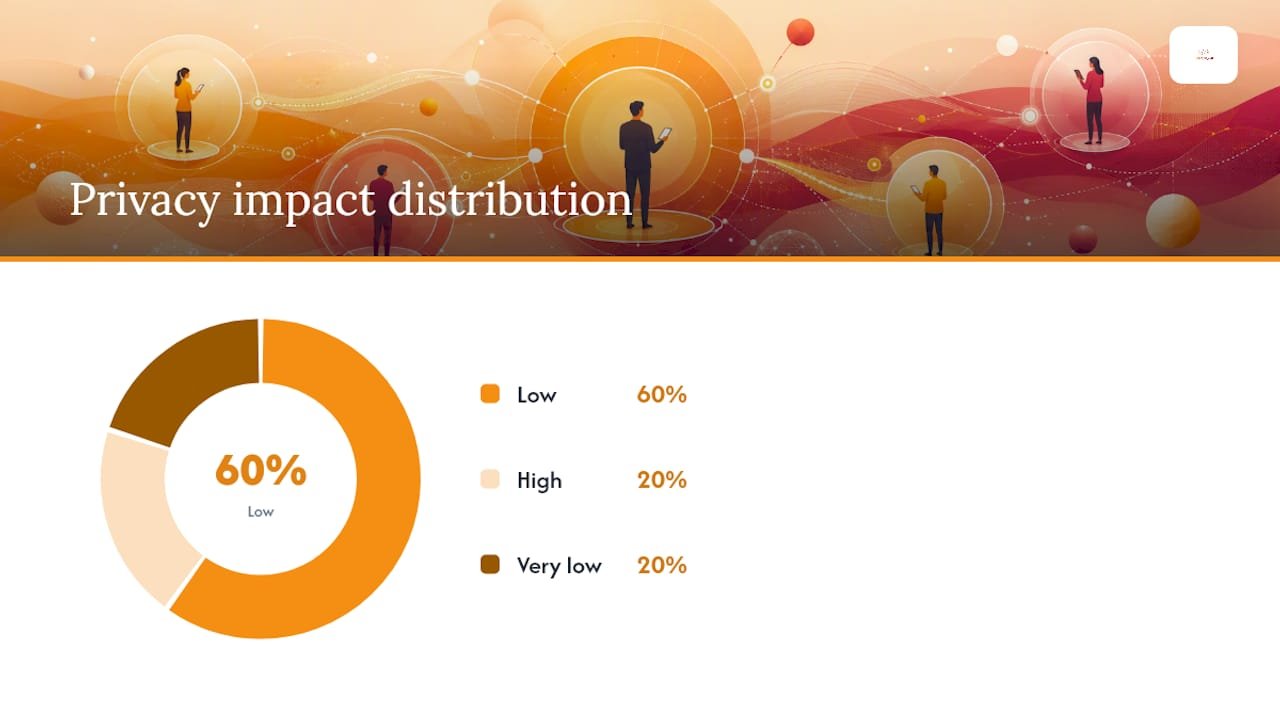
| Control | Privacy Impact | Support Cost | Best Fit |
|---|---|---|---|
| MDM/UEM | High (full device visibility) | High | Company-critical roles, high-risk data access |
| MAM/Containerization | Low (workspace only) | Medium | Most knowledge workers and BYOD phones |
| VDI | Very low (no local data) | High | Regulated industries, contractors, high-turnover roles |
| ZTNA/SASE | Low (identity based) | Medium | Distributed teams needing app-specific access |
| NAC | Low (posture check only) | Medium | Network segmentation and guest/BYOD Wi-Fi |
NIST’s telework guidance goes a step further and recommends placing BYOD devices on a separate external network entirely, so a compromised personal phone never sits on the same segment as core infrastructure. Pairing that segmentation with a hardened wireless network for BYOD traffic closes one of the more common gaps in real-world deployments.
Pro Tip: Start with identity and context, MFA, conditional access, ZTNA, before reaching for full-device MDM. Most organizations find this covers 80 percent of the risk with a fraction of the employee friction, and you can always escalate to heavier controls for higher-risk roles.
What Governance and Privacy Rules Should Guide a BYOD Policy?
Technical controls only work if governance backs them up. Someone has to own the policy, review it on a schedule, and answer for enforcement when it fails.
Assign clear ownership: who approves the policy, who enforces day-to-day compliance, and who reviews it, ideally every 12 months or after any major incident. Canadian government guidance on BYOD deployment models stresses that risk assessments should precede any choice between light-touch and heavy-touch controls, not follow it.
Build a privacy-first checklist before you deploy anything:
- Document exactly what IT logs (app compliance status, container health, login timestamps).
- Name what is explicitly off-limits (personal messages, call history, location outside the corporate container).
- Get written consent as part of enrollment, in language an employee can actually understand.
Regulatory context raises the stakes further. A healthcare practice bound by HIPAA, a defense contractor working toward CMMC certification, or a public safety agency under CJIS rules all carry compliance obligations that push BYOD controls toward the stricter end of the spectrum, often requiring full containerization or blocking BYOD entirely for systems touching regulated data.
Incident response needs a BYOD-specific branch. When a device is reported lost, IT should be able to trigger a selective wipe within minutes, not hours, and the employee should know exactly who to call. NIST’s public guidance on BYOD privacy and security trade-offs frames this responsiveness as central to keeping employee trust intact even as security tightens.
One figure worth sitting with: organizations that skip a formal, directory-integrated offboarding process routinely leave former employees with lingering access on personal devices, an exposure that the UK’s National Cyber Security Centre has flagged as one of the most overlooked gaps in BYOD programs. It’s rarely a technology failure. It’s a process nobody automated.
How Do You Roll Out a BYOD Policy Without Breaking Everything?
Moving from policy draft to enforced program works best as a sequence, not a single launch event.
- Scope and assess risk. Identify which roles, data types, and systems will be accessible from personal devices, and rank them by sensitivity.
- Get stakeholder agreement. Legal, HR, and department leaders need to sign off on the privacy language and access rules before IT builds anything.
- Run a technical pilot. Choose one department, enroll a small group, and test enrollment friction, container performance, and helpdesk load in real conditions.
- Roll out in phases. Expand tier by tier, starting with lower-risk roles, and refine based on pilot feedback before touching finance, HR, or executive access.
- Monitor and measure. Track compliance rates, access denials, and support tickets on an ongoing basis, not just at launch.
A pilot lasting four to six weeks is usually enough to surface real problems: confusing enrollment steps, unexpected battery drain from a container app, or an access policy that’s too aggressive for how people actually work. Minimal success criteria worth tracking:
- Enrollment completion rate among the pilot group.
- Device compliance rate (percentage passing the OS and encryption baseline).
- Helpdesk ticket volume tied to enrollment or access issues.
- Direct user feedback on friction points.
Budget for more than software licensing. MDM/MAM platforms and identity tools carry per-user costs, but the heaviest hidden cost is almost always helpdesk load during rollout, as unclear user responsibilities generate support tickets that pile up fast if the enrollment process isn’t tested first. Pair the technical rollout with structured cyber awareness training so employees understand not just what to click during setup, but why the boundaries exist.
What Should the Enrollment Checklist and Sample Clauses Look Like?
Once the policy and technical stack are chosen, the actual deployment comes down to a checklist your IT team can run for every new device.
Enrollment checklist:
- Verify identity through your existing single sign-on provider before issuing enrollment credentials.
- Confirm the device meets the minimum OS version and has encryption and a screen lock enabled.
- Install the containerized workspace or MDM profile and confirm compliance status reports correctly.
- Walk the employee through the privacy disclosure and get documented acknowledgment.
- Enroll the device in multi-factor authentication before granting any application access.
Sample clauses to adapt directly into your policy or employee agreement:
| Clause | Purpose | Enforcement Mechanism |
|---|---|---|
| Device eligibility | Ensure minimum security baseline | Compliance check blocks non-conforming devices |
| Acceptable use | Define permitted activity on enrolled devices | Periodic audit and employee attestation |
| Selective wipe | Remove corporate data without touching personal content | Privacy-safe container wipe on offboarding or loss |
| Monitoring disclosure | Set clear privacy expectations | Written acknowledgment at enrollment |
| Disciplinary action | Deter policy violations | HR-enforced, tied to signed agreement |
The selective wipe deserves its own explanation, since it’s the clause employees ask about most. A properly configured container wipe removes only the corporate workspace, email, files, credentials, apps, while leaving personal photos, texts, and unrelated apps completely untouched. This is precisely the mechanism the NCCoE’s practice guide demonstrates: the corporate data lives in an isolated, encrypted space that can be deleted independently of the rest of the device. It’s worth reviewing how device repair and servicing workflows handle a similar separation problem when a device changes hands for maintenance, the same segregation principle applies.
Pro Tip: Test your selective wipe process on a spare device before you ever need it in a real offboarding scenario. Nothing damages trust in a BYOD program faster than a wipe that accidentally deletes an employee’s family photos.
When Should You Handle BYOD In-House vs. Bring in a Managed Partner?
Most small and mid-sized organizations underestimate what a BYOD program actually demands once it’s running, not building it, but keeping it running. Monitoring compliance drift, patching policy gaps as new device types show up, and responding to a lost-phone incident at 11 p.m. on a Saturday are ongoing operational burdens, not one-time projects.
A managed service starts to make sense once you hit a few honest signals: your internal team is small enough that BYOD monitoring competes with other priorities, you need coverage outside business hours, or you’re navigating a regulatory framework like HIPAA or CMMC where the margin for error is thin. Compliance complexity, in particular, tends to be where internal teams get stretched. Interpreting how a framework applies to a BYOD environment takes specialized knowledge that’s expensive to keep in-house for a program touching a few hundred devices.
In-house control still makes sense in specific cases: organizations with strict data residency requirements, tight custom integrations with proprietary systems, or security teams large enough to run 24/7 monitoring without burning out. If that’s your situation, the frameworks above give you what you need to build it yourself.
For everyone else, the honest answer is that a policy on paper and a policy that’s actually enforced, monitored, and updated are two different things, and the gap between them is where most BYOD programs quietly fail.
How Total Cyber Solutions Supports Your BYOD Program
Building a BYOD policy is one project. Enforcing it every day, watching for compliance drift, responding to a lost device at midnight, keeping pace with new regulatory requirements, is a different kind of workload entirely. Total Cyber Solutions handles both: our team develops enforceable BYOD policies aligned to frameworks like HIPAA and CMMC, then backs them with ongoing managed cybersecurity services that monitor device compliance around the clock.

As a veteran-owned managed IT and cybersecurity provider, we also run cyber awareness training programs so your staff understands the “why” behind enrollment steps, which cuts down on the helpdesk friction that derails most BYOD rollouts. If your organization is weighing whether to build this internally or hand it to a partner who already runs these programs daily, start the conversation through our MSP intake form and we’ll walk through what a right-sized BYOD program looks like for your business.
Where to Go for Deeper BYOD Guidance
- NIST SP 800-46r2: Guide to Enterprise Telework, Remote Access, and BYOD Security covers tiered access models and network segmentation in full technical depth.
- NCCoE / NIST SP 1800-22: Mobile Device Security walks through a working example solution using containerization and encryption on real device platforms.
- ITSM.70.003: End User Device Security for BYOD offers a risk-assessment framework for choosing between deployment models.
- SHRM’s BYOD Policy Template provides HR-focused language for acceptable use and disciplinary clauses.
Frequently Asked Questions
What is a BYOD security policy in simple terms?
It’s a written set of rules governing how personal devices, phones, laptops, tablets, can access company data and systems, covering device requirements, access controls, privacy limits, and what happens when an employee leaves.
What is mobile device management, and do I need it for BYOD?
Mobile device management (MDM) is software that lets IT enforce security settings, monitor compliance, and remotely wipe a device. It’s not mandatory for every BYOD program; many organizations get sufficient protection from lighter-touch containerization (MAM) paired with identity controls, reserving full MDM for higher-risk roles.
What are the biggest BYOD compliance requirements to watch for?
Requirements shift by industry, but healthcare organizations under HIPAA, defense contractors pursuing CMMC certification, and public safety agencies under CJIS rules all typically require stricter data segregation and audit trails than a general commercial BYOD policy.
How do you enforce a BYOD policy without invading employee privacy?
Scope monitoring to the corporate container only, disclose exactly what’s logged in writing, and get documented consent at enrollment. Identity-based controls like MFA and conditional access also reduce how much device-level visibility you need in the first place.
What happens to personal data during a selective wipe?
A properly configured selective wipe removes only the corporate workspace, apps, email, files, credentials, leaving personal photos, messages, and unrelated apps untouched on the device.
Sources
- Guide to Enterprise Telework, Remote Access, and Bring Your Own Device (BYOD) Security (NIST SP 800-46r2)
- Mobile Device Security: Bring Your Own Device (NCCoE / NIST SP 1800-22)
- End user device security for Bring-Your-Own-Device (BYOD) deployment models (ITSM.70.003)
- How to Develop a BYOD Security Policy: Best Practices & Examples (2026)