

The phishing messages hitting your employees’ inboxes right now fall into a short list of patterns: mass credential-harvest emails, business email compromise (BEC) posing as an executive, spear-phishing aimed at finance staff, smishing texts about benefits or payroll, vishing follow-up calls, and collaboration-tool prompts that mimic Teams or Slack. QR-code phishing has also become routine. Microsoft observed automated BEC campaigns that reached more than 67,000 users across 42,000 organizations in under three hours, which tells you how fast one convincing template scales once attackers automate it.
The single priority that matters more than any other control: assume credential theft will eventually succeed, and build your defense around fast token and session containment rather than perfect prevention.
- Email credential phishing and clone-invoice scams
- BEC and CEO fraud targeting finance and payroll
- Spear-phishing aimed at specific employees or roles
- Smishing (SMS) and vishing (voice) follow-ups
- Collaboration-tool phishing (fake Teams/Slack OAuth prompts)
- QR-code phishing embedded in flyers, emails, or parking notices
Why this matters right now: Adversary-in-the-middle (AiTM) kits and device-code phishing now capture live session tokens, which means a password reset alone does not undo the damage. SpyCloud’s Phishing Pulse research flags AI-generated phishing and token compromise as the dominant concerns defenders are dealing with today, not just isolated credential leaks.
Key Takeaways
Phishing succeeds when employees face convincing, role-specific lures faster than security teams can train against them, so defense depends on rapid reporting and token containment as much as detection.
| Point | Details |
|---|---|
| Top vectors to train against | Credential phishing, BEC, spear-phishing, smishing, vishing, collaboration-tool phishing, and QR codes. |
| Token theft bypasses passwords | AiTM and device-code phishing capture session tokens, so password resets alone don’t stop access. |
| Reporting speed beats perfect detection | A fast, blame-free reporting culture limits damage more than trying to prevent every click. |
| Prioritize phishing-resistant MFA | FIDO2 or passkey-based MFA blocks the token-theft techniques that SMS codes cannot stop. |
| Total Cyber pairs training with response | Managed detection, phishing simulations, and incident response close the gap between a click and containment. |
Table of Contents
- Real Examples Of Phishing Attacks Employees Receive
- What Real Phishing Incidents Look Like In Practice
- How Do Modern Phishing Attacks Bypass MFA?
- What Should Employees Do When They Spot A Phishing Attempt?
- Which Controls Actually Reduce Phishing Risk?
- What Total Cyber Solutions Brings To Employee Security Awareness
- What Legal Exposure Does A Phishing Breach Create?
- Why Do These Phishing Tactics Keep Working?
- What Tools Help Employees Spot And Report Phishing?
- The Overlooked Gap In Most Awareness Programs
- Get Help Building A Phishing-Resistant Workforce
- Sources
Real Examples Of Phishing Attacks Employees Receive
You cannot train employees to spot phishing with vague warnings about “suspicious emails.” You need the actual message text, the psychological hook, and the technical artifact behind it. Below are eight scenarios pulled from patterns security teams report seeing across email, SMS, voice, and collaboration platforms. Use them directly in your next simulation.
1. Mass credential-harvest email (IT helpdesk impersonation)
Subject line: “Action Required: Your Password Expires in 24 Hours.” The body mimics a Microsoft 365 or Okta notification, complete with matching logos and a “Reset Now” button. The link routes through a lookalike domain that still passes SPF, DKIM, and DMARC checks because the attacker registered a clean domain and configured authentication properly. Investigations of these campaigns show that authentication passing does not mean the sender is legitimate.
- Why it works: Password expiration notices feel routine and urgent at once.
- Technical artifact: A credential-harvest page cloned from your real login portal.
- Target roles: Everyone, but especially new hires unfamiliar with your actual IT branding.
- What to test: Send a fake “password expiring” notice from a domain one character off from your real one and measure who reports it versus who clicks.
2. Clone-phish invoice with reused legitimate content
The attacker intercepts or copies a real vendor invoice thread, then resends it with altered banking details and a slightly modified sender address. Because the thread references a genuine project or purchase order, it reads as continuity rather than a cold email.
- Why it works: The content is real. Only the payment details changed.
- Technical artifact: A PDF attachment with updated wire instructions.
- Target roles: Accounts payable, procurement.
- What to test: Reuse a real (redacted) internal invoice format with swapped account numbers in a simulation.
3. Spear-phish targeting finance with a fabricated audit request
A message appears to come from an external auditor or the company’s law firm, referencing a real fiscal quarter and requesting a “confidential” spreadsheet of vendor payment details. The sender researched the company’s audit cycle from a press release or LinkedIn post.
- Why it works: It uses specific, verifiable-sounding details that suggest insider knowledge.
- Technical artifact: A malicious macro-enabled spreadsheet or a link to a fake SharePoint document.
- Target roles: Controllers, finance directors, external-facing accounting staff.
- What to test: Reference a real (public) company event in a simulated spear-phish and track whether staff verify the sender through a second channel.
4. BEC payroll diversion posing as the CEO
“Hi [name], I need you to update my direct deposit information before Friday’s payroll run. I’m in meetings all day, please confirm once done.” Short, plausible, time-pressured, and sent from a spoofed or lookalike executive address.
- Why it works: Employees rarely question a direct request from leadership, especially with a deadline attached.
- Technical artifact: No attachment or link at all, just a reply-based social engineering exchange.
- Target roles: HR, payroll administrators, executive assistants.
- What to test: Simulate a CEO-styled payroll change request and measure whether staff follow your out-of-band verification policy before acting.
5. Smishing about benefits enrollment
A text message reads: “Your open enrollment deadline is tomorrow. Confirm your benefits selection here: [link].” It arrives on a personal phone during open enrollment season, when the topic is already top of mind.
- Why it works: It matches a real calendar event employees expect to see.
- Technical artifact: A mobile-optimized credential phish page.
- Target roles: All employees, especially remote and field staff using personal devices.
- What to test: Time a smishing simulation to your actual HR enrollment window.
6. Vishing follow-up after a phishing email
After a credential-harvest email goes out, a caller phones the IT helpdesk or the targeted employee directly, claiming to be “verifying” the password reset request. This adds a human layer of pressure that makes the earlier email feel more legitimate.
- Why it works: A voice on the phone lends false authority to a digital request.
- Technical artifact: None; the goal is verbal confirmation or an MFA code read aloud.
- Target roles: Helpdesk staff, anyone recently targeted by email phishing.
- What to test: Pair a phishing simulation with a scripted vishing call to see if staff share one-time codes.
7. Fake Teams or Slack shared-document OAuth prompt
A message inside a collaboration tool reads: “[Colleague name] shared a document with you.” Clicking it triggers an OAuth consent screen asking for permissions to read email and files, rather than a normal login prompt.
- Why it works: Employees trust internal-looking notifications inside tools they use daily, and OAuth consent screens look procedural rather than dangerous.
- Technical artifact: A malicious third-party app requesting broad Microsoft Graph or Google Workspace permissions.
- Target roles: IT staff, executives, anyone with mailbox delegate access.
- What to test: Simulate an OAuth consent request and check whether employees read the requested permissions before clicking “Accept.”
8. QR-code phishing on a physical or digital flyer
A QR code appears in a “parking permit renewal,” “IT security update,” or “HR survey” flyer posted in a break room or attached to an internal email. Scanning it with a personal phone routes past corporate email filters entirely.
- Why it works: QR codes bypass the visual inspection employees have learned to apply to suspicious links, and scanning happens on unmanaged personal devices.
- Technical artifact: A mobile credential-harvest page or malicious app download.
- Target roles: All employees, particularly in office environments with public bulletin boards.
- What to test: Post a fake QR-code flyer in a common area and track scan rates through a controlled redirect.
APWG’s telemetry confirms QR-code and payment-sector targeting rose in recent quarters, which is exactly why this vector belongs in every current training rotation, not just email-based scenarios.
What Real Phishing Incidents Look Like In Practice
Reading about phishing examples helps you build training scenarios. Reading about how they actually played out inside real organizations tells you which defenses failed and which ones saved the day.
Case one: credential harvest to mailbox takeover to ransomware. An employee clicked a cloned Microsoft 365 login page from a lookalike domain. The attacker captured the password, logged in from a new location, and because MFA either was not enforced or used a phishable SMS method, gained full mailbox access. From there, they set up a forwarding rule to exfiltrate financial correspondence and eventually used that access as a foothold to deploy ransomware. Stopransomware treats phishing as one of the top entry vectors feeding exactly this chain.
- What failed: SMS-based MFA that AiTM kits can intercept, and no monitoring for new inbox forwarding rules.
- What fixed it: IT revoked all active sessions, removed the malicious rule, and rotated credentials across the account and any linked service accounts.
Case two: BEC leading to wire diversion. A finance employee received a payroll change request that appeared to come from the CFO, styled almost identically to the real signature block. The request was processed same-day, before anyone called the CFO directly to confirm. The funds moved to a mule account within hours.
- What failed: No callback verification policy for financial changes above a set dollar threshold.
- What fixed it: The company contacted its bank within the “golden hour” after the transfer, which allowed a partial recall. Every guide on this topic agrees on one point: speed of bank notification determines whether recovery is even possible.
Case three: collaboration-tool OAuth token theft. An employee accepted what looked like a shared document notification inside Teams. The consent screen granted a malicious app read access to email and calendar data. Because the access token, not a password, was compromised, standard password resets did nothing. The attacker maintained silent read access for weeks before anyone noticed unusual API calls. Microsoft’s own research into multi-stage AiTM token compromise campaigns documents this exact pattern.
- What failed: No governance process reviewing newly consented third-party apps.
- What fixed it: Security revoked the malicious app’s permissions at the identity provider level and audited all apps with similar permission scopes.
The financial stakes behind these failures are not abstract. The FBI’s IC3 annual report documents phishing and BEC as consistently among the highest-loss categories reported to law enforcement each year, which is one reason tracking phishing’s role in broader threat trends matters for budget conversations, not just security awareness.
How Do Modern Phishing Attacks Bypass MFA?
Adversary-in-the-middle (AiTM) phishing works by placing a proxy server between the employee and the real login page. The employee enters their password and MFA code exactly as expected, but the proxy captures the resulting session token in real time. Because the attacker now holds a valid, authenticated session, they bypass MFA entirely without ever needing the password again. Device-code phishing achieves something similar by tricking a user into entering a code on a legitimate Microsoft or Google device-authorization page, handing over a valid token in the process.
Attackers also use nested EML files and calendar invites to slip past scanners. A malicious link gets buried inside an email attached as an .eml file, or embedded in a calendar invite’s description field, both of which many secure email gateways scan less aggressively than a standard email body. Microsoft’s research notes that multi-stage delivery chains like these are increasingly common precisely because they exploit trust in familiar file types and calendar notifications.
Watch for these technical indicators:
- New OAuth apps requesting broad mailbox or file permissions
- Session tokens issued to unfamiliar devices or unusual IP ranges
- Rapid new-session creation shortly after a password reset
- New inbox forwarding or rule changes nobody remembers setting
- Calendar invites from unknown external senders with embedded links
Pro Tip: Build token revocation into your incident response playbook as a first step, not an afterthought. Resetting a password does nothing against a stolen session token. Revoke refresh tokens at the identity provider and audit consented apps every time you suspect account compromise.
What Should Employees Do When They Spot A Phishing Attempt?
Every minute between a click and a report widens the attacker’s window. Give employees a script this short:
- Stop. Do not click any further links or open any attachments in the message.
- Take a screenshot of the message, including the sender address and full headers if possible.
- Report it through your company’s designated channel (a “Report Phishing” button, a forwarding address, or a direct call to IT).
- If instructed by IT, disconnect the device from the network to limit lateral movement.
- Do not delete the original message. IT needs it intact for analysis.
IT and incident response teams should move in parallel:
- Reset the affected account’s password and revoke all active sessions and refresh tokens.
- Remove any malicious inbox rules or forwarding addresses added without authorization.
- Check for lateral movement, especially into shared drives or connected SaaS apps.
- Prioritize privileged accounts (admins, finance, executives) for review first.
- Report significant incidents to the FBI’s Internet Crime Complaint Center (IC3), which also tracks patterns useful for future defense planning.
Pro Tip: Reward fast reporting publicly, even when the employee did click. A culture that punishes mistakes teaches people to hide them, which is exactly when a small incident turns into a long, undetected compromise.
Which Controls Actually Reduce Phishing Risk?
Not every control delivers equal value. Rank these by impact, starting with the ones that stop token theft outright.
Technical controls, in priority order:
- Phishing-resistant MFA (FIDO2 security keys or platform passkeys) instead of SMS or app-based push codes
- Blocking legacy authentication protocols that skip modern MFA checks entirely
- Conditional access policies that flag logins from new devices or unusual locations
- Endpoint detection and response (EDR/XDR) to catch post-click lateral movement, which plays a direct role in containing incidents fast
- OAuth app governance, reviewing and restricting third-party app permissions regularly
- Link rewriting and attachment sandboxing at the email gateway
- Immutable, offline backups as a last line of defense against ransomware follow-through
Process and training measures:
- Run scenario-based phishing simulations using realistic examples, not generic templates
- Build a one-click reporting path and publicize it constantly
- Test your incident response playbook at least twice a year, including token revocation steps
- Apply extra scrutiny and verification callbacks for finance, HR, and executive assistant roles
Measuring success matters as much as running the program. Track both click rate and report rate. A comprehensive training program built around real examples like the ones above, paired with clear reporting incentives, tends to move the report rate faster than click rate alone improves, since recognizing a phish and reporting it are two separate skills.
| Control | Priority |
|---|---|
| Phishing-resistant MFA | Highest |
| OAuth app governance | High |
| EDR/XDR deployment | High |
| Scenario-based simulations | Ongoing |
| Offline backups | Foundational |
What Total Cyber Solutions Brings To Employee Security Awareness
Total Cyber is a veteran-owned managed cybersecurity and IT services provider built around exactly the gap most awareness programs leave open: the space between recognizing a phishing email and containing what happens after someone clicks.
- Managed detection and response that catches lateral movement and token misuse after an initial compromise
- Phishing and cyber awareness training programs built around realistic, role-specific scenarios like the ones in this article
- Vulnerability assessments that identify weak points in MFA, email authentication, and OAuth governance before attackers find them
- Incident response support, including the token revocation and account containment steps most in-house teams have never had to execute under pressure
If your current phishing defenses lean entirely on spam filters and an annual training video, that gap is worth closing before an incident forces the issue. Total Cyber works with small and mid-sized organizations to close it through both training and managed operations.
What Legal Exposure Does A Phishing Breach Create?
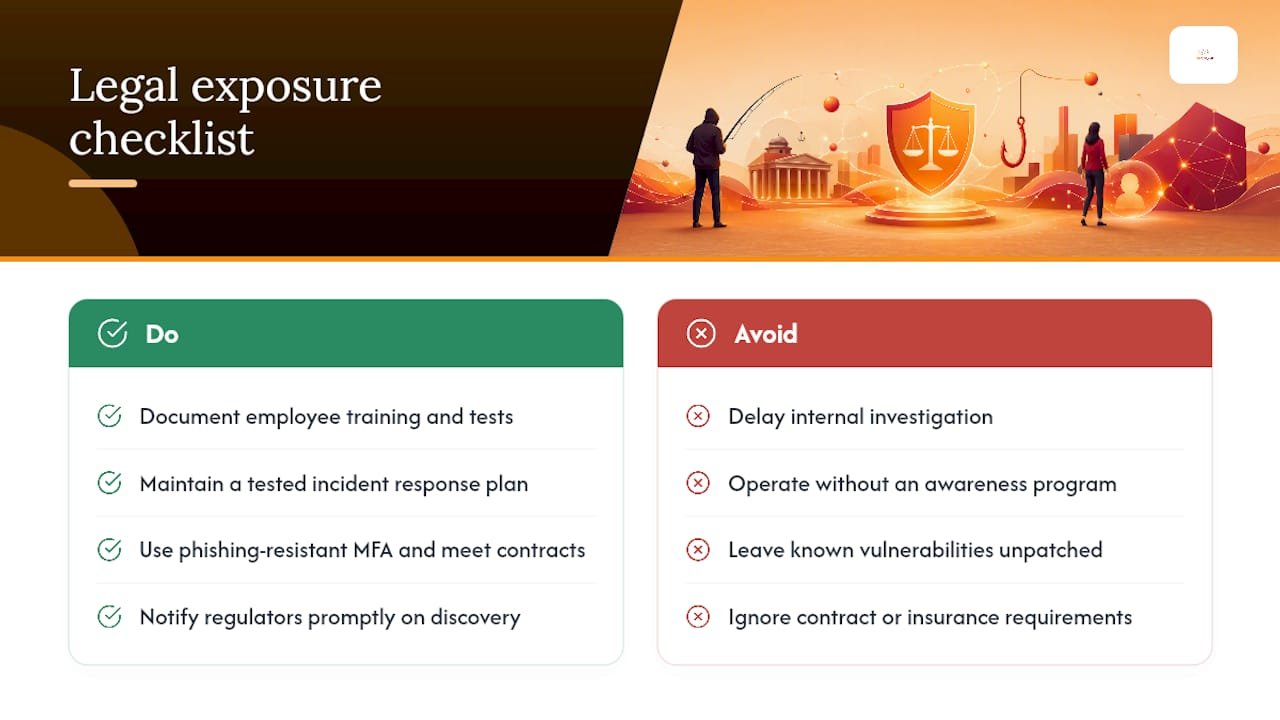
A successful phishing attack rarely stays a technical problem for long. If employee credentials lead to a breach involving protected health information, payment card data, or personally identifiable information, notification obligations kick in under frameworks like HIPAA, state breach notification laws, or, for organizations handling card data, PCI DSS. The clock on those notification windows often starts the moment the breach is discovered, not when it’s confirmed, which means a slow internal investigation compounds legal risk on top of the original attack.
Regulated industries carry heavier obligations. Healthcare organizations subject to HIPAA, government contractors under CMMC or CJIS requirements, and financial firms under various federal guidelines all face compliance audits that increasingly ask a direct question: can you prove you trained employees and tested your defenses? A phishing incident that reveals no training program existed, or that a known vulnerability sat unpatched, tends to draw harsher regulatory scrutiny than one where the organization can show a documented awareness program and a tested response plan.
Contractual exposure matters too. Vendor agreements and cyber insurance policies increasingly include specific security requirements, phishing-resistant MFA among them, and failing to meet them can void coverage exactly when you need it most. Insurance carriers have grown far more particular about what they’ll pay out for BEC-related wire fraud, and some policies now explicitly exclude losses tied to unverified payment changes. Building documented compliance practices into your security program isn’t just good hygiene. It’s often the difference between a covered claim and a denied one.
Why Do These Phishing Tactics Keep Working?
Phishing succeeds because it exploits predictable human responses rather than technical flaws. Attackers lean on a small set of psychological levers, and recognizing them by name helps employees catch a manipulation attempt even when the message itself looks flawless.
Urgency and time pressure shows up in nearly every example above: a password expiring in 24 hours, a payroll deadline tomorrow, an audit due Friday. Urgency shortens the window employees give themselves to think critically, which is exactly the point.
Authority does the same work differently. A message that appears to come from the CEO, an auditor, or IT support borrows the credibility of that role. Most employees are conditioned not to question a direct instruction from leadership, and attackers know it.
Social proof and familiarity show up in collaboration-tool phishing and clone-phish invoices. A “colleague shared a document with you” notification, or an invoice thread with real prior context, reads as continuity rather than a cold approach. The brain treats familiar patterns as safe by default.
Fear and consequence framing appears in benefits-related smishing and security-alert emails. Missing an enrollment deadline or losing account access feels like a real cost, which pushes people to act before verifying.
Employees who understand these levers by name, not just as vague “red flags,” tend to pause more consistently, according to CISA’s guidance on training employees to verify before acting. That pause is the entire goal of an awareness program.
What Tools Help Employees Spot And Report Phishing?
Employees need more than a warning in an onboarding deck. They need tools built into their daily workflow that make reporting faster than ignoring the problem.
Most major email platforms now include a built-in “Report Phishing” or “Report Message” button directly in the toolbar, which routes suspicious messages straight to IT or a security vendor for analysis without requiring the employee to forward anything manually. If your organization hasn’t enabled and publicized this button, it’s one of the fastest wins available.
Browser-level protections matter too. Modern browsers flag known malicious domains automatically, and enterprise DNS filtering can block access to newly registered lookalike domains before an employee ever reaches the login page. Password managers offer a quieter but equally valuable defense: they won’t auto-fill credentials on a spoofed domain, since the URL doesn’t match what’s stored, which gives an alert employees might otherwise miss.
For phone-based threats, employees should know they can independently verify a caller’s identity by hanging up and calling the company directory number directly, never a number the caller provides. The same logic applies to remote and field employees using personal devices, where smishing and QR-code lures are most likely to land outside the visibility of corporate email filters.
Finally, external reporting channels matter for anything involving financial loss or suspected large-scale compromise. The IC3 accepts reports directly from affected organizations and individuals, and that reporting feeds the broader threat intelligence that shapes future law enforcement action.
The Overlooked Gap In Most Awareness Programs
Most phishing training still treats detection as the finish line. Teach employees to spot a bad link, run an annual simulation, call it done. That approach misses what the last two years of attack data actually show: even well-trained employees click sometimes, and the real difference between a contained incident and a full compromise is what happens in the minutes after.
The conventional advice to “just train harder” undersells a harder truth. AiTM kits and device-code phishing exist specifically because they bypass the exact behaviors detection training reinforces. An employee can do everything right, notice nothing unusual, and still hand over a session token because the fake login page is functionally identical to the real one. That’s not a training failure. It’s a gap that only token-focused response and phishing-resistant MFA can close.
If you take one thing from this article, prioritize reporting speed and technical containment over the fantasy of zero clicks. Build the culture where employees report fast without fear, and build the backend systems that revoke a stolen token in minutes, not days. Detection training still matters. It’s just not enough on its own anymore.
— Alden
Get Help Building A Phishing-Resistant Workforce
Total Cyber gives small and mid-sized organizations something most awareness vendors don’t: a single team that runs the training and handles the incident response when a click gets through anyway. That combination matters because the examples in this article prove detection alone isn’t a complete defense against token theft and AiTM kits.

The process starts with an assessment of your current email security, MFA setup, and reporting workflows, followed by a prioritized plan that closes the gaps fastest, whether that’s deploying phishing-resistant MFA, launching realistic simulations built from scenarios like the ones above, or standing up a tested incident response playbook. From there, Total Cyber can run managed cybersecurity services on an ongoing basis, so your team isn’t rebuilding defenses from scratch after every new attack pattern emerges.
If your organization hasn’t tested its phishing response in the last year, or if your MFA setup still relies on SMS codes an AiTM kit could intercept, request an evaluation through Total Cyber’s MSP form and get a prioritized plan built around your actual risk, not a generic checklist.
Sources
- Teach Employees to Avoid Phishing — CISA
- IC3 Annual Report 2024
- APWG Phishing Attack Trends Report Q1 2025
- SpyCloud 2026 Phishing Pulse Report