

Privileged access management is the discipline of controlling, monitoring, and time-limiting the accounts that can change systems, not just view them. Done right, it shrinks your breach surface, forces least privilege by default, and gives auditors a clean trail instead of a shrug. The catch: most programs stall at vaulting passwords and never build the governance layer that actually removes standing risk. Fix that gap first.
TL;DR:
- Discovery of privileged accounts must include both human and non-human identities to reveal the full scope of potential risks before implementing controls.
- Automating credential rotation, ephemeral secrets, and JIT privileges significantly reduces attack surface by limiting long-lived credentials and standing access.
- Classifying accounts correctly, especially distinguishing high-risk non-human identities like service accounts and vendor credentials, prioritizes remediation efforts effectively.
- Continuous governance through automated recertification, mapped roles, and session monitoring is essential to prevent privilege creep and maintain an audit trail.
- Most PAM failures stem from governance gaps, such as entitlement sprawl and manual reviews, rather than technical shortcomings, making automation and regular reviews crucial.
Table of Contents
- What Is Privileged Access Management, and How Does It Differ From IAM?
- How Does PAM Actually Work Day to Day?
- What Are the Different Types of Privileged Accounts, and Which Ones Carry the Most Risk?
- Which PAM Best Practices Actually Reduce Risk, Not Just Check a Box?
- Why Are Non-Human Identities the Hardest Part of Modern PAM?
- What Does a PAM Implementation Roadmap Actually Look Like?
- What Are the Most Common PAM Failure Modes?
- Your Practical PAM Checklist and a Managed Path Forward
- Three Lessons From the Field, and a 90-Day Plan
- Where to Go for Deeper PAM Guidance
- Sources
What Is Privileged Access Management, and How Does It Differ From IAM?
You’ve probably heard PAM, IAM, and PIM used almost interchangeably. They’re not the same thing, and mixing them up leads to buying the wrong tool.
Identity and access management (IAM) is the broad umbrella: it governs who someone is and what they’re generally allowed to touch, covering every employee, contractor, and application account in your directory. Privileged access management is the specialized subset that focuses only on the accounts capable of real damage: domain admins, root, database owners, cloud IAM roles with write access, and the service accounts running your pipelines. Privileged identity management (PIM), a term Microsoft uses for its Entra ID feature set, usually refers narrowly to time-bound role activation inside a specific identity platform, whereas PAM is the broader category covering vaulting, session control, and credential rotation across every system, not just one directory.
Think of it this way: IAM answers “who are you and what’s your normal access?” PAM answers “when you need to act like an admin, how do we control that, watch it, and revoke it fast?”
A mature PAM program has four subcomponents working together:
- Vaulting: secure, encrypted storage for privileged credentials so no one carries a plaintext password in a spreadsheet or a script.
- Just-in-time (JIT) elevation: temporary, time-boxed privilege grants instead of always-on admin rights.
- Session monitoring: recording and logging what happens once elevated access is active.
- Approval workflows: a human or policy gate that checks the request before access is granted.
TechTarget’s definition of PAM frames these pillars as working in concert. Skip one and the whole model leaks.
Where does Zero Trust fit? Zero Trust’s core principle, never trust by default and verify every request, is essentially what PAM operationalizes for privileged accounts specifically. The NIST NCCoE’s privileged account management guidance gives financial-sector teams reference architectures that map PAM controls directly onto NIST Cybersecurity Framework functions like Protect and Detect. If your security program already tracks against the NIST framework, PAM is one of the more concrete ways to demonstrate that alignment to an auditor rather than just describing it in a policy document.
How Does PAM Actually Work Day to Day?
The concept sounds simple. The mechanics are where programs succeed or quietly fail.
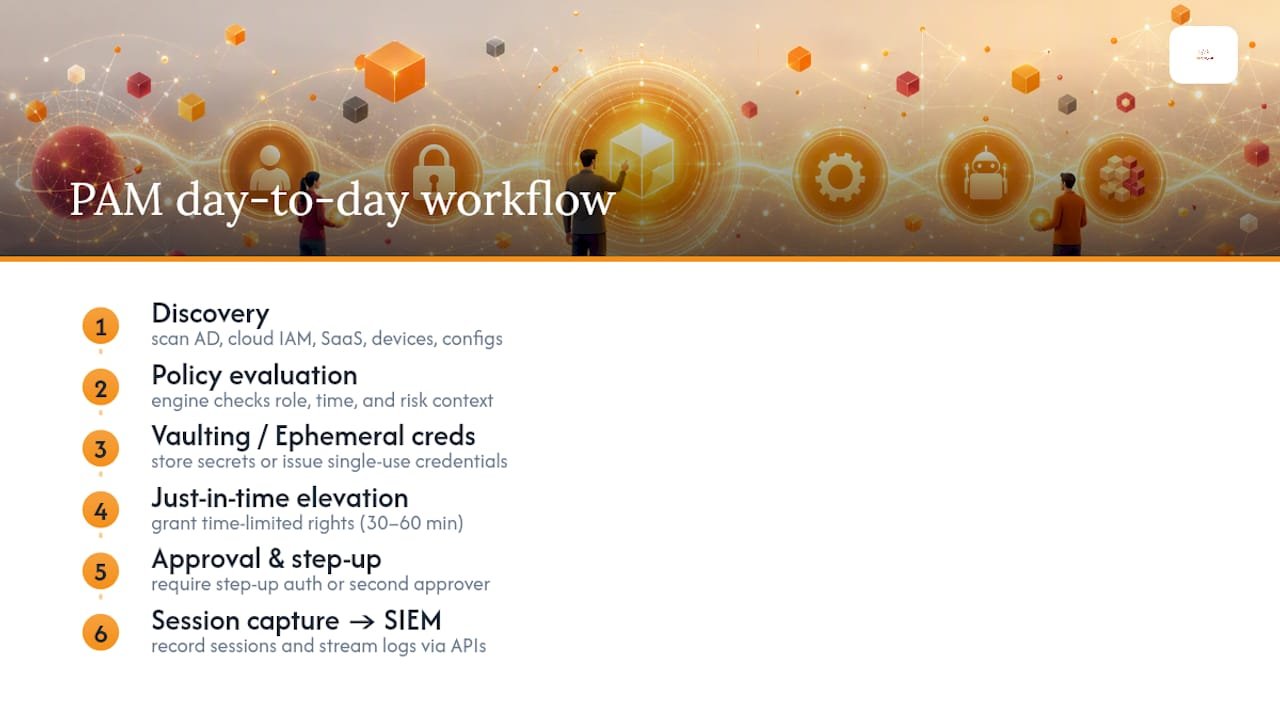
Discovery comes first, and it’s the step most teams underestimate. You can’t protect an account you don’t know exists. A discovery scan typically crawls Active Directory, cloud IAM consoles, SaaS admin panels, network devices, and application configuration files looking for anything with elevated rights, including forgotten service accounts nobody remembers creating. Most organizations find privileged accounts they didn’t know were live. That’s normal. It’s also the moment leadership usually realizes the scope of the problem is bigger than the pitch deck suggested.
Vaulting and ephemeral credentials replace static secrets. A traditional privileged password sits in a vault, gets checked out, and gets checked back in, still functionally the same secret every time. Ephemeral credential generation is a step further: the system issues a brand new, single-use credential for each session and destroys it afterward. There’s nothing long-lived for an attacker to steal, because by the time they’d try to reuse it, it’s already dead.
Just-in-time elevation is the operational heart of modern PAM. Instead of granting a user standing admin rights that sit active around the clock, JIT grants privilege only for the specific task, for a defined window, often 30 to 60 minutes, then automatically revokes it. Sensitive actions, deleting a production database, modifying firewall rules, can require step-up authentication or a second approver on top of the initial request.
Session capture ties the whole thing together. Once someone is elevated, the system records keystrokes, screen activity, or command-line input depending on the platform, and streams that log toward your SIEM. If something goes wrong, you have a full replay, not a guess.
Automation and orchestration bind these pieces through APIs. Policy engines evaluate each access request against role, time, and risk context, then trigger vaulting, approval, and logging automatically. Without that orchestration layer, you end up with a set of point tools that don’t talk to each other, and someone manually reconciling four dashboards every Monday.
Pro Tip: Start your discovery scan with service accounts, not human admins. They almost always outnumber human privileged accounts three or four to one, and nobody owns them until something breaks.
What Are the Different Types of Privileged Accounts, and Which Ones Carry the Most Risk?
Not every privileged account carries the same blast radius. Classifying them correctly determines where you spend your remediation budget first.
Human privileged roles are the most familiar category:
- Domain administrators, who can alter identity and access policy for the entire environment.
- Local administrators on individual workstations and servers.
- Emergency or “break glass” accounts, held in reserve for outages, that often go unmonitored for months at a time.
- Business privileged users, like finance leads with wire-approval authority or HR admins who can change payroll records.
A compromised domain admin account is close to a full-environment takeover. A compromised local admin is contained to that one machine, unless lateral movement tools are involved.
Non-human identities are where the risk has genuinely shifted in recent years. Service accounts, API keys, OAuth tokens, and automation agents now vastly outnumber human privileged accounts in most environments, and CSO Online’s reporting on always-on privileged access makes the case that non-human identities have become the primary vector for privilege misuse precisely because they’re broad in scope, persistent, and rarely reviewed the way a human account would be. Microsoft’s PAM overview lists service accounts among the standard privileged account categories every organization should inventory.
Vendor and third-party access deserves its own category, often called VPAM. A managed print vendor, an HVAC monitoring integrator, or a software support contractor frequently gets a remote access credential that outlives the contract itself. VPAM applies the same vaulting, JIT, and session recording principles to external parties, with the added requirement of offboarding the moment the engagement ends.
For blast-radius estimation: a compromised domain admin can touch everything. A compromised CI/CD service account can touch every repository and deployment pipeline it feeds. A compromised vendor credential typically touches whatever narrow system it was scoped for, unless that scoping was never actually enforced.
Which PAM Best Practices Actually Reduce Risk, Not Just Check a Box?
A lot of PAM advice online is generic. Here’s what actually moves the needle, in priority order.
- Design for least privilege with clear role definitions. Every privileged role should map to a specific job function, not a convenient catch-all “admin” group that half the IT team gets added to over time.
- Implement JIT and short TTL credentials, and deny standing privilege by default. If an account doesn’t need admin rights at 2 AM on a Sunday, it shouldn’t have them at 2 AM on a Sunday.
- Require MFA and step-up approval for sensitive actions. A password check-out from a vault is not the same control as a second-factor challenge at the moment of elevation.
- Automate credential rotation and kill embedded secrets. Hardcoded API keys in scripts or config files are one of the most common findings in penetration tests, and they’re entirely preventable.
- Enable session recording, alerting, and a defined retention window. Recording without alerting just gives you a very long video to watch after the fact. Pair the two.
- Map every privileged identity to a named business owner and recertify on a fixed schedule, typically quarterly for high-risk accounts and semiannually for lower-risk ones.
The governance-gap analysis from NHI Mgmt Group makes a point worth repeating here: a vault is storage, not governance. You can vault a password perfectly and still leave the underlying entitlement standing indefinitely because nobody ever revisits whether the access is still needed. Zero Standing Privilege, the idea that no account holds elevated rights except during an active, approved task, is the model that actually closes that gap.
Pro Tip: When you recertify privileged access, don’t just ask “does this person still work here?” Ask “does this person still need this specific privilege for their current job?” Those are different questions, and the second one is the one that actually reduces your attack surface.
Rotation deserves a specific callout. Manual rotation, someone updating a password every 90 days on a spreadsheet reminder, fails constantly because it’s tedious and easy to skip. Automated rotation tied to a policy engine doesn’t have that problem; it simply happens on schedule, every time, without anyone needing to remember.
Why Are Non-Human Identities the Hardest Part of Modern PAM?
Machine identities break most of the assumptions classic PAM tooling was built around. A human logs in, does a task, logs out. A service account authenticates continuously, often around the clock, with a scope that was set once during initial configuration and never revisited.
That persistence is exactly why they’re dangerous. CSO Online’s analysis of always-on privileged access points to the shift in where privilege risk actually concentrates now: not in the admin who logs in twice a week, but in the automation running unattended in the background with permissions nobody has audited recently.
Non-human identities commonly carry far more privilege than their function requires. Research from NHI Mgmt Group found excessive privilege present in roughly 97% of non-human identities studied, a figure that should reframe how most security teams prioritize their next quarter.
Discovering NHIs takes different tooling than discovering human accounts:
- Secrets scanning across code repositories, catching hardcoded API keys before they ship.
- Pipeline tooling audits, reviewing what your CI/CD platform actually has permission to touch.
- Cloud inventory sweeps, since cloud roles and service principals multiply fast and rarely get cleaned up.
The workable pattern here is workload identity paired with brokered, short-lived credentials: the pipeline requests a token scoped to a single task, uses it, and the token expires. No long-lived secret sits in a config file waiting to be found. The pitfalls run the other direction, embedded secrets committed to source control, undocumented automation nobody remembers building, and nested privileged calls where one automated process invokes another with even broader access than the first.
What Does a PAM Implementation Roadmap Actually Look Like?
Most PAM failures aren’t technology failures. They’re sequencing failures, teams try to deploy the advanced controls before the basics are in place.
- Phase 1, discovery and inventory. Catalog every privileged account, human and non-human, across on-prem, cloud, and SaaS. Measure your baseline: total count, how many are actively used, how many are unowned.
- Phase 2, quick wins. Separate standard user accounts from admin accounts (no one should browse the web from a domain admin login). Enforce MFA everywhere privilege exists. Remove the most obvious cases of standing privilege you found in discovery.
- Phase 3, deploy core controls. Roll out vaulting, JIT elevation, and session monitoring, typically starting with your highest-risk account tier before expanding coverage.
- Phase 4, policy automation and continuous validation. Automate recertification cycles, tie approval workflows to your policy engine, and run periodic access reviews instead of annual fire drills.
| Metric | What it tells you |
|---|---|
| Time-to-revoke | How fast access is pulled once it’s no longer needed |
| Percentage of standing privileges removed | Progress toward Zero Standing Privilege |
| Number of NHIs rotated on schedule | Whether automation coverage is actually working |
| Percentage of privileged accounts with a named owner | Governance maturity, not just technical maturity |
If your organization is also tracking toward a specific framework, mapping this roadmap against NIST’s business-level guidance or a CMMC requirement gives you a second use for the same inventory work, which makes the initial discovery phase easier to justify to leadership.
What Are the Most Common PAM Failure Modes?
Programs don’t usually fail because the technology doesn’t work. They fail because the governance around the technology never gets built.
- Standing privilege and entitlement sprawl. Accounts accumulate access over years and nobody prunes it. Detection requires a recurring access review, not a one-time cleanup.
- Shared credentials with no individual accountability. If three people use the same “admin” login, you have no way to know who did what. Vaulting with individual check-out, mapped to a named owner, fixes this directly.
- Manual reviews that quietly stop happening. A quarterly access review that depends on someone remembering to run a spreadsheet report will eventually get skipped. NHI Mgmt Group’s risk analysis lists exactly this kind of process debt among the recurring causes of privilege-related breaches.
- Session visibility gaps. If you can’t tie a specific elevated action back to an approval record, your audit trail has a hole in it, and regulators will find that hole before you do.
A short checklist by timeline:
Immediate: Identify and disable unused privileged accounts. Enforce MFA on every account that has elevated rights.
30 days: Eliminate shared admin credentials in favor of individually vaulted, owner-mapped access. Turn on session recording for your top five most sensitive systems.
90 days: Complete a full recertification cycle. Automate at least one manual approval workflow that currently depends on email.
Your Practical PAM Checklist and a Managed Path Forward
Here’s the shortlist Total Cyber uses when we walk a client through their first PAM maturity assessment: full identity inventory including non-human accounts, a gap analysis against least-privilege standards, MFA and JIT enforcement on every privileged path, session monitoring wired into existing logging, and a recertification cadence with a named business owner on every account.
Total Cyber Solutions supports this work through risk and vulnerability assessments that surface exactly where standing privilege and unmanaged service accounts live in your environment, followed by compliance consulting for organizations mapping controls to HIPAA, CJIS, CMMC, or NIST requirements. Managed cybersecurity monitoring picks up where the initial assessment ends, watching privileged sessions and flagging anomalies your internal team may not have the bandwidth to catch around the clock. Workforce training rounds it out, since a technically perfect PAM deployment still fails if staff routinely request exceptions out of habit.

A typical engagement starts with a scoped discovery call, moves into an assessment of your current privileged account landscape, and produces a prioritized remediation plan you can execute in phases rather than all at once. Schedule a discovery call with Total Cyber to walk through where your organization stands today.
Three Lessons From the Field, and a 90-Day Plan
Three things stand out across PAM engagements. First, the biggest risk is almost never the account everyone worries about, the domain admin gets watched. It’s the forgotten service account from a project that ended two years ago. Second, security and operational friction are in constant tension: teams that lock down access too aggressively without JIT tooling just push users toward workarounds. Third, governance decays fast without automation. A quarterly review that runs on a calendar reminder will eventually get skipped.
The fix isn’t complicated. Ninety days, done in order: inventory everything, including non-human accounts. Remove the obvious standing privileges you find. Turn on MFA and JIT for what’s left. Then monitor, because the work doesn’t end once the tooling is live.
— Alden
Where to Go for Deeper PAM Guidance
For readers who want the primary sources behind this piece: the NIST NCCoE’s privileged account management guidance offers reference architectures for financial services. Microsoft’s PAM explainer covers standard account types and controls. CSO Online and NHI Mgmt Group both dig into non-human identity governance in more depth, and TechTarget’s definition is a solid baseline reference for terminology.
Sources
- Always-on privileged access is pervasive — and fraught with risks | CSO Online
- Privileged access governance gaps are still driving enterprise risk | NHI Mgmt Group
- NCCoE privileged account management (NIST)
- What is privileged access management (PAM)? | TechTarget