

Your employee password policy needs to require length over complexity, block known-breached passwords, drop routine forced rotation, and lean on password managers plus phishing-resistant multifactor authentication wherever you can turn it on. That is the posture current NIST guidance points toward, and it is what we unpack below, with a ready-to-use policy template and a same-day checklist.
TL;DR:
- NIST sets a 15 character minimum for single factor passwords, while allowing longer passphrases and rejecting mandatory symbol, number, or capitalization rules.
- Require phishing resistant MFA for finance, customer data, and administrator accounts; lower risk internal tools can use a strong memorized secret with standard MFA.
- Pilot the rules with one department, enforce them centrally through your identity provider, and audit weak passwords, lockout logs, and MFA enrollment quarterly.
- Password resets should require verified identity through a trusted secondary channel or authenticated MFA, with unusual time or location requests logged for manual review.
Table of Contents
- Why password security still matters for organizations
- NIST-aligned best practices: the specific rules you should adopt and why
- How to build an employee password policy (step-by-step) plus a customizable template
- Compact password policy checklist for immediate use
- Next steps to strengthen access management beyond passwords
- How we implement NIST-aligned password policies
- Compliance considerations: mapping password rules to regulatory requirements
- Tailoring password policies by employee role or access level
- Password recovery and reset procedures that prevent unauthorized access
- Integration with Single Sign-On and identity management systems
- Strategies for employee communication and ongoing engagement
- Author Alden’s practical priorities for IT leaders
- Engage Total Cyber Solutions: assessment and managed service CTA
- FAQ
- Sources
Why password security still matters for organizations
You might think passwords are old news, something security teams solved years ago. They are not. Credential theft remains one of the most common ways attackers get into a business, and the methods keep working because they target people, not firewalls.
Phishing emails trick someone into typing a password into a fake login page. Credential stuffing takes usernames and passwords leaked in one breach and tries them everywhere else, betting that your employee reused the same password on three other sites. Both attacks succeed constantly because weak, reused, or stolen passwords are still sitting on so many accounts.
Here is the pattern we see again and again:
- An employee reuses a personal password on a work account because remembering a dozen unique ones feels impossible.
- A weak password gets guessed or cracked in minutes because it is short or follows a predictable pattern.
- A breached password from an unrelated site gets tried against your systems through automated credential stuffing tools.
- No one notices until the account is already being used for something it should not be.
The Federal Trade Commission recommends long, unique passwords managed through a password manager, along with limits on failed login attempts and changed default device passwords, as baseline protection for small businesses according to its cybersecurity guidance. That is not an aggressive stance. It is the floor.
The fix is not asking employees to try harder. It is building a policy that makes the secure choice the easy choice.
NIST-aligned best practices: the specific rules you should adopt and why
The clearest, most current authority on this is the National Institute of Standards and Technology, and its latest digital identity guidelines changed the conversation in a way worth understanding before you write a single policy line.
NIST SP 800-63B-4 recommends a 15-character minimum for passwords used as a single authentication factor, and it discourages the composition rules many of us grew up enforcing, according to the implementation FAQ. No more forced mixes of uppercase, numbers, and symbols. Instead, verifiers should block known-breached and common passwords.
Blocklists should be sized to stop the most common compromised passwords and the ones attackers are likely to try in online guessing attacks, not attempt exhaustive dictionary coverage that only frustrates users.
That shift makes sense once you watch how people actually respond to composition rules. Told to add a symbol, most people append the same “!” to the end of a password they already use everywhere. Told to use eight characters minimum with upper and lower case, they write “Password1!” and call it a day. Composition rules create predictable patterns attackers now exploit; length and uniqueness do not.
Here is what the current guidance means for your policy in practice:
- Require a minimum length of 15 characters for single-factor contexts, and allow passphrases well beyond that length.
- Drop composition requirements (no mandatory symbol, number, or capital letter rules).
- Block passwords found in known breach databases and common password lists rather than policing character composition.
- Stop forcing routine password changes. Rotate a password only when there is evidence of compromise.
- Allow paste and autofill so password managers work the way they are supposed to.
- Apply rate limiting and account lockout after repeated failed attempts to slow down guessing attacks.
That last point connects to a bigger idea in the standard: assurance levels. NIST SP 800-63-4 defines authentication assurance levels, AAL1 through AAL3, along with guidance on activation factors, rate limiting, and how verifiers should store and protect credentials, as detailed in the full publication. Not every account needs the same level of protection. Your email and financial systems deserve AAL2 or AAL3 treatment, meaning MFA or phishing-resistant authenticators. A low-risk internal tool might reasonably sit at AAL1 with a strong memorized secret alone.
The practical translation: build a risk-based matrix. Longer memorized secrets for single-factor, lower-assurance systems. MFA or phishing-resistant authenticators mandatory for anything touching finances, customer data, or admin privileges. We cover MFA options in more depth on our two-factor authentication page, which is worth a look once you have your tiers sketched out.
How to build an employee password policy (step-by-step) plus a customizable template
Writing the policy is the easy part. Getting it adopted without a wave of help desk tickets takes a process. Here is one that works.
- Inventory your systems and sort them by risk. List every system employees log into and tag each one by what it exposes: financial data, customer records, internal documents, nothing sensitive at all.
- Assign an assurance level to each tier. High-risk systems get MFA requirements and phishing-resistant authenticators where supported. Lower-risk systems get a strong memorized secret and standard MFA.
- Draft the policy document using the template below, adjusting scope and exceptions for your environment.
- Pilot with one department before rolling out company-wide, ideally a group with a mix of technical comfort levels.
- Communicate the change before enforcement starts: explain the why, not just the what, and point employees to the password manager they will use.
- Enforce through your identity provider or IAM system, setting the blocklist, length minimum, and lockout thresholds centrally rather than relying on individual discipline.
- Audit quarterly. Check for weak passwords still in use, review lockout logs, and confirm MFA enrollment across all accounts.
Pro Tip: Run the pilot group through a real phishing simulation after rollout. It tells you fast whether the new password manager and MFA setup actually changed behavior.
Here is a template you can adapt directly:
| Policy section | What to include |
|---|---|
| Purpose | State the goal: protect company and customer data through strong authentication practices. |
| Scope | Name every system and employee category the policy covers, including contractors and remote staff. |
| Minimum requirements | 15-character minimum for single-factor accounts; no composition rules; blocklist enforcement. |
| Exceptions | Legacy systems unable to meet length minimums get compensating controls, such as mandatory MFA. |
| MFA requirements | Define which account tiers require MFA and which require phishing-resistant authenticators. |
| Password manager guidance | Name the approved manager, provisioning process, and expectation that unique passwords are generated per account. |
| Reset and incident handling | Define how resets are verified, who approves them, and when forced rotation applies (compromise only). |
| Roles and responsibilities | Assign policy ownership (IT, security lead, or vCSO), employee obligations, and audit responsibility. |
Pressure-test the draft against a real account before you publish it. Our breakdown of what makes a password secure is a useful companion piece once you get to the employee-facing rollout materials, since it explains the reasoning in plainer terms than a policy document usually allows.
Compact password policy checklist for immediate use
If you want to move today, before the full policy document is even finished, start here. Each item below has an owner and something you can do right now.
- Set the 15-character minimum. IT owns this; update the identity provider’s password policy settings this week.
- Load a breach blocklist. IT owns this; most identity providers support breach-password screening as a built-in feature.
- Require MFA on every account. Security lead owns this; prioritize financial and admin accounts first.
- Provision a password manager for every employee. IT owns this; pick one platform and roll it out company-wide.
- Allow paste and autofill. IT owns this; check that login forms are not blocking password manager functionality.
- Enable rate limiting and lockout. IT owns this; set a threshold like five failed attempts before a temporary lock.
- Change every default device and router password. IT owns this; audit this during the next hardware refresh.
- Train employees on the new rules. Manager or security lead owns this; a short session beats a long email.
- Turn on login monitoring and alerts. Security lead owns this; flag unusual login locations or repeated failures.
| Checklist item | Owner | Immediate action |
|---|---|---|
| 15-character minimum | IT | Update identity provider settings |
| Breach blocklist | IT | Enable screening feature |
| MFA everywhere | Security lead | Enforce on finance and admin first |
| Password manager | IT | Select platform and provision accounts |
| Rate limiting | IT | Set lockout threshold |
| Default passwords changed | IT | Audit during hardware refresh |
| Employee training | Manager | Schedule a short session |
Next steps to strengthen access management beyond passwords
A password policy is one piece of a bigger access management picture. Once the basics are in place, here is where to focus next.
- Move toward phishing-resistant MFA, like security keys or platform authenticators, especially for admin and finance accounts.
- Pilot a passwordless rollout on a limited group to test passkeys before a company-wide push. Our guide to passwordless authentication walks through a four-step rollout built around NIST guidance.
- Centralize enforcement through your identity provider so password rules, lockouts, and MFA requirements live in one place instead of being configured system by system.
- Set a logging and monitoring cadence, reviewing failed login attempts and unusual access patterns at least monthly.
- Build a short incident playbook for compromised credentials so resets happen fast and consistently, not ad hoc.
Training matters here too. A policy nobody understands gets worked around. Our piece on how not to get hacked covers the behavioral side of this in plain language, useful for the employee-facing training materials you will eventually need.
How we implement NIST-aligned password policies
We handle this rollout end to end for organizations that would rather not build it alone. Our typical engagement includes assessment, policy development, deployment, and training.
- We run risk and vulnerability assessments to identify system assurance levels.
- We build policy compliance documentation aligned with applicable frameworks.
- We provision and manage MFA and password manager rollouts as part of managed cybersecurity services.
- We provide vCSO leadership for strategic policy ownership.
- We conduct cybersecurity training to support policy adoption.
- We support passwordless pilot programs testing passkeys and phishing-resistant authenticators.
Current threats continue to evolve quickly, and our breakdown of rising cyber threats gives a sense of why this work rarely stays static once it is deployed.
Compliance considerations: mapping password rules to regulatory requirements
Your password policy does not exist in isolation. If your business handles health records, payment data, or personal information from EU residents, specific frameworks set their own expectations, and your internal policy needs to reflect them.
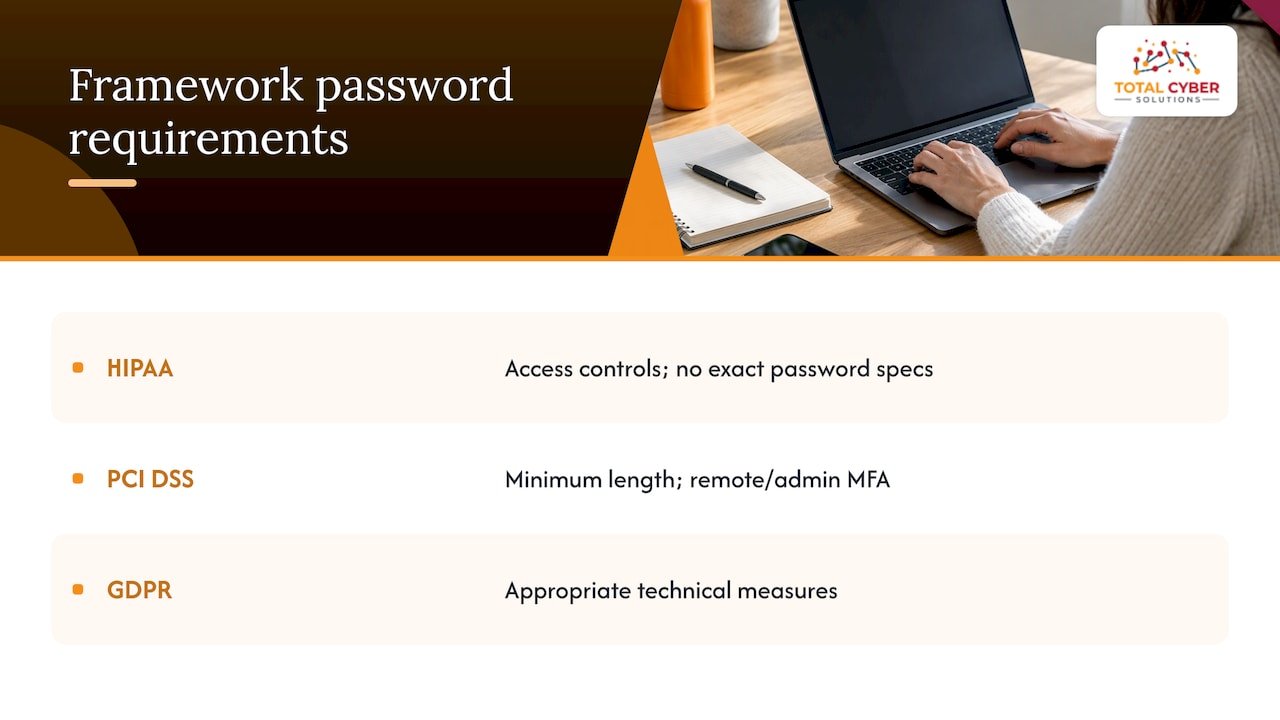
HIPAA requires covered entities and business associates to implement access controls and authentication for systems holding protected health information, though it does not prescribe exact password specifications, leaving length and complexity choices to the organization’s risk assessment. PCI DSS, which governs payment card data, has historically required specific password rules for systems in the cardholder data environment, including minimum length and multifactor authentication for remote access and administrative accounts. GDPR does not specify password rules directly but requires “appropriate technical measures” to protect personal data, which auditors and regulators generally interpret to include strong authentication practices.
The practical move is building your password policy around the NIST-aligned baseline covered earlier, then layering framework-specific requirements on top where they apply. A healthcare practice following HIPAA and a payment processor following PCI DSS will share the same length and MFA foundation, but the payment processor may need stricter logging and more frequent access reviews. Document which framework applies to which system, and keep that mapping inside your policy so an auditor can trace the connection directly rather than guessing at your reasoning.
Tailoring password policies by employee role or access level
Not every employee needs the same password requirements, and treating them identically either over-secures low-risk accounts or under-secures high-risk ones. A tiered approach balances security against the friction employees actually experience.
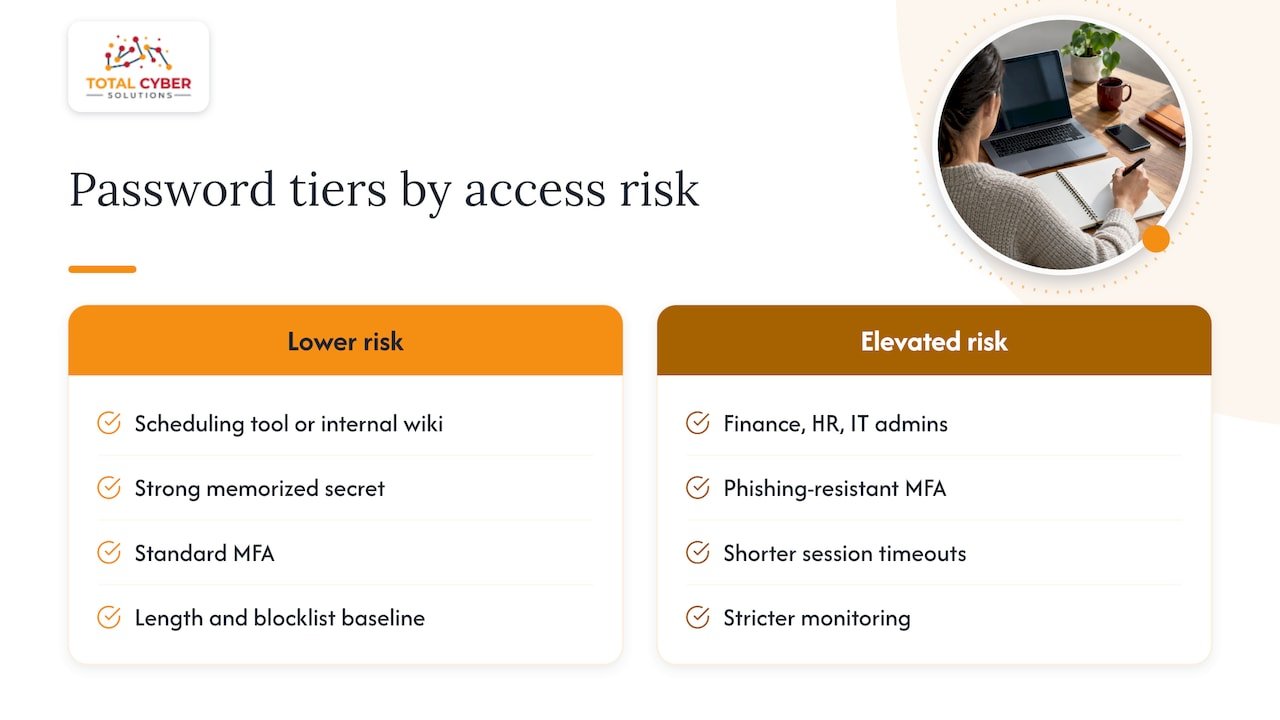
Start by separating accounts into tiers based on what they can access. Frontline staff using a scheduling tool or internal wiki represent lower risk; a strong memorized secret and standard MFA usually covers it. Finance, HR, and IT administrator accounts carry far more risk and deserve phishing-resistant MFA, shorter session timeouts, and stricter monitoring. Executives, who are frequently targeted specifically because of their access and visibility, often warrant the same elevated tier as administrators.
This tiering also solves a usability problem. Demanding the strictest possible controls on every single account creates friction that employees resent and route around, usually by writing passwords down or reusing them elsewhere. Reserve the heaviest requirements, like hardware security keys, for the accounts where a breach would do the most damage, and keep lower-risk accounts simpler but still compliant with your length and blocklist baseline. A partner resource on access rights in practice management software illustrates the same principle from a different angle: access controls work best when they match the actual sensitivity of what is being protected, not a one-size-fits-all rule.
Password recovery and reset procedures that prevent unauthorized access
A password policy is only as strong as its reset process. Attackers who cannot guess a password often try to trick the reset flow instead, which makes secure verification during recovery just as important as the password rules themselves.
Build resets around identity verification that does not rely solely on information an attacker could find through social engineering or a prior breach. A manager or helpdesk approval step for account resets, combined with verification through a secondary channel like a known phone number, closes a gap that pure security-question resets leave wide open. Self-service reset tools should require the employee to already be authenticated through MFA on a trusted device, not just answer a memorized question.
Log every reset, flag resets that happen outside business hours or from unfamiliar locations, and route those for manual review rather than automatic approval. Forced rotation after a reset should only apply when there is actual evidence the account was compromised, consistent with the broader move away from routine password changes. Build the reset process into your incident playbook so the same team handling a compromised-credential event also owns the reset procedure, rather than splitting it across departments that do not talk to each other during a real incident.
Integration with Single Sign-On and identity management systems
A password policy enforced manually, system by system, falls apart fast. Centralizing enforcement through Single Sign-On and an Identity and Access Management platform is what actually makes length minimums, blocklists, and MFA requirements stick.
With SSO in place, employees authenticate once against a central identity provider rather than maintaining separate credentials for every application. That single point of authentication is exactly where your password policy settings, length minimum, blocklist, lockout threshold, live and get enforced consistently, instead of depending on whether each individual application was configured correctly. It also means a single MFA enrollment covers access to dozens of connected applications rather than requiring separate MFA setup per system.
IAM platforms extend this further by tying access itself to role, so the tiered approach described earlier becomes something the system enforces automatically rather than something managers have to remember. When someone changes roles or leaves the company, access across every connected system updates or revokes in one action instead of requiring IT to hunt down every account manually. That consolidation is also where audit logging becomes genuinely useful, since every authentication event across every connected system funnels into one place to review.
Strategies for employee communication and ongoing engagement
A policy that lands in an employee’s inbox as a dense PDF rarely changes behavior. The rollout itself, how you explain it and keep it visible, matters almost as much as the rules themselves.
Lead with the why before the what. Employees who understand that forced password rotation actually made things worse, and that a password manager removes the burden of memorizing a dozen passwords, adopt the new rules faster than employees handed a list of requirements with no context. A short session, even fifteen minutes, covering the reasoning behind length-over-complexity and showing the password manager in action beats a written memo every time.
Keep the policy visible after rollout instead of treating it as a one-time announcement. Short reminders tied to real events, a phishing attempt that almost worked, a breach in the news, a new hire’s first week, keep the policy present without feeling like nagging. Run periodic phishing simulations and share results constructively rather than punitively, since employees who feel blamed tend to hide mistakes instead of reporting them. Make the security team genuinely easy to reach when something looks suspicious. A policy only works if employees feel safe flagging the moment they clicked something they should not have.
Author Alden’s practical priorities for IT leaders
If you are rolling this out with limited time, sequence matters more than perfection. Get MFA and password managers in place first. Those two controls alone close most of the gap that weak passwords create, even before you touch length minimums or blocklists.
Start with your highest-risk systems, finance, admin accounts, customer data, and expand from there. Trying to fix everything simultaneously invites rollout fatigue and shortcuts. On change management: explain the reasoning before enforcing the rule, give people a working password manager before you ask them to stop writing passwords on sticky notes, and expect a few weeks of friction before the new habit sets in.
— Alden
Engage Total Cyber Solutions: assessment and managed service CTA
We build and enforce NIST-aligned password policies for organizations that want this handled correctly the first time, without pulling your internal team off other priorities.

- We run gap assessments that show exactly where your current password practices fall short of current standards.
- We deploy and manage password managers, MFA, and blocklist enforcement through our managed cybersecurity services.
- We provide vCSO leadership and policy compliance consulting for organizations mapping password rules to HIPAA, PCI DSS, or other frameworks.
- We deliver employee training that gets the new policy actually adopted, not just published.
Ready to see where your current policy stands? Request an MSP discovery call and we will walk through a practical path to a NIST-aligned policy for your organization.
FAQ
Which is a recommended password policy?
A recommended policy sets a 15-character minimum for single-factor accounts, drops composition rules like mandatory symbols, and blocks known-breached or common passwords instead, following current NIST guidance. It also pairs this with a password manager and MFA rather than relying on password strength alone.
How do I set a password to never expire for a single user?
Most business email and productivity platforms let an administrator exempt specific accounts from password expiration policies through the identity or admin management console. Before doing this for any account, confirm the account has strong MFA enabled, since removing expiration without MFA increases risk if that password is ever compromised.
What are the key elements of a security policy?
A solid security policy typically covers purpose and scope, access control rules including password and MFA requirements, data handling and classification, incident response procedures, and roles and responsibilities for enforcement. The exact elements vary by organization and the regulatory frameworks that apply.
What are the NIST password guidelines for 2026?
Guidance under NIST SP 800-63-4 calls for a 15-character minimum for single-factor passwords, discourages composition rules, recommends blocking breached and common passwords, and advises against routine forced rotation unless there is evidence of compromise. It also supports password manager use, including allowing paste and autofill on login forms.
Sources
- Frequently asked questions — Digital Identity Guidelines Implementation Resources
- Cybersecurity for Small Business | Federal Trade Commission