

Disaster recovery in Azure runs on two native services, Azure Site Recovery and Azure Backup, paired with a plan that actually reflects what your business can survive losing. The first move isn’t a tool choice. It’s a Business Impact Analysis that sets your Recovery Time Objective and Recovery Point Objective for each workload, then maps those numbers to the right Azure architecture and a test failover schedule you actually run.
TL;DR:
- Implementing recovery objectives based on a Business Impact Analysis ensures cost-effective protection aligned with actual business needs.
- Use Azure Site Recovery for rapid workload recovery and Azure Backup for data integrity, combining both for mission-critical applications when appropriate.
- Verify region, SKU parity, and connectivity requirements ahead of time to prevent failures during actual failover scenarios.
- Automate environment provisioning, testing, and recovery steps with Infrastructure as Code to improve repeatability and reduce human error during disasters.
- Regularly test failover, validate data and application integrity, and monitor recovery health to ensure readiness and identify gaps before an actual incident.
Table of Contents
- Architectural Components for Azure Disaster Recovery
- Azure Site Recovery and Azure Backup: When to Use Each
- Designing Recovery Objectives and Tiers (RTO/RPO Mapping)
- Replication Policies, Recovery Points, and Multi-VM Consistency
- Replication Process and Connectivity Requirements
- Automation and Infrastructure as Code for Repeatable Recovery
- Testing, Validation, and Drills (Test Failover Best Practices)
- Choosing DR Regions, Capacity Checks, and Cost Trade-Offs
- Implementation Checklist and Starter Runbook
- Post-Failover Recovery Steps: Data Integrity and Application Checks
- Monitoring and Alerting Strategies During Disaster Recovery Operations
- Security and Compliance Considerations in Disaster Recovery Setups
- Total Cyber Solutions Perspective: Why Managed Services Help Operationalize Azure DR
- How Total Cyber Solutions Can Assess, Implement, and Run Your Azure DR
- Sources
Architectural Components for Azure Disaster Recovery
Every Azure DR setup rests on the same skeleton, whether you’re protecting three VMs or three hundred. You pick a primary region where production lives, a secondary region where replicas wait, and you decide how those two talk to each other.
Availability zones handle the small stuff, a rack failure, a power blip within one region. Full Azure Site Recovery replication handles the big stuff: an entire region going dark. You need both layers, because they solve different problems at different price points.
The building blocks you’ll configure directly:
- Recovery Services vault: the container that holds replication configuration, recovery points, and backup policies for a region.
- Replica managed disks: continuously updated copies of your source disks, sitting in the target region ready to boot.
- Cache storage account: a staging area in the source region where the Mobility agent writes changes before they ship to the target.
- Recovery plans: the orchestration layer, built in ASR or scripted through Azure Automation, that sequences which VMs boot first and in what order dependencies come online.
Get the vault and replica placement wrong and you’ll discover it mid-failover, which is the worst possible time.
Azure Site Recovery and Azure Backup: When to Use Each
These two services get bundled together constantly, and that’s a mistake. Azure Site Recovery vs Site Recovery paired with Backup isn’t really a choice between competitors. It’s a choice between two jobs.
ASR keeps a workload running when a region fails. It replicates continuously, so RPOs of under a minute are realistic for many workloads, and RTOs land in minutes rather than hours. Backup does something different: it protects you from data loss, corruption, or a bad deployment, with restore points you can pull from days, weeks, or months back.
- Use ASR when downtime itself is the enemy: customer-facing apps, order processing, anything with an SLA attached.
- Use Backup when your risk is data integrity, not uptime: file shares, databases where a ransomware event or accidental delete is the realistic threat.
- Combine both for mission-critical apps. ASR gets you back online fast; Backup gives you a clean recovery point if the failure itself corrupted data before you failed over.
- Common ASR candidates: SQL Server VMs, SharePoint farms, line-of-business apps built on IaaS rather than PaaS.
Pricing scales with protected instance count for ASR and with storage consumed for Backup, so a hybrid approach often costs less than running everything through continuous replication.
Designing Recovery Objectives and Tiers (RTO/RPO Mapping)
RTO is how long you can stay down. RPO is how much data you can afford to lose. They sound similar and get confused constantly, but they drive completely different architecture decisions, and conflating them is how teams end up overpaying for the wrong protection.
A Business Impact Analysis is how you get real numbers instead of guesses. Pull in finance, operations, and legal, not just IT, and ask what an hour of downtime costs each system in dollars, compliance exposure, or reputation. That conversation, uncomfortable as it is, produces the business continuity priorities that everything else follows.
- Mission-critical tier (very low RTO and RPO): active-active architecture, traffic split across regions continuously.
- Business-critical tier (moderate RTO and RPO requirements): warm standby with ASR replication running, scaled-down secondary environment.
- Operational tier (longer RTO and RPO tolerances): pilot light, minimal infrastructure pre-staged, scaled up on failover.
Microsoft’s Well-Architected reliability guidance maps these patterns in more depth. The most common mistake is setting an aggressive RTO because it sounds responsible, then paying active-active prices for a workload nobody would actually escalate about at 2 a.m.
Pro Tip: If a business stakeholder can’t tell you the dollar cost of an hour of downtime for a given app, that app probably doesn’t need a sub-15-minute RTO. Push back before you architect for it.
Replication Policies, Recovery Points, and Multi-VM Consistency
Your replication policy decides what “recovered” actually means when failover happens. Get the snapshot type wrong and you’ll boot a VM that looks fine and has a corrupted database underneath.
- Crash-consistent snapshots capture disk state as if the power was pulled. Fast, cheap, but a database mid-transaction may not recover cleanly.
- App-consistent snapshots flush application memory and pending writes (via VSS on Windows) before the snapshot, at the cost of a brief performance hit during capture.
- Replication frequency for Azure-to-Azure scenarios runs continuous by default, with recovery point retention configurable up to 72 hours depending on your policy.
- Multi-VM consistency groups synchronize recovery points across VMs that depend on each other. Reserve them for tightly coupled tiers, like an app server and its database, because enforcing that synchronization adds replication overhead across the whole group.
The Azure-to-Azure architecture guide covers exact retention limits and policy settings if you’re tuning for cost against a specific RPO target.
Replication Process and Connectivity Requirements
Replication is a pipeline, not a single event. The Mobility agent on each source VM captures writes, stages them in cache storage, ships them to the target region, and Azure builds recovery points from that stream on the receiving end.
That pipeline needs specific outbound access, and firewalls block it more often than you’d expect:
- Storage service tags for cache and target storage accounts
- Microsoft Entra ID endpoints for authentication
- Azure Site Recovery service endpoints
- Service Bus and Key Vault endpoints for orchestration and secrets
Beyond the service tags, plan your failover internet strategies and ExpressRoute capacity for the failover scenario, not just steady state. IP addressing needs to stay consistent or your DNS and app configs break on cutover, and services like Traffic Manager or Front Door should route users to whichever region is live without manual DNS changes.
Automation and Infrastructure as Code for Repeatable Recovery
Manual failover steps are where DR plans die during an actual incident. Under pressure, people skip steps, forget dependencies, or fat-finger a config, and that’s exactly when Infrastructure as Code earns its place.
- Provision DR target environments with ARM templates, Bicep, or Terraform so the secondary region matches production exactly, no configuration drift from manual builds.
- Script recovery-plan steps in Azure Automation runbooks, handling boot order, health checks, and DNS updates without a human running through a checklist mid-incident.
- Store secrets and connection strings in Azure Key Vault, and confirm Key Vault itself has geo-redundancy planned in, since a DR plan that can’t retrieve its own credentials fails immediately.
Pro Tip: Test your IaC templates by tearing down and rebuilding the DR environment on a schedule, not just during an actual disaster. Drift creeps in from manual “quick fixes” faster than most teams notice.
Testing, Validation, and Drills (Test Failover Best Practices)
A DR plan nobody has tested is a theory, not a plan. Test failover in ASR spins up VMs in an isolated network, so you validate recovery without touching production or your live users.
- Run test failovers quarterly for mission-critical and business-critical tiers; twice a year is defensible for operational-tier workloads.
- Validate application health checks, not just that the VM booted, since a running VM with a failed service tells you nothing useful.
- Confirm data integrity against the last known-good state before the test.
- Check networking and DNS resolution inside the isolated test network, catching the misconfigurations that only surface under failover conditions.
- Automate cleanup and rollback after each test to avoid leaving orphaned resources billing you for months, which is easier to overlook than it sounds.
A regular audit of your DR setup, similar to a technology checkup, catches drift between what your runbook says and what your environment actually does.
Choosing DR Regions, Capacity Checks, and Cost Trade-Offs
Not every Azure region offers the same VM sizes, storage SKUs, or services, and discovering a mismatch during an actual failover is a brutal way to learn that. Confirm SKU parity between your primary and candidate secondary region before you commit, not after.
- Geographic separation matters for resilience, but it adds latency, so weigh distance against how sensitive your users are to lag.
- Data residency and regulatory requirements can eliminate otherwise-obvious region pairs, particularly for regulated industries.
- Active-active costs the most, running full duplicate capacity around the clock.
- Warm standby trims cost by running a scaled-down secondary that scales up on failover.
- Pilot light costs least, keeping only core infrastructure provisioned, but stretches your effective RTO.
Storage and egress costs compound quietly here. Continuous replication traffic and cross-region data transfer add up faster than most budgets account for, especially at scale.
Implementation Checklist and Starter Runbook
Getting from zero to a working DR posture doesn’t require solving everything at once. It requires sequencing the right steps.
- Run the Business Impact Analysis, inventory every workload, and assign tiers with RTO/RPO targets attached to each.
- Pick one pilot workload, enable ASR or Backup protection, and validate that replication is actually flowing before moving to the next.
- Run a test failover on that pilot and document what broke, because something will.
- Automate target environment provisioning with IaC so the next workload doesn’t repeat manual setup.
- Write the recovery runbook in plain steps a tired on-call engineer can follow, and schedule recurring drills on the calendar, not as a someday task.
Starting with one workload beats attempting a full-environment rollout in month one. You’ll find your process gaps fast, and fix them before they’re expensive.
Post-Failover Recovery Steps: Data Integrity and Application Checks
Failover completing successfully doesn’t mean recovery is done. It means the riskiest phase just started, and skipping the verification steps here is how a clean failover turns into a data integrity incident nobody catches for days.
Start with data integrity verification. Compare row counts, checksums, or transaction logs in the failed-over database against the last known-good state before the incident. For app-consistent recovery points, this usually confirms cleanly. For crash-consistent snapshots, check for partial transactions or orphaned records, since that’s exactly the scenario crash-consistent snapshots are more prone to.
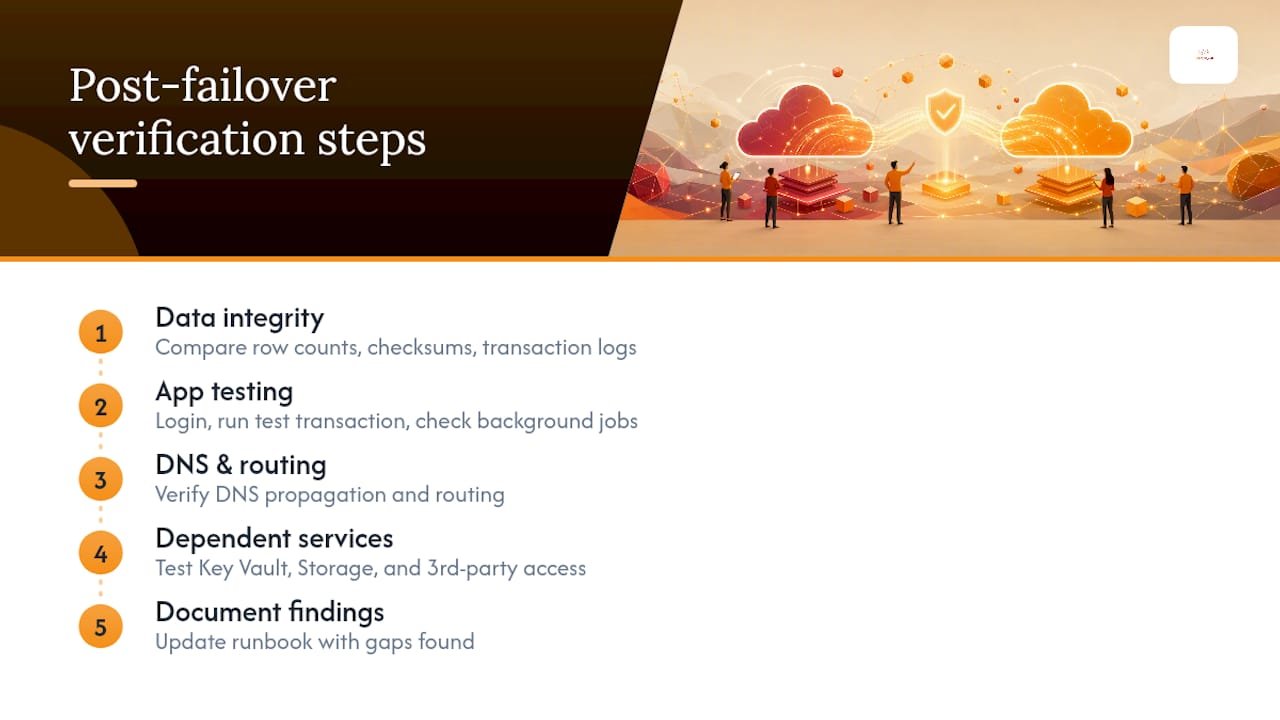
Next, validate application functionality end to end, not just that services are running. Log in as a test user. Process a test transaction. Confirm that background jobs, scheduled tasks, and integrations with other systems (payment processors, third-party APIs) are actually connecting, not just that the VM shows a green health check.
Check DNS propagation and confirm Traffic Manager or Front Door is routing traffic to the correct region. A surprising number of “failed” failovers are actually successful failovers with stale DNS caching still pointing users at a dead primary region.
Finally, confirm dependent services, Key Vault, Storage accounts, and any third-party integrations, are reachable from the new region. A recovery plan that boots the VM but forgets the VM needs a working connection to Key Vault for its secrets will fail silently, and that failure often surfaces hours later as a mystery outage rather than an obvious error.
Document what you find. Every gap discovered during an actual failover should update the runbook before the next drill.
Monitoring and Alerting Strategies During Disaster Recovery Operations
Visibility during a failover is not optional, and it’s usually the first thing teams under-invest in, because monitoring feels like a “normal operations” concern rather than a DR one.
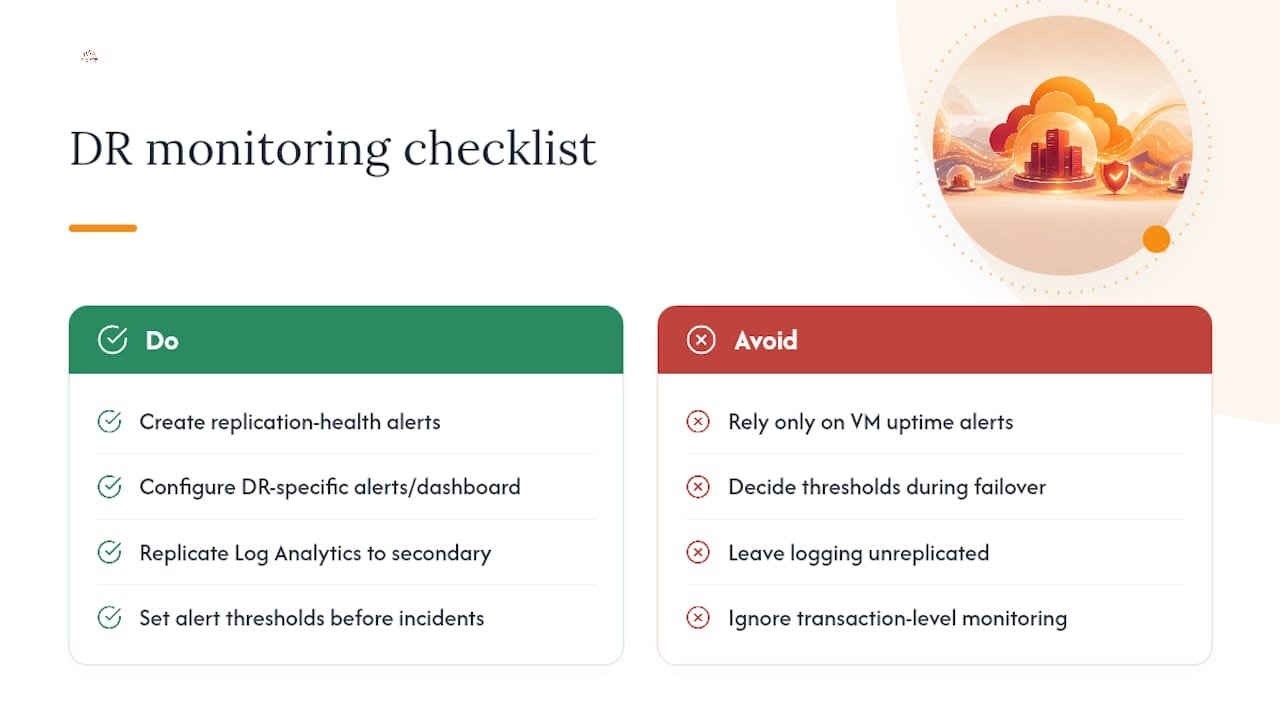
Set up Azure Monitor alerts specifically tied to replication health, not just VM uptime. A replication health alert catches a stalled sync hours before you’d otherwise discover it, which is the difference between a manageable RPO gap and a multi-day data loss surprise.
During an actual failover event, alerting needs change. You’re not watching for the same signals as steady-state operations; you’re watching for boot failures, network connectivity drops between regions, and DNS propagation delays. Configure a separate alert set, or at least a separate dashboard view, that surfaces these specifically during a declared DR event so your team isn’t digging through noise while the clock is running.
Application Insights adds a layer that infrastructure monitoring alone misses: transaction-level visibility. Knowing a VM is “up” tells you nothing about whether checkout transactions are actually completing. That gap is exactly where post-failover incidents hide.
Log Analytics workspaces should replicate to the secondary region alongside your workloads, or you lose your own diagnostic history at the exact moment you need it most. It sounds obvious once stated, but it’s a common oversight in DR plans built around compute and storage replication while logging infrastructure gets left behind.
Set alert thresholds before the incident, not during one. Deciding what counts as “acceptable latency” or “normal error rate” while a real failover is underway means making that judgment call under pressure, with worse information than you’d have during a calm afternoon of planning.
Security and Compliance Considerations in Disaster Recovery Setups
A DR environment that isn’t held to the same security standard as production isn’t a backup plan. It’s a second attack surface, and a common one that penetration tests find wide open.
Replica VMs and storage in your secondary region need the same network security groups, firewall rules, and access controls as production, not a looser version stood up quickly to “just get it working.” Attackers who compromise a poorly secured DR environment can pivot into production through the same replication channels meant to protect you.
Encryption matters on both ends of the replication pipeline. Data in transit between regions and data at rest in replica storage should carry the same encryption standards you’d require in your primary environment, and Azure’s platform encryption handles most of this by default, but custom configurations can quietly disable it.
Compliance frameworks like HIPAA, CJIS, and CMMC often have explicit requirements around where replicated data can live geographically and who can access it. A DR region chosen purely for cost or latency can put you out of compliance if it sits outside an approved jurisdiction for regulated data, so that decision belongs in the region-selection conversation, not as an afterthought discovered during an audit.
Access control for the DR environment itself deserves scrutiny too. Who can trigger a failover? Who can access replica data? Azure Policy can audit DR configuration against your compliance baseline automatically, catching drift between your documented security posture and what’s actually deployed. Without that auditing, DR environments tend to accumulate permission creep that nobody notices until it’s exploited.
Total Cyber Solutions Perspective: Why Managed Services Help Operationalize Azure DR
Most Azure DR plans fail from neglect, not bad architecture. Teams configure ASR correctly, then testing quietly stops after month two because nobody owns it. Total Cyber Solutions builds BCDR operations around Azure migrations specifically to close that gap: automation, scheduled drills, and accountability that survive staff turnover. If your DR plan hasn’t been tested this quarter, start here.
— Alden
How Total Cyber Solutions Can Assess, Implement, and Run Your Azure DR
Building this in-house works fine if you have dedicated capacity to own testing cadence, IaC upkeep, and runbook maintenance indefinitely. Most IT teams don’t, not because they lack skill, but because DR competes with daily fires for attention, and DR usually loses.
Total Cyber Solutions runs Azure disaster recovery as an ongoing operational discipline rather than a one-time setup. That means an initial assessment mapping your workloads to RTO/RPO tiers, implementation of ASR and Backup policies matched to those tiers, automated provisioning through Infrastructure as Code, and a test failover schedule that actually happens on the calendar instead of sliding indefinitely.

If your team leans toward implementing this yourself, that’s a reasonable path for organizations with dedicated cloud infrastructure staff. If you’d rather have a partner who owns testing and keeps runbooks current as your environment changes, that’s where managed cybersecurity services from Total Cyber Solutions fit. Start with an assessment through the MSP engagement form to see where your current setup stands against your actual recovery objectives.