

Disaster recovery testing proves your backups, runbooks, and teams can restore services within your documented RTO and RPO. If you’ve never run a test, start with a tabletop exercise tied to your business impact analysis. NIST SP 800-34 uses the BIA to set the scope and rigor of testing for each system.
TL;DR:
- Most organizations discover significant gaps in recovery time and data loss limitations during actual restore attempts, revealing untested or outdated procedures.
- Testing should progress from basic tabletop exercises to full cutovers, prioritizing critical systems and extending the scope only after initial success.
- Preparation requires verified backups, current runbooks with version control, and comprehensive dependency maps, including third-party SLAs and contacts.
- Regularly scheduled tests based on system impact and real-world triggers are essential, with objective pass/fail criteria to measure recovery capabilities accurately.
- Building a continuous improvement cycle with a dedicated owner and proper documentation ensures recovery plans remain effective and audit-ready.
Table of Contents
- What Does Disaster Recovery Testing Actually Prove?
- What Are the Different Levels of DR Tests?
- How Do You Prepare for a DR Test?
- How Do You Run a DR Test and Measure Results?
- What Failures Do DR Tests Usually Uncover?
- How Often Should You Run DR Tests?
- How Total Cyber Solutions Helps You Operationalize DR Testing
- Why Leadership Has To Fund Realistic Testing, Not Just Compliance Testing
- Get Help Building a Disaster Recovery Testing Program That Holds Up
- Standards and Templates Worth Bookmarking
- Sources
What Does Disaster Recovery Testing Actually Prove?
Backups running on schedule and backups being restorable are two different claims, and the gap between them has ended careers. A test either confirms you can meet your Recovery Time Objective (RTO), the maximum acceptable downtime, or it doesn’t. Same goes for your Recovery Point Objective (RPO), the maximum data loss you can tolerate before things get ugly. You don’t know either number until you’ve timed a real restore.
GitLab found this out the hard way. Their backups appeared healthy for months. When they actually needed one, the restore took 18 hours and exposed data that didn’t match expectations. Nobody had timed a full restore before the day they needed one.
Your business impact analysis determines which systems get tested first and how often. A BIA ranks processes by how much downtime the business can absorb and in what order systems need to come back online. That ranking becomes your test schedule.
Auditors care about this too. SOC 2, HIPAA, and ISO 22301 all expect documented, tested continuity plans, not just a plan sitting in a drawer. Evidence means dated test records, pass/fail results, and remediation tracking, not a statement that a plan exists. Total Cyber’s work on business continuity planning starts every engagement with this exact BIA step, because everything downstream depends on getting the priority list right.
What Are the Different Levels of DR Tests?
Not every system needs a full cutover, and testing everything at maximum intensity burns budget and goodwill fast. NIST SP 800-34 ties test rigor to system impact level, which means low-impact systems get lighter tests and mission-critical ones earn the expensive, disruptive exercises.
-
Tabletop exercise. A facilitator walks the team through a disaster scenario verbally. No systems touched, no downtime. This validates whether people know their roles and whether the runbook makes sense on paper. Good starting point for any team that hasn’t tested before.
-
Walkthrough. Similar to a tabletop but more detailed, often stepping through the actual runbook line by line with the people who would execute it. Surfaces gaps in documentation before anyone touches production.
-
Simulation. Teams perform real recovery actions in an isolated environment, such as restoring a database to a sandbox. This is where you start collecting real timing data instead of estimates.
-
Parallel test. The recovery environment runs alongside production, processing real or shadow traffic without cutting over fully. This validates that the recovery environment can actually handle load and stay in sync.
-
Full cutover. Production traffic actually moves to the recovery environment. Highest confidence, highest risk, and the only test type that proves your DR site works under real conditions.
Most organizations start with tabletops for every critical system, then progress toward simulation and parallel tests for the systems that would hurt the most if they went down. Full cutover tests get reserved for the handful of systems where a real disaster would be existential.
How Do You Prepare for a DR Test?
Preparation is where most DR testing programs quietly fail before the test even starts. You need three artifacts in place: a current BIA, runbooks that match reality, and a dependency map that includes vendors outside your walls.
Runbooks need version control and named owners, not a PDF someone wrote three IT managers ago. Store an offline copy too. If the outage that triggers your DR plan also takes down the wiki where your runbook lives, you have a problem inside a problem.
Dependency mapping deserves more attention than it usually gets. Your recovery plan might work perfectly, except the payment processor’s API, the DNS provider, or a SaaS vendor your app depends on isn’t part of the test scope at all. Extend your mapping to cover third-party SLAs and confirm you actually have a contact who picks up the phone during an incident.
Before you run anything, work through this checklist:
- Verify backup integrity with a checksum or test restore, not just a “job completed successfully” log entry.
- Confirm credential access to recovery systems works right now, not “should work.”
- Prepare communication templates for stakeholders so nobody is drafting an email during a live outage.
- Get documented approval from system owners for the test window and scope.
- Confirm rollback steps exist in case the test itself causes issues.
Pro Tip: Test your credentials and access paths a week before the exercise, not the morning of. Expired service accounts and locked-out MFA devices are two of the most common reasons scheduled DR tests get postponed.
How Do You Run a DR Test and Measure Results?
Execution steps differ by test type, but every one of them needs objective pass/fail criteria decided in advance, or you’ll argue about whether it “kind of” worked.
-
Tabletop: Present the scenario, inject a complication midway (a key person is unreachable, a vendor doesn’t answer), and document every decision point and gap in real time.
-
Simulation: Perform isolated restores, run smoke tests against the restored environment, and time every step. This is your first real RTO data point.
-
Parallel test: Route a slice of traffic to the recovery environment, check data consistency against production, and confirm failback works cleanly afterward.
-
Full cutover: Requires signed approvals, a defined change window, a rollback plan, and business sign-off before you touch anything. Anything less invites chaos.
To validate RPO specifically, write a timestamped test record right before your backup or replication snapshot runs, then confirm that record survives the recovery with its timestamp intact. If it’s missing or stale, your actual RPO is worse than documented. One recurring pattern across cloud environments: DNS propagation and TTL settings quietly extend RTO during failover far more often than the application layer does.
What Failures Do DR Tests Usually Uncover?
The same handful of problems show up across nearly every organization’s first few tests. None of them are exotic.
- Silent backup corruption. Backups “complete” but restores fail or return incomplete data. Fix this with regular restore verification and checksum validation, not job status logs.
- Stale runbooks. Named contacts left the company, steps reference retired systems. Version-control every runbook and keep an offline copy accessible during outages.
- Undocumented dependencies. A vendor or internal service nobody mapped becomes the blocker. Extend dependency maps and confirm vendor SLAs cover disaster scenarios, not just routine support.
- Replication lag and DNS TTLs. Both quietly inflate real recovery time beyond documented RTO. Pre-warmed standby replicas and lower TTLs ahead of a test window reduce this drag.
A structured checklist covering backup integrity, runbook accuracy, and dependency checks catches most of these before they become a live incident.
How Often Should You Run DR Tests?
Cadence should track system criticality, not a calendar date picked at random. A workable pattern many organizations use: tabletop exercises monthly or quarterly, simulations quarterly, parallel tests biannually, and full cutovers annually or after major architecture changes.
- Run trigger-based tests after any architecture change, staffing turnover in key recovery roles, a real incident, or ahead of a compliance audit.
- Assign clear governance: an owner for each system’s test, a required sign-off, and executive briefings on results.
- Track KPIs over time: test pass rate, mean time to remediate discovered issues, and the drift between documented and actual recovery capability.
Cadence recommendations along these lines are widely reflected in industry DR testing guidance, and they align with the NIST principle of tying test frequency to how much a failure would cost you.
How Total Cyber Solutions Helps You Operationalize DR Testing
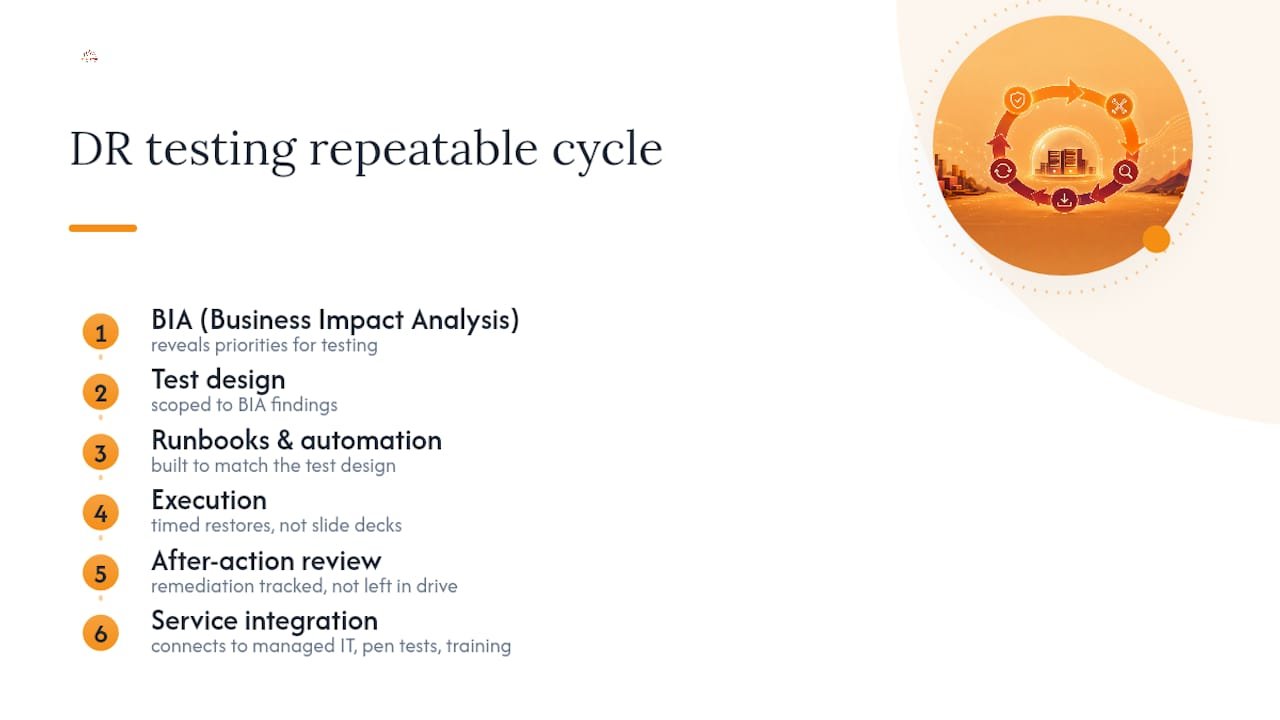
Total Cyber runs this as a repeatable cycle: BIA first, then test design scoped to what that BIA reveals, then runbooks and automation built to match, then execution, then after-action review and remediation tracking that doesn’t disappear into a shared drive.
This connects directly to the services we already provide: managed IT and cybersecurity support, continuity planning, penetration testing, risk assessments, and workforce training so the people executing your runbook actually know what they’re doing under pressure. If your last DR test was a slide deck instead of a timed restore, that’s the gap worth closing before an auditor or an outage finds it for you. You can request a discovery call to talk through where your current plan stands.
Why Leadership Has To Fund Realistic Testing, Not Just Compliance Testing
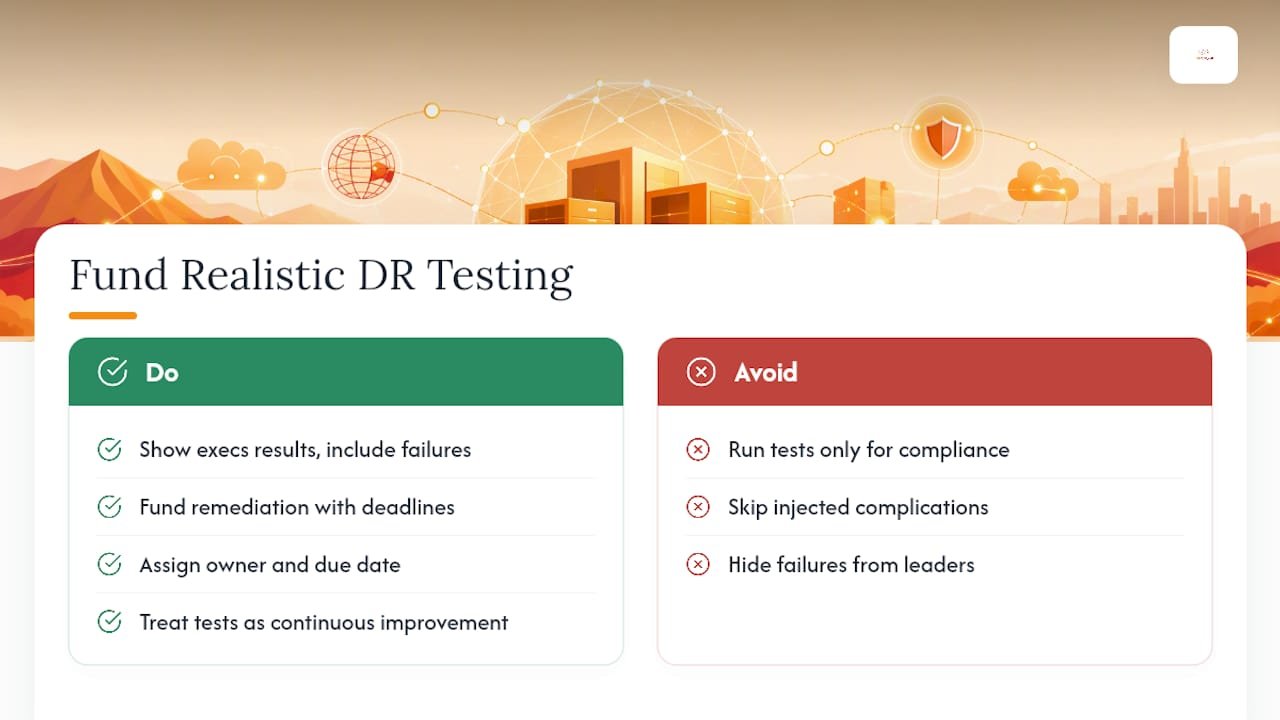
Compliance-only DR testing checks a box and proves nothing. A tabletop run purely to satisfy an auditor tends to skip the injected complications that make tests useful, because nobody wants an ugly result on record.
Real improvement happens when executives see test results directly, including the failures, and fund remediation on a deadline instead of a wish list. Testing is discovery, not a pass/fair scorecard. Treat every DR test as continuous improvement work with an owner and a due date, and the program actually gets better each cycle instead of just getting repeated.
— Alden
Get Help Building a Disaster Recovery Testing Program That Holds Up
Building and maintaining a DR testing program in-house means someone has to own the BIA, keep runbooks current, schedule exercises, and chase remediation items on top of their regular workload. That’s usually where programs stall out after the first tabletop.

Total Cyber’s managed cybersecurity services keep your runbooks current, coordinate test execution, and track remediation items until they’re actually closed, not just logged. That’s the difference between a DR plan that exists and one that’s ready when you need it. A managed partner also produces the dated, structured test records auditors expect for SOC 2, HIPAA, or CMMC reviews, without your team building a reporting process from scratch. If your organization is ready to move from an untested plan to a proven one, start a discovery conversation with Total Cyber and walk through where your current recovery capability actually stands.
Standards and Templates Worth Bookmarking
- NIST SP 800-34 Rev. 1, the federal contingency planning guide behind most test-type and cadence recommendations.
- A practical DR testing checklist covering backup integrity, failback, and dependency validation.
- AWS guidance on testing disaster recovery workloads, useful for cloud failover and DNS validation steps.
- A partner walkthrough of DR testing exercises with additional practical templates for teams building their first test plan.
Sources
- Contingency Planning Guide for Federal Information Systems (NIST SP 800-34 Rev. 1)
- Disaster Recovery Testing Checklist – QAPractices
- How to Implement Disaster Recovery Testing
- Testing disaster recovery – AWS Documentation
- RTO vs RPO: Setting Recovery Targets That Actually Hold