

MFA fatigue attacks work by bombarding a user with repeated push notifications until they approve one out of sheer annoyance or confusion. If you do only two things this week, do these: turn on number matching or verified push for every authenticator app in your environment, and set an alert for any approval that follows a burst of denials from the same account. Treat that pattern as a breach until proven otherwise.
TL;DR:
- Enabling number matching or verified push on all authenticator apps significantly reduces accidental approvals and complicates social engineering attacks.
- Logging for denial bursts followed by a single approval, especially in unusual contexts, is the most effective way to detect MFA fatigue attacks in real time.
- Immediate containment steps include revoking sessions, forcing password resets, removing unknown MFA devices, and monitoring for lateral movement.
- Long-term defenses involve adopting phishing-resistant authentication methods like FIDO2 or passkeys, which eliminate the approval prompt entirely.
Table of Contents
- What MFA Fatigue Attacks Are and Why They Keep Working
- How the Attack Unfolds Inside Your Identity Logs
- Detecting an Active Attack and Containing It Fast
- Prioritized Defenses Against MFA Fatigue
- Migrating to Phishing-Resistant Authentication
- Who’s Behind These Attacks and What They’re After
- MFA Fatigue Versus Other MFA Bypass Techniques
- What a Successful Attack Actually Costs You
- Why Push Notifications Became an Easy Target
- How Your Phone’s Own Security Features Can Help
- Real Incidents That Put This Attack on the Map
- What Total Cyber Sees Working for Smaller Teams
- How Total Cyber Solutions Can Help You Close This Gap
- Primary Standards and Advisories Worth Bookmarking
- Sources
- FAQ
What MFA Fatigue Attacks Are and Why They Keep Working
An attacker who already has a stolen username and password triggers push notification after push notification on the victim’s phone, betting that irritation eventually beats caution. This is sometimes called MFA prompt bombing, and it belongs to a broader category security teams now call user authentication fatigue: the moment your defenses depend on a tired, distracted person making the right call, five times in a row, at 11 p.m.
The attack flow is simple and that’s exactly the problem:
- The attacker buys, phishes, or brute-forces valid credentials.
- They repeatedly trigger the login flow, generating a stream of push prompts.
- Sometimes they call the victim, posing as IT support, asking them to “just approve it to make it stop.”
- Eventually the victim taps “Approve,” out of exhaustion, confusion, or trust in the caller.
Simple approve/deny push design is the underlying weakness. It asks a human to make a security decision with zero context, under time pressure, often outside working hours. MITRE catalogs this behavior formally as Multi-Factor Authentication Request Generation, technique T1621, placing it squarely under Credential Access in its attack framework, which tells you this isn’t a fringe tactic. It’s a documented, repeatable MFA attack vector that shows up in real incident response cases.
How the Attack Unfolds Inside Your Identity Logs
The fastest way to catch this MFA bypass technique isn’t watching phones, it’s watching logs. The attack leaves a distinct fingerprint in identity provider (IdP) data, and that fingerprint is almost always the same shape: a cluster of denials followed by one approval.
Here’s the operational sequence a SOC should hunt for:
- Multiple failed or denied push attempts in a tight window, often five, ten, or more within a few minutes.
- A single approval that comes right after that denial burst, from the same user or device chain.
- Anomalous context attached to that approval: an off-hours timestamp, a new geographic location, an unrecognized device, or an IP address with poor reputation.
Specific log fields matter here. Okta environments log deny_push events tied to the user session. Microsoft Entra ID often surfaces sign-in error code 500121 when an MFA challenge fails, which is worth a dedicated detection rule on its own. Duo’s fraud reporting result field flags user-initiated fraud reports, a strong signal when it appears alongside recent denials.
Security researchers who study SOC detection patterns for this attack recommend correlating denial bursts with successful approvals as the primary detection object, rather than alerting on either event type alone. That correlation, combined with location, device, and IP reputation checks, is what separates a real MFA fatigue attack from someone who simply fat-fingered their phone twice.
Detecting an Active Attack and Containing It Fast
Speed matters more here than almost anywhere else in incident response. Every minute an attacker holds an approved session is a minute they can pivot, exfiltrate, or plant persistence.
Start with alert tuning. A reasonable baseline threshold is three or more denied push attempts within a five-minute window, followed by any approval, flagged as high severity regardless of time of day. Tune this down for privileged or admin accounts, where even a single denial followed by approval deserves review.
Once the alert fires, run this containment sequence without waiting for a full investigation:
- Revoke all active sessions for the affected account immediately.
- Force a password reset and require a new MFA enrollment.
- Remove any MFA devices you don’t recognize from the account’s registered methods.
- Hunt for persistence: new app registrations, forwarding or mail rules, and new OAuth grants tied to the account.
- Check for lateral movement from the account’s recent sign-in history.
Notify the affected user directly and plainly. Tell them what happened, that it wasn’t their fault, and what you need from them next (a new password, re-registration of MFA, and a heads up to report anything similar immediately going forward). Small teams without a dedicated SOC should build this notification into a template now, before an incident, not during one.
Pro Tip: Build a one-page “if you get a push you didn’t request” card for every employee. Tape it near their monitor. The instruction is one line: deny it, report it, don’t call anyone back who claims to be IT unless you dialed the number yourself.
Prioritized Defenses Against MFA Fatigue
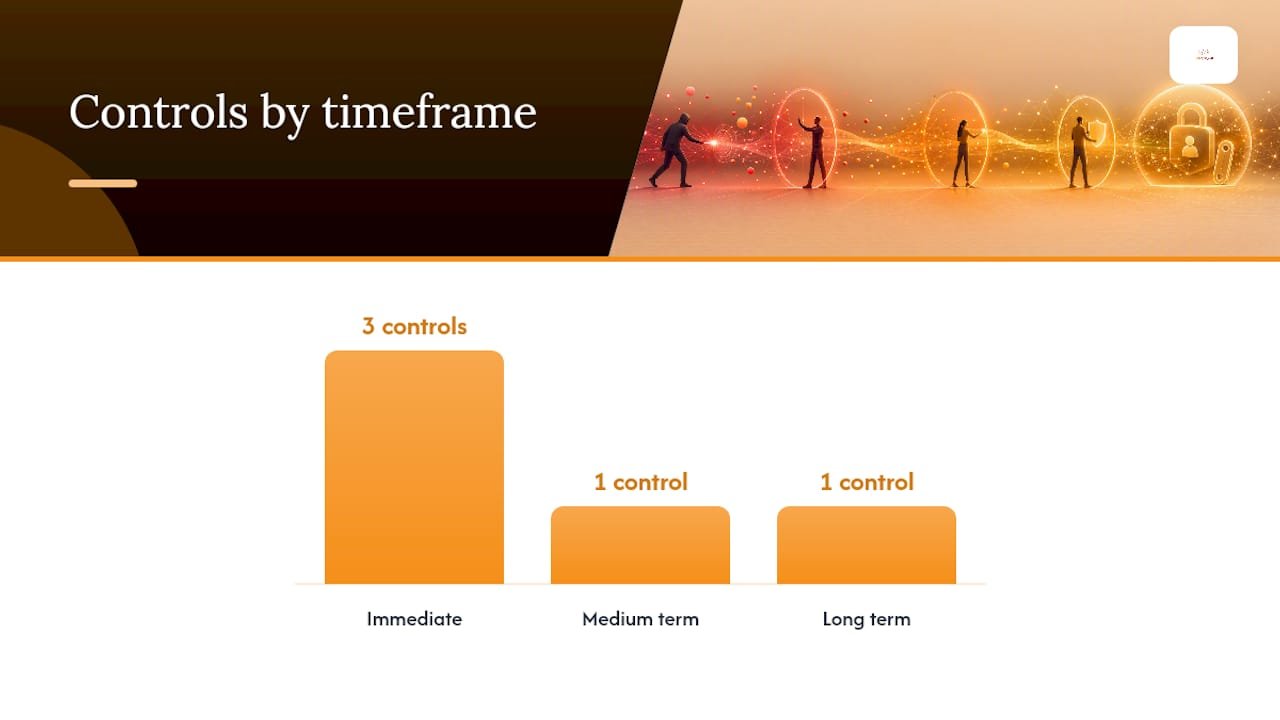
Mitigating MFA fatigue effectively means separating what you fix this week from what you plan for this year. Trying to do everything at once is how good security programs stall out.
Immediate (this week):
- Enable number matching or verified push on every authenticator app in use. CISA’s fact sheet on number matching recommends this specifically to cut down accidental and coerced approvals.
- Enforce rate limits on MFA challenge attempts per account, per time window.
- Turn on fraud reporting in your MFA platform so users can flag suspicious pushes with one tap.
Medium term (this quarter):
- Layer in adaptive, risk-based authentication that factors in device trust, location, and behavior before granting access.
- Block or challenge sign-ins from IP ranges with known poor reputation.
- Tighten session lifetime and re-authentication requirements for sensitive applications.
Long term (this year):
- Pilot FIDO2 or passkey-based authentication for your highest-risk user groups.
- Update procurement and vendor contracts to require phishing-resistant MFA support going forward.
Number matching doesn’t eliminate every risk. Microsoft’s own guidance on the topic notes that verified push and number matching convert a one-tap approval into an action an attacker can’t complete remotely, which cuts accidental approvals sharply. But a determined attacker who also runs a phone-based social engineering nudge can still talk a user through entering the matching number themselves. That’s why this stays a layered defense problem, not a single-control fix.
| Control | Timeframe | What it stops |
|---|---|---|
| Number matching / verified push | Immediate | Accidental one-tap approvals |
| Rate limiting | Immediate | High-volume prompt bombing |
| Fraud reporting | Immediate | Slow attacker response, alert SOC |
| Risk-based authentication | Medium term | Logins from unusual context |
| FIDO2 / passkeys | Long term | The approvable prompt itself |
Migrating to Phishing-Resistant Authentication
The most durable fix for MFA fatigue is removing the approvable prompt entirely. FIDO2 and passkeys don’t ask a user to approve or deny anything; authentication happens through cryptographic key exchange between the device and the service, with no push notification for an attacker to spam. The FIDO Alliance describes this model as phishing-resistant by design, because there’s no shared secret or approval decision to intercept or manipulate.
A practical pilot looks like this:
- Identify your highest-risk applications first: admin consoles, finance systems, email administration, and anything tied to privileged access.
- Select a pilot group of tech-comfortable users to test enrollment and daily use before a wider rollout.
- Test compatibility against your actual application stack; not every legacy system supports FIDO2 natively yet.
- Budget helpdesk time for the first few weeks; passkey enrollment questions spike immediately after rollout.
For legacy applications that can’t support passkeys yet, certificate-based authentication and hardware security keys for admin accounts make a reasonable bridge while you work through the rest of the migration. Reviewing your current two-factor authentication setup is a good place to start scoping that work.
Who’s Behind These Attacks and What They’re After
MFA fatigue attacks show up across a wide range of threat actors, from financially motivated cybercrime groups to more organized intrusion sets that specialize in initial access. The common thread is that almost none of them build this technique from scratch. It’s a low-cost, high-yield follow-on step once credentials are already in hand.
Financially motivated groups tend to target help desks, finance departments, and IT staff, because those accounts often carry elevated privileges and provide a fast path to fraud or ransomware deployment. Initial access brokers, groups that specialize in breaching a network and then selling that access to other criminals, have used prompt bombing as one of several tools to get past MFA before handing off a foothold. Nation-state-aligned actors have also used the technique, though usually as one piece of a longer, more patient intrusion rather than the sole method of entry.
What ties these motivations together is scale and patience. Multi-factor authentication vulnerabilities like prompt bombing don’t require sophisticated tooling. They require stolen credentials, which are widely available on criminal marketplaces, and a willingness to annoy someone until they make a mistake. That low barrier to entry is exactly why this attack type has spread across so many different threat actor profiles rather than staying confined to one specialized group.
MFA Fatigue Versus Other MFA Bypass Techniques
Prompt bombing is only one entry in a growing list of MFA attack vectors, and it’s worth knowing how it differs from the others because the defenses don’t always overlap cleanly.
Adversary-in-the-middle phishing kits intercept both the password and the one-time code or session token in real time, using a proxy site that looks identical to the real login page. This bypasses MFA without ever bothering the user with repeated prompts; it’s quieter and often harder to detect than fatigue attacks, though number matching does little to stop it since the attacker relays the real challenge through the proxy.
SIM swapping targets SMS-based MFA specifically, tricking or bribing a mobile carrier into porting a victim’s phone number to a device the attacker controls. This bypasses codes sent by text entirely, which is one reason SMS is considered the weakest widely used MFA method today.
Session token theft, often through malware or stolen browser cookies, skips the authentication challenge altogether by hijacking an already-authenticated session. No prompt, no code, no push notification ever appears.
Compared to these, MFA fatigue is almost crude: it doesn’t need malware, a fake login page, or carrier-level access. It just needs patience and a stolen password. That simplicity is exactly why it remains common even as more advanced bypass techniques get attention. Passkeys close off fatigue attacks and largely blunt adversary-in-the-middle phishing too, since there’s no shared secret to relay. SIM swapping and session theft require separate, dedicated defenses.
What a Successful Attack Actually Costs You
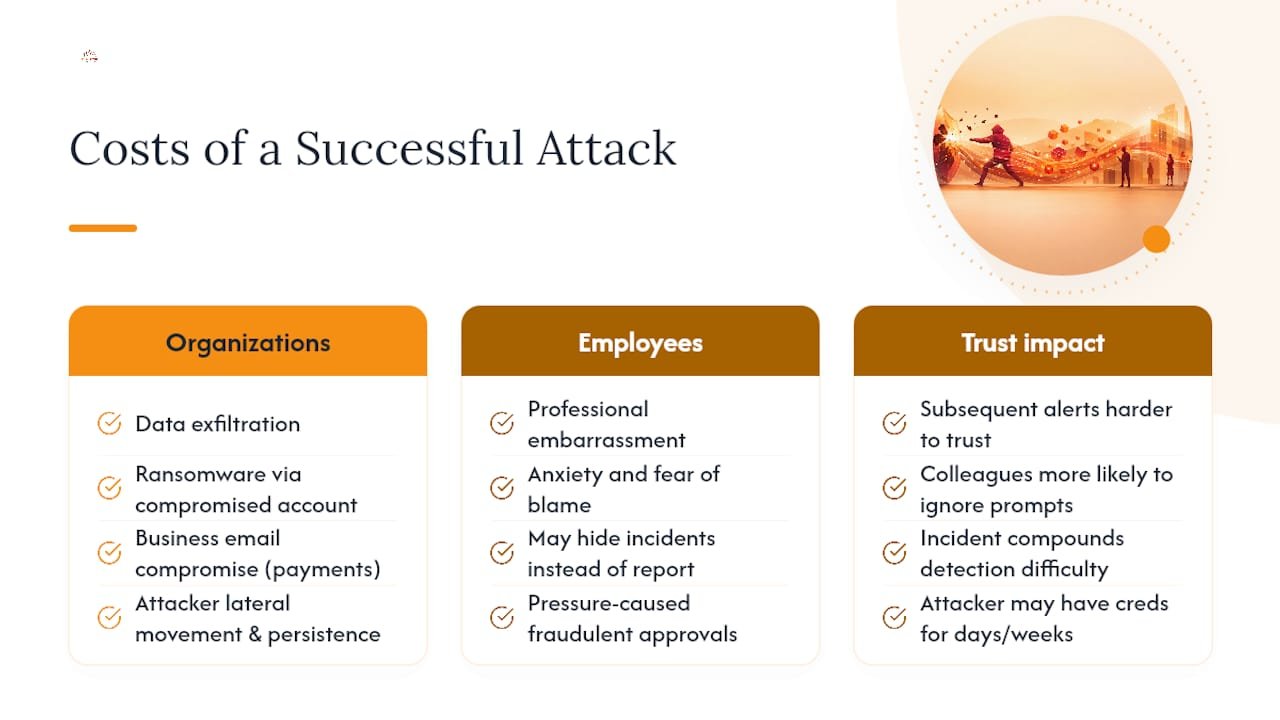
A single approved push can hand an attacker legitimate, authenticated access to your environment, and that access looks identical to a real employee logging in. That’s what makes the aftermath so expensive to untangle. Security teams can’t just block an IP; they have to assume the attacker moved laterally, read email, or set up persistence before anyone noticed.
For organizations, the immediate risks include data exfiltration, ransomware deployment using the compromised account’s existing privileges, and business email compromise used to redirect payments or impersonate executives. The Exabeam whitepaper on MFA fatigue points out that these attacks are almost always downstream of credential theft, meaning the damage often started well before the first push notification ever fired. By the time you’re responding to the prompt bombing, the attacker may have already had working credentials for days or weeks.
For individuals, the impact goes beyond professional embarrassment. An employee who approved a fraudulent push under pressure often carries real anxiety about being blamed, which is why the notification approach matters as much as the technical containment. Framing this as a system failure, not a personal one, keeps people reporting future incidents instead of hiding them.
The compounding risk is trust. Once one account is compromised through a fatigue attack, every subsequent alert from that identity becomes harder to evaluate cleanly, and every other employee who hears about the incident becomes slightly more likely to freeze up or ignore a legitimate security prompt out of fear of being wrong again.
Why Push Notifications Became an Easy Target
Push-based MFA was built for convenience, and that convenience is precisely what created the vulnerability. When an app sends a login challenge, it typically calls the identity provider’s API, which relays a payload to the user’s device through the mobile OS’s native push service, either Apple’s APNs or Google’s FCM. The notification then renders as a simple approve or deny choice, often with minimal context about where the request originated.
That simplicity is the mechanism attackers exploit. The push channel itself is difficult to intercept or forge, so attackers don’t attack the transport, they attack the decision. Triggering the login flow repeatedly is trivial from a scripting standpoint; most authentication APIs weren’t originally designed with aggressive rate limiting for this specific abuse pattern, since legitimate users rarely trigger more than one or two challenges in a short span.
Number matching changes the underlying mechanism in a meaningful way. Instead of a binary approve/deny choice, the app displays a two-digit number, and the user has to type that same number into the login screen to complete the request. This forces the person receiving the push to actively look at the login screen and transcribe a code, which breaks the “just tap approve without looking” pattern that makes fatigue attacks work. It doesn’t stop a coordinated social engineering call where the attacker reads the number to a victim over the phone, but it does eliminate the accidental, half-asleep tap that accounts for a large share of successful attacks.
How Your Phone’s Own Security Features Can Help
Mobile operating systems have quietly become part of the defense here, even though most users never think about it that way. Both major mobile platforms now support features that reduce how easily a flood of push notifications reaches a user unfiltered, including notification grouping, Do Not Disturb scheduling, and focus modes that can suppress non-critical app alerts during set hours.
Biometric authentication tied to the device itself, fingerprint or face recognition required before an app can even display sensitive content, adds another layer that a remote attacker can’t touch, since it depends on physical possession of the device. Device management policies pushed through mobile device management (MDM) platforms can also enforce screen lock timeouts and require biometric confirmation before any authenticator app opens, which slows down anyone trying to approve a request without genuinely engaging with what they’re looking at.
None of these mobile OS features were designed specifically to stop prompt bombing, but they raise the friction involved in a blind, reflexive tap. A user who has to unlock their phone with a fingerprint, open a grouped notification, and read a two-digit number has several more chances to notice something is wrong than a user who sees a banner and swipes without thinking. Enterprises that manage devices through MDM should treat these settings as a low-cost addition to the identity-layer controls already discussed, not a replacement for them.
Real Incidents That Put This Attack on the Map
The technique moved from theoretical to front-page news through a string of intrusions where attackers combined stolen credentials with relentless push bombing, sometimes for hours, until an exhausted employee gave in. In several widely reported cases, attackers didn’t stop at spamming notifications. They followed up with direct phone calls impersonating internal IT staff, telling the target that approving the prompt was the only way to stop the barrage, a tactic that turns a technical weakness into a purely human one.
What these incidents share is a pattern: initial access through a purchased or phished credential, a sustained wave of MFA requests sent late at night or during a shift change when a security team is thinner, and a single approval that opened the door to broader network access. In more than one case, the compromised account belonged to a contractor or vendor with elevated access, which meant the blast radius extended well past a single employee’s mailbox.
These cases pushed major identity providers to accelerate rollout of number matching and verified push as default or strongly recommended settings, rather than optional extras buried in admin consoles. They also prompted a wider industry conversation about why an entire authentication layer had depended, for years, on a tired employee making a split-second judgment call with no context. The lesson SOC teams took from this cycle wasn’t subtle: log correlation and phishing-resistant MFA aren’t optional hardening steps anymore, they’re baseline expectations.
What Total Cyber Sees Working for Smaller Teams
Smaller IT teams rarely have the bandwidth to watch identity logs around the clock, and that’s exactly where MFA fatigue attacks slip through, usually late at night, usually on a day when nobody’s staring at the SOC dashboard. Managed detection and identity monitoring close that gap without requiring you to hire a full overnight security staff.
A workable checklist for most small and mid-sized businesses: confirm number matching is on for every account today, verify your identity provider logs are actually flowing into a monitored system, run a short training refresher on what to do with an unexpected push, and put a rough timeline on a passkey pilot for your highest-risk accounts. None of this requires a big budget. It requires someone actually checking the settings and keeping the plan moving forward.
— Alden
How Total Cyber Solutions Can Help You Close This Gap
Some companies offer an alternative to hiring and staffing an in-house SOC around the clock for MFA fatigue detection. Instead of hoping your IT generalist happens to spot a denial burst at 2 a.m., you get a team of dedicated security professionals watching identity logs and responding to the exact pattern this article walks through.

Total Cyber’s Managed Cybersecurity Services build in continuous identity monitoring, so a burst of denied pushes followed by an approval triggers a real response, not a missed log entry. That pairs with Cybersecurity Training to teach your staff exactly what to do the moment an unexpected push shows up, and Policy Compliance support to keep your MFA configuration aligned with frameworks like NIST and HIPAA as you roll out stronger controls. If you’re also weighing a move toward passkeys or need a clearer picture of where your current identity setup is exposed, a vulnerability assessment is a solid next step before committing to a full migration timeline.
If you want a team that’s already built around exactly this threat, request a consultation through the MSP form and walk through where your current setup stands.
Primary Standards and Advisories Worth Bookmarking
For configuration detail, start with MITRE’s T1621 technique page, CISA’s number matching fact sheet, and NIST SP 800-207 on Zero Trust.
Sources
- CISA: Implement number matching in MFA applications (fact sheet)
- MITRE ATT&CK: Multi-Factor Authentication Request Generation (T1621)
- NIST SP 800-207: Zero Trust Architecture
- Microsoft Entra blog: Defend your users from MFA fatigue attacks
FAQ
How Can You Tell an MFA Fatigue Attack Is Happening?
The clearest sign is a burst of several denied push notifications in a short window, followed by one approval, especially from an unusual location, device, or time of day. Identity logs from providers like Okta or Microsoft Entra ID will show this denial-then-approval pattern clearly if you’re aggregating and correlating events rather than reviewing them one at a time.
How Do You Prevent MFA Fatigue Attacks?
Start by enabling number matching or verified push on every authenticator app, which requires the user to actively read and enter a code instead of tapping a single approve button. Layer in rate limiting on MFA challenges and, longer term, migrate high-risk accounts to FIDO2 or passkeys, which remove the approvable prompt entirely.
What Are the Four Types of MFA?
The four common categories are something you know (a password or PIN), something you have (a phone, hardware token, or smart card), something you are (biometrics like fingerprint or face recognition), and somewhere you are (location-based or contextual verification). Push notifications and number matching fall under the “something you have” category, tied to a registered device.
Is Two-Factor Authentication No Longer Secure?
Two-factor authentication is still far better than a password alone, but not every method carries equal protection. SMS codes and simple push approvals are the weakest forms and are exactly what MFA fatigue attacks and SIM swapping target, while phishing-resistant options like FIDO2 close off most of those attack paths. Reviewing your current two-factor authentication setup is worth doing if you’re still relying on basic push or SMS methods.