

RTO is the maximum tolerable downtime, or how long a system can stay offline before the damage becomes unacceptable. RPO is the maximum tolerable data loss, or how far back in time you can afford to roll before that loss becomes unacceptable too. They’re set independently, they answer different questions, and mixing them up is how disaster recovery plans fail their first real test.
TL;DR:
- Setting RTO and RPO targets must be based on a detailed business impact analysis and validated through real failover and restore tests.
- RTO typically involves infrastructure and operational resources to minimize downtime, while RPO depends on backup frequency and replication technology.
- Tiering workloads allows for customized recovery times and data loss tolerances, ensuring investments match each system’s criticality.
- Actual recovery times are often longer than planned due to overlooked delays such as DNS propagation and manual runbook steps.
- Ransomware recovery demands separate targets and specialized testing, with immutable backups and air-gapped copies crucial for effective mitigation.
Table of Contents
- RTO vs RPO: What Each One Actually Controls
- How to Set RTO and RPO Targets That Actually Hold Up
- RTO and RPO Examples Across Common Workloads
- Which Architecture Actually Meets Your Target
- How to Test RTO and RPO Without Fooling Yourself
- Why Ransomware Breaks Your Normal RTO Math
- What Most RTO and RPO Plans Get Wrong
- Getting Your Recovery Targets From Theory to Tested
- Where to Go Deeper on RTO and RPO Standards
- Sources
- FAQ
RTO vs RPO: What Each One Actually Controls
Think of a failure as a line on a clock. RTO looks forward from that moment: how long until the system is back up and usable? RPO looks backward from that same moment: how much data between the last good backup and the crash are you willing to lose? One metric is about waiting. The other is about forgetting.
That direction matters because it changes who owns the number and what money gets spent where.
- Timeline direction: RTO asks “how long can we be down?” RPO asks “how much can we afford to lose?”
- Ownership: RTO usually lands with infrastructure and operations teams, since it depends on failover speed and system architecture. RPO tends to sit with the backup and data team, since it depends on backup frequency and replication method.
- What it drives: A tight RTO pushes investment into standby infrastructure, automation, and orchestration. A tight RPO pushes investment into replication technology and backup frequency.
- Validation method: RTO gets proven with a failover clock, timing how long it actually takes to bring a system back. RPO gets proven with a restore integrity check, confirming exactly how much data landed intact at the recovery point.
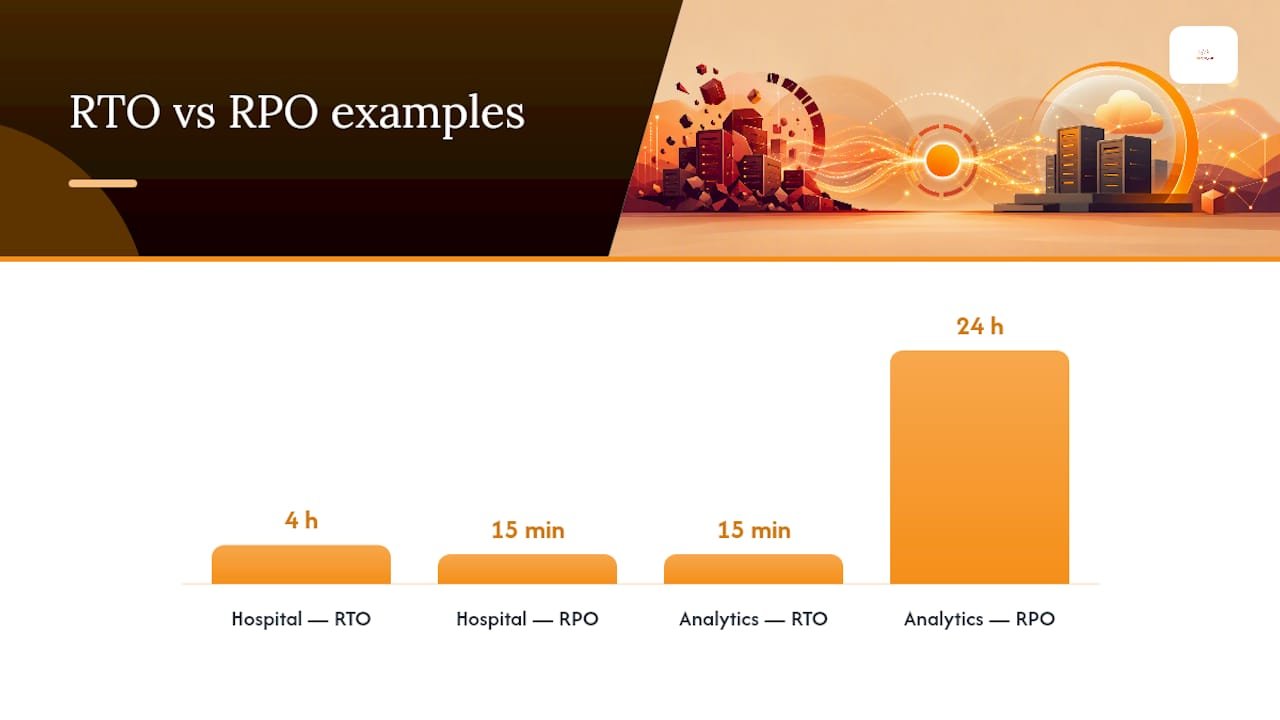
Quick example: A hospital scheduling system with a four-hour RTO but a 15-minute RPO tells you the business can tolerate a short outage but cannot tolerate losing appointment data. A marketing analytics dashboard with the opposite profile, a 15-minute RTO but a 24-hour RPO, tells you the opposite: uptime matters more than freshness.
NIST’s definition of recovery time objective draws this same forward/backward distinction, and it’s the cleanest way to explain the two metrics to a non-technical executive who’s never heard the terms.
Statistic to know: According to NIST’s contingency planning guidance, the optimal RTO sits at the point where the cost of faster recovery equals the cost of continued downtime. Push RTO lower than that point and you’re overspending on infrastructure for marginal benefit.
How to Set RTO and RPO Targets That Actually Hold Up
Guessing at these numbers is how disaster recovery plans collapse under real pressure. A defensible target comes from a Business Impact Analysis (BIA), not a gut feeling from the last outage.
- Run the BIA. Interview business owners and gather revenue per hour of downtime, regulatory reporting windows, the point where customers start canceling or calling competitors, and which systems depend on which others.
- Calculate Maximum Tolerable Period of Disruption (MTPD). This is the absolute ceiling before the business suffers unrecoverable harm, whether that’s contractual penalties, regulatory fines, or customers leaving for good.
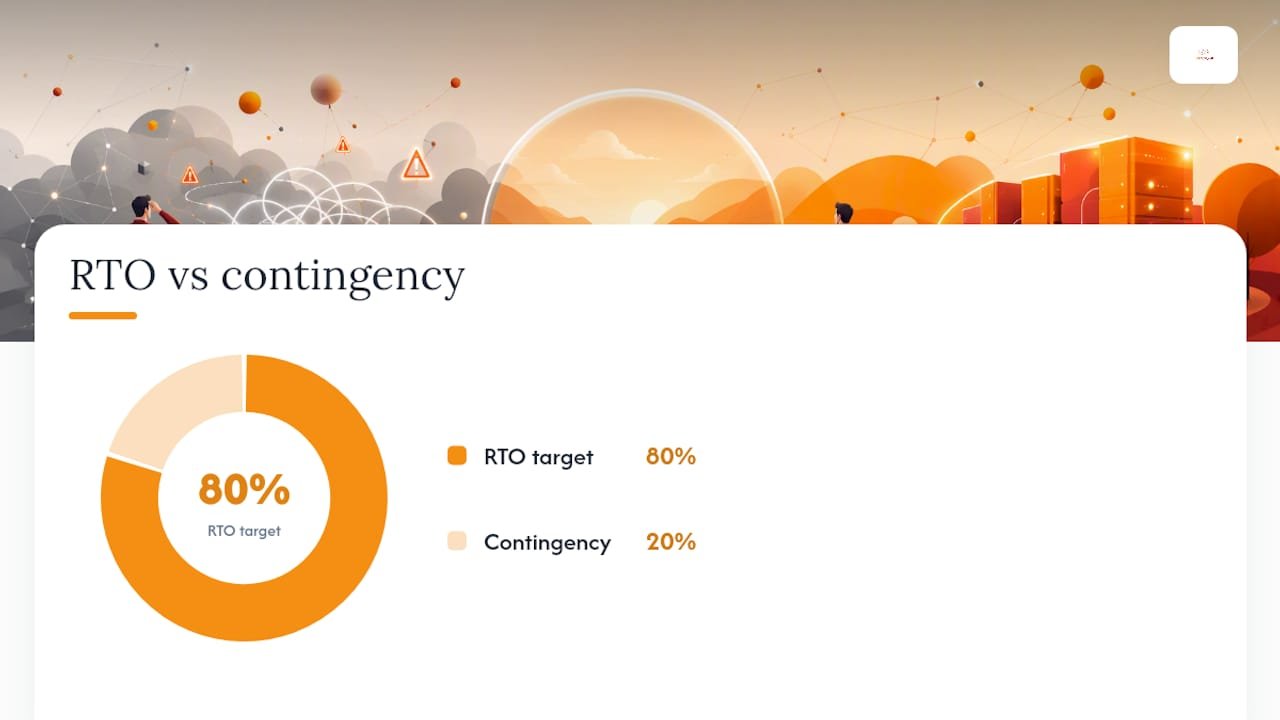
- Subtract a contingency buffer. Take the MTPD and subtract at least 20% to land on your actual RTO target. If MTPD is ten hours, your RTO target should be eight hours or less, leaving room for the fact that real incidents rarely go according to script.
- Assign workloads to tiers. Not every system deserves the same treatment, or the same budget.
- Document and get sign-off. Targets that live only in an engineer’s head aren’t targets. They need a signature from the business owner who actually feels the pain of an outage, and business continuity planning should treat that sign-off as a required deliverable, not a courtesy.
A five-tier model, adapted from common practitioner framing on tiered recovery targets, gives most SMBs a workable starting point, categorizing workloads by criticality and aligning their recovery time and data loss tolerance accordingly, ranging from mission-critical systems requiring near-immediate recovery and minimal data loss, to non-critical systems where longer outages and data loss are acceptable.
Once targets are tiered and signed off, engineering’s job shifts from guessing to matching architecture to a number someone already agreed to defend.
RTO and RPO Examples Across Common Workloads
Abstract targets only become useful once you attach them to something real. Here’s how the tiers above translate into actual systems most SMBs run.
- E-commerce payment processor: Near-zero RPO and an RTO measured in minutes. A payment gateway that loses even ten minutes of transaction data creates reconciliation nightmares and possible compliance exposure, so this workload gets synchronous replication regardless of cost.
- Reporting data warehouse: A longer RPO, often 12 to 24 hours, and a moderate RTO of half a day or more. Nobody’s making a same-day decision off yesterday’s dashboard, so nightly batch replication is usually enough.
- Cache or stateless service: Short RTO but a surprisingly relaxed RPO. Because the cache rebuilds itself from the source database, losing the cache entirely costs you performance for a few minutes, not data permanently.
- Transactional database: This is where the real tradeoff lives. Synchronous replication gets you close to zero RPO but adds write latency that can throttle throughput under load. Asynchronous replication protects performance but accepts a small RPO window, often seconds to a few minutes, that must be sized against what the business actually signed off on.
The pattern across all four: RPO tightens as the cost of losing that specific data rises, and RTO tightens as the cost of being without that specific system rises. They rarely move together.
Which Architecture Actually Meets Your Target
Picking a disaster recovery pattern without knowing your target is backwards. The target should dictate the architecture, not the other way around.
- Synchronous replication writes to primary and secondary storage simultaneously, achieving near-zero RPO. It adds real write latency, and that cost has to be measured against actual production load before you commit to it across a whole environment.
- Asynchronous replication, snapshots, or continuous data protection write to the secondary with a short delay, typically landing RPO somewhere between seconds and a few hours depending on configuration. This covers the large majority of Tier 1 and Tier 2 workloads without the latency penalty of synchronous writes.
- Hot standby keeps a fully running duplicate environment ready to take traffic, supporting RTOs under an hour but at close to double the infrastructure cost.
- Warm standby keeps infrastructure provisioned but scaled down, landing RTO in the hours range at a fraction of hot standby’s cost.
- Cold standby means restoring from backup onto infrastructure that doesn’t exist until you need it, which is fine for Tier 3 and Tier 4 workloads but will blow past any RTO under a day.
Google Cloud’s disaster recovery guidance notes that moving from nightly backups to sub-hour RPO adds meaningful storage, bandwidth, and configuration overhead, which is exactly why tiering matters instead of buying the fastest option for everything.
The parts that actually blow up a well-designed RTO rarely show up in the architecture diagram: DNS time-to-live settings that take twenty extra minutes to propagate, a manual runbook step nobody has timed since it was written, or a “system-level RTO” that was never broken down into its slowest component. AWS’s guidance on establishing RPO and RTO targets for cloud workloads makes the same point: map the target to the pattern, then test the parts nobody thinks to test.
Pro Tip: Time your DNS propagation and manual runbook steps separately from your failover clock. Most SMBs discover their real RTO is 20 to 40 minutes longer than the number on the slide, purely from steps nobody accounted for.
How to Test RTO and RPO Without Fooling Yourself
An untested RTO is a guess wearing a suit. The only way to know your numbers are real is to break something on purpose and time every piece of putting it back together.
- Break down RTO into its components. Detection time, diagnosis time, execution time, verification time, and propagation time each get measured separately, because the system-level RTO is only as fast as its slowest link under the failure class you actually tested.
- Run restore verification tests. Confirm that a backup restores cleanly and that the data inside it is usable, not just that the file exists.
- Run partial failover tests. Fail over a single component or service and confirm dependencies hold up, catching the integration gaps that a full test would mask.
- Run full failover drills. Fail over the entire environment on a schedule, at minimum annually for critical tiers, and time the whole chain end to end.
- Run ransomware clean-room restores. Test recovery from an isolated, uninfected environment separately from a standard outage drill, since the failure mode is fundamentally different.
- Set replication-lag alerts at 50% of your RPO threshold. If your RPO target is one hour, alert when lag hits thirty minutes, giving the team lead time to act before the target is actually breached.
- Document every result and remediate failures before the next drill. A test that finds a gap and gets filed away without a fix is worse than never testing at all.
The NIST contingency planning guide treats this component-by-component measurement as the difference between a plan on paper and a proven capability. Documenting disaster recovery test results the same way each time also makes audits and compliance reviews far less painful.
Why Ransomware Breaks Your Normal RTO Math
A standard outage and a ransomware incident are not the same event, and treating them like they are is one of the more expensive mistakes in disaster recovery planning. Ransomware recovery routinely runs 24 to 72 hours for critical systems, according to practitioner analysis of ransomware recovery timelines, because forensic investigation and malware eradication have to happen before restoration can even start.
- Immutable backups that can’t be altered or deleted by an attacker, even one with admin credentials, are the baseline requirement now, not an upgrade.
- Air-gapped or logically isolated copies keep at least one clean recovery point outside the blast radius of a compromised network.
- Clean-room restore workflows rebuild systems in an isolated environment first, confirming they’re malware-free before reconnecting to production.
- Separate cyber-specific drills, run at least annually and ideally more often for critical systems, because a standard failover drill doesn’t test forensic isolation or reinfection risk.
Reconciling this with your operational targets means keeping two RTOs on the books: one for hardware and software failures, and a longer, explicitly labeled one for cyber incidents. Pretending they’re the same number sets leadership up for a bad surprise mid-incident. Faster detection through managed detection and response shrinks the gap between the two by catching an intrusion before it spreads far enough to demand the longer timeline.
What Most RTO and RPO Plans Get Wrong
Run enough BIAs and you start noticing the same three mistakes, in the same order, at nearly every SMB.
First, most companies never test what they wrote down. A tiering spreadsheet from two years ago that’s never seen a failover drill isn’t a disaster recovery plan, it’s a document. Second, cyber incidents get folded into the same RTO as a hardware failure, which sets everyone up for a bad surprise the day ransomware actually hits. Third, teams chase a sub-hour RTO for everything because it sounds impressive, without checking whether the business impact justifies the added infrastructure cost.
Here’s the honest checklist: run a minimal BIA on your top five workloads before you touch architecture. Pick targets you can actually test, not targets that sound good in a boardroom. And automate one failover this quarter, even a small one, because a single proven drill teaches you more than a year of untested documentation. For SMBs running lean IT teams, a managed IT services partner running quarterly drills usually beats an internal team squeezing disaster recovery testing between other fires. Some managed IT service providers build this exact workflow with clients who don’t have the headcount to own it alone.
— Alden
Getting Your Recovery Targets From Theory to Tested
An experienced cybersecurity service provider builds RTO and RPO targets the way this article just laid out: business impact first, architecture second, testing always. Where a generic IT vendor hands you a backup schedule and calls it a disaster recovery plan, Total Cyber runs the actual BIA, tiers your workloads, and proves the numbers with real failover drills instead of leaving them as an assumption on a slide.

A typical engagement moves in three stages. First, a business continuity assessment identifies your critical workloads and sets defensible RTO and RPO targets with the people who own the business risk. Second, managed cybersecurity services and managed backup design map architecture to those targets, including the immutable, isolated backups a ransomware-aware plan requires. Third, scheduled recovery testing proves the numbers hold under an actual failure, not just on paper.
If your current recovery plan hasn’t been tested in the last year, or if you’re not sure your RTO and RPO targets were ever formally set, start the conversation with Total Cyber’s MSP team and get a straight answer on where the gaps are.
Where to Go Deeper on RTO and RPO Standards
For readers who want the primary documents behind this guide: NIST’s contingency planning guide covers the cost/downtime tradeoff in full detail. AWS’s cloud DR blog and Google Cloud’s DR planning guide cover cloud-specific architecture patterns. For tiered target models with practitioner framing, see RiskPublishing’s breakdown of setting and validating recovery targets.
Sources
- NIST glossary: Recovery time objective
- Contingency planning guide for federal information systems (NIST SP 800-34 Rev.1)
- RTO vs RPO: How to set and validate recovery
- Establishing RPO and RTO targets for cloud applications (AWS blog)
FAQ
Can RPO Be Higher Than RTO?
Yes, and it often is. A reporting data warehouse might have a 15-minute RTO but a 24-hour RPO, because getting the dashboard back online fast matters more than how fresh the data is inside it. The two numbers are set independently based on what the business actually needs.
What Is RTO and RPO for Dummies?
RTO is how long you can be down before it hurts. RPO is how much data you can afford to lose before it hurts. Set both per system based on real business impact, not a one-size-fits-all guess.
What Is RPO and RTO in AWS?
AWS frames RPO and RTO the same way any disaster recovery plan should: as targets you set first, then map to a specific architecture pattern, from backup and restore to multi-site active-active. AWS’s own guidance recommends categorizing workloads and testing restores to confirm the targets actually hold in practice.
How Do You Set RPO and RTO?
Start with a Business Impact Analysis to find revenue impact, regulatory windows, and customer tolerance for each workload. Total Cyber’s business continuity services run this exact process with clients who need a signed-off, testable set of targets rather than a guess.