

For a reliable Microsoft 365 tenant to tenant migration, sequence identity first, move workloads in coordinated waves, and rehearse a tested cutover weekend before you touch production. Microsoft’s own Migration Orchestrator tooling handles a lot of that natively, but complex Teams or SharePoint fidelity usually still needs a partner tool. Start now by running discovery and building your source-to-target identity map.
TL;DR:
- Proper discovery and identity mapping are critical, with missing details like user inventories, site permissions, and third-party integrations causing major delays.
- Sequentially moving identities, mailboxes, and permissions is essential; reversing this order risks broken access and extended troubleshooting.
- Throttling limits in Microsoft 365 often cause delays or errors; scheduling large transfers off-peak and using batching helps mitigate performance issues.
- Validating a successful migration requires matching mailbox and site content, verifying holds, and ensuring apps and policies transfer correctly before decommissioning.
- Using a managed migration service is recommended for complex, high-stakes projects involving multiple domains, sensitive data, or compressed timelines.
Table of Contents
- What Approach Fits Your Tenant to Tenant Migration Scenario?
- What Should Your Discovery and Planning Checklist Include?
- How Do You Map Identities Without Losing Permissions?
- How Should You Sequence Waves and the Cutover Runbook?
- What Throttling and Throughput Limits Should You Plan Around?
- How Do You Validate a Migration Before Decommissioning the Source?
- What Do Most Migration Post-Mortems Get Wrong?
- Get a Managed Tenant to Tenant Migration Team on Your Side
- Sources
What Approach Fits Your Tenant to Tenant Migration Scenario?
The business reason behind your migration decides almost everything else. A merger with a fixed close date runs on a different clock than a quiet rebrand with no deal pressure, and picking the wrong architecture for your scenario is how teams end up rebuilding permissions at 2 a.m. during cutover weekend.
- Mergers and acquisitions: Deal timelines and Transition Service Agreements (TSAs) usually force phased work. EPC Group’s five-phase M&A playbook (Discovery, Plan, Build, Cutover, Stabilize) with identity coexistence built in tends to fit best here.
- Divestitures: You’re splitting one identity space into two. Expect heavier work on Conditional Access rebuild and license separation than on raw data volume.
- Consolidation: Multiple tenants folding into one target usually means repeated waves using the same runbook, refined after each pass.
- Rebrand without a deal: Lower time pressure, but domain cutover still has to be precise, since a sloppy MX record change stops mail cold.
Native Microsoft tooling is usually sufficient when identity complexity is low, workload scope is narrow, and you don’t need pixel-perfect Teams channel history. Reach for a commercial migration tool or a partner-led engagement when Teams chat fidelity matters, SharePoint permission structures are deep, or your timeline is too compressed to absorb Orchestrator’s current workload gaps.
What Should Your Discovery and Planning Checklist Include?
Discovery is the phase most teams try to shortcut, and it’s the one that determines whether your timeline estimate is fiction or fact. Practitioner analyses of failed migrations point to the same root cause repeatedly: gaps in discovery and identity planning, not a single broken script or misconfigured connector, according to a ShareGate review of common migration failures.
Before you schedule anything, your discovery phase needs to produce:
- A full user and license inventory, including guest accounts and shared mailboxes
- Mailbox sizes and item counts, so you can estimate throughput realistically
- A OneDrive and SharePoint site map with owners and permission tiers
- An inventory of Teams apps, connectors, and Power Automate flows tied to those teams
- A list of third-party integrations that authenticate against Entra ID
- Confirmation of any eDiscovery holds or litigation holds that must survive the move
Pro Tip: Treat your discovery output as a living document, not a one-time export. Tenants drift between the scoping call and the cutover weekend, and stale inventory is a common source of surprise mailboxes showing up mid-migration.
Dependency mapping comes next. Exchange migration typically has to lead because Teams chat history and meeting metadata reference mailbox GUIDs, and OneDrive/SharePoint permission structures are coupled to the identities that own them. Move identity out of order and you’ll spend the cutover weekend chasing broken permission inheritance instead of validating data.
Licensing needs its own line item in the plan. Budget for overlapping costs during the migration window itself, plus Cross-Tenant User Data Migration add-ons if you’re moving mailbox and OneDrive content across tenant boundaries. Order those add-ons early. Procurement delays are a frequent, avoidable cause of slipped cutover dates.
Domain transfer deserves its own rehearsal. MX and Autodiscover records have to flip in the right order, or you’ll bounce inbound mail during the exact window when stakeholders are watching closest.
How Do You Map Identities Without Losing Permissions?
This is where most tenant migration process failures actually originate, and it’s almost never a data corruption problem. It’s a sequencing problem.
Cross-Tenant Identity Mapping (CTIM) links a source identity to a target MailUser object, and that MailUser has to carry the source mailbox’s ExchangeGuid, ArchiveGuid, and LegacyExchangeDN before anything else happens to that account. Skip this and the mailbox conversion breaks in a way that’s genuinely painful to unwind.
- Build the identity map first. Populate every attribute CTIM requires before you touch licensing or provisioning.
- Never license a target user before ExchangeGuid is written. Assigning an Exchange license too early provisions a brand-new empty mailbox in the target tenant, and that blocks the MailUser-to-mailbox conversion Microsoft’s own cross-tenant mailbox migration guidance depends on.
- Disable OneDrive auto-provisioning for every migration-scope account. A OneDrive site that already exists in the target cannot be overwritten by your migration tool, which strands the source content.
- Upload the complete identity map in one pass for shared-data moves. Each CSV upload overwrites the prior one, so a partial map silently drops users who were included earlier.
- Recreate Conditional Access policies, service principals, and guest accounts manually. These Entra ID objects don’t migrate natively, and skipping this step is a well-documented cause of lost permissions and user lockouts after cutover.
Pro Tip: Run a pilot batch of 10 to 20 real users through the full identity and permission chain before you commit a full wave. It’s the cheapest insurance you’ll buy in the entire project.
How Should You Sequence Waves and the Cutover Runbook?
Sequencing follows the dependency chain you built during discovery: identity and coexistence first, mailboxes and OneDrive next, SharePoint and Teams and Power Platform after that, endpoints and device policy last. Reversing this order is how teams end up rebuilding the same permission set twice.
Before cutover weekend, confirm four things: content is pre-staged in the target tenant, mail routing has been tested end-to-end with a small pilot group, your communication plan has gone out to affected users with specific dates, and you’ve defined rollback triggers with a named owner authorized to pull them.
A workable cutover runbook looks roughly like this:
- T-minus 5 days: Freeze non-essential changes in the source tenant; confirm the identity map is final.
- T-minus 2 days: Run the last full pre-stage pass on mailbox and OneDrive content; validate item counts against discovery baselines.
- Cutover Friday evening: Flip MX and Autodiscover records; begin mailbox delta sync.
- Cutover Saturday: Complete OneDrive and SharePoint delta passes; spot-check permissions on a sample set of sites.
- Cutover Sunday: Validate mail flow both directions, confirm Teams meeting links resolve, and get sign-off from a named business owner before declaring the tenant open Monday.
- Week one: Run a final delta pass to catch anything created during the freeze window, then close out domain cutover.
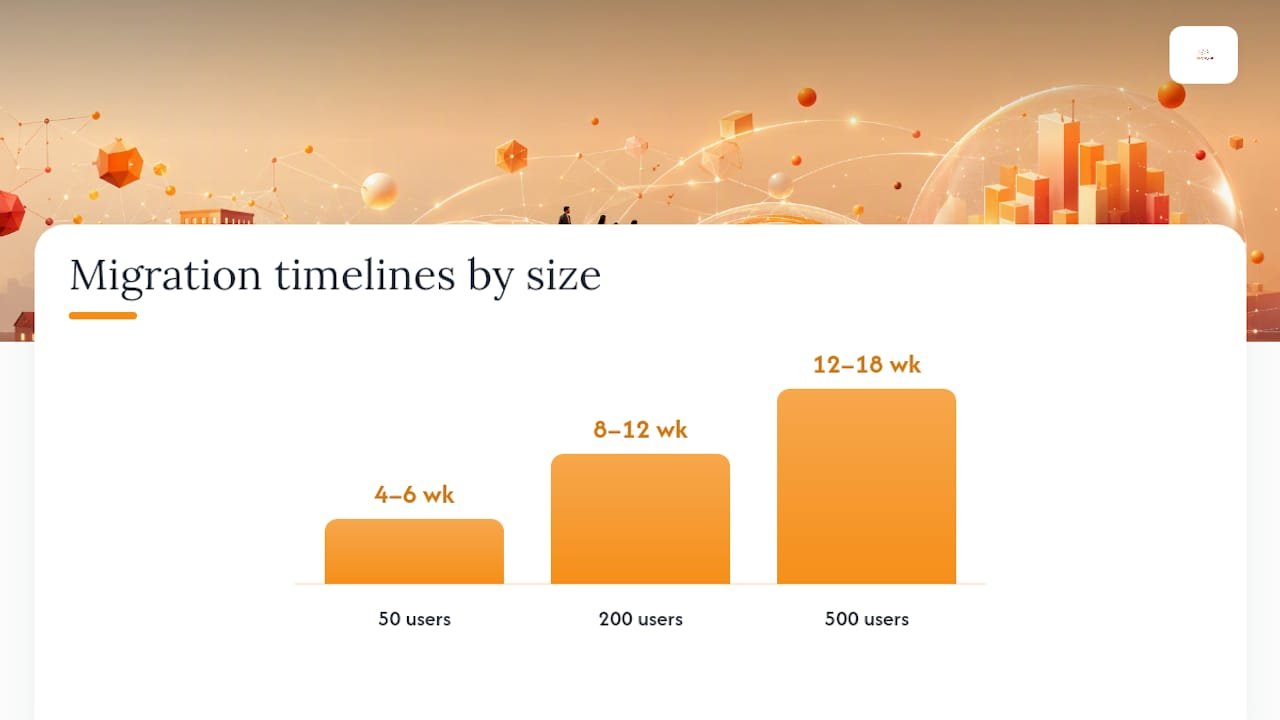
Field playbooks that track this kind of timeline report 50-user migrations closing in four to six weeks, 200-user migrations running eight to twelve weeks, and 500-user migrations stretching to twelve to eighteen weeks. Those numbers assume discovery was done properly. Skip discovery and expect the P90 case, not the P50.
What Throttling and Throughput Limits Should You Plan Around?
Exchange Online and SharePoint both enforce per-tenant API throughput limits, and hitting them shows up as sudden queue stalls, batch jobs that report “in progress” for hours with no completed items, or a wall of retryable errors in your migration tool’s logs. This is normal at scale, not a sign your migration is broken.
Practical mitigations that actually move the needle:
- Keep batch sizes conservative and let the tool’s retry logic absorb throttling responses rather than manually resubmitting.
- Schedule the heaviest transfer windows off-peak, since Microsoft’s throughput ceilings ease when overall tenant traffic is lower.
- Run multiple worker nodes in parallel where your tool supports it, since a single-threaded migration job will always hit the ceiling first.
- Lean on Migration Orchestrator’s dependency-ordered batching where your workload mix qualifies for it, since it’s built to pace mailbox, OneDrive, and Teams chat migration together.
Monitor completed-item counts against your discovery baseline hourly during active migration windows. A gap that grows instead of closes is your earliest warning sign of a throttling or permission problem worth escalating immediately.
How Do You Validate a Migration Before Decommissioning the Source?
Closing out a tenant to tenant migration means proving the target tenant actually works, not just that data arrived.
- Confirm mailbox counts and item counts match discovery baselines within an acceptable variance.
- Spot-check content on a sample of SharePoint sites and OneDrive accounts, focusing on permission inheritance, not just file presence.
- Verify eDiscovery holds and litigation holds carried over correctly.
- Reauthorize third-party apps and confirm multi-factor authentication policies are active on every migrated account.
Run hypercare for at least two to four weeks with a defined ticket triage SLA and a running defect log. Don’t decommission source domains or turn off directory sync until every open defect is closed and a named business owner has signed off in writing.
What Do Most Migration Post-Mortems Get Wrong?
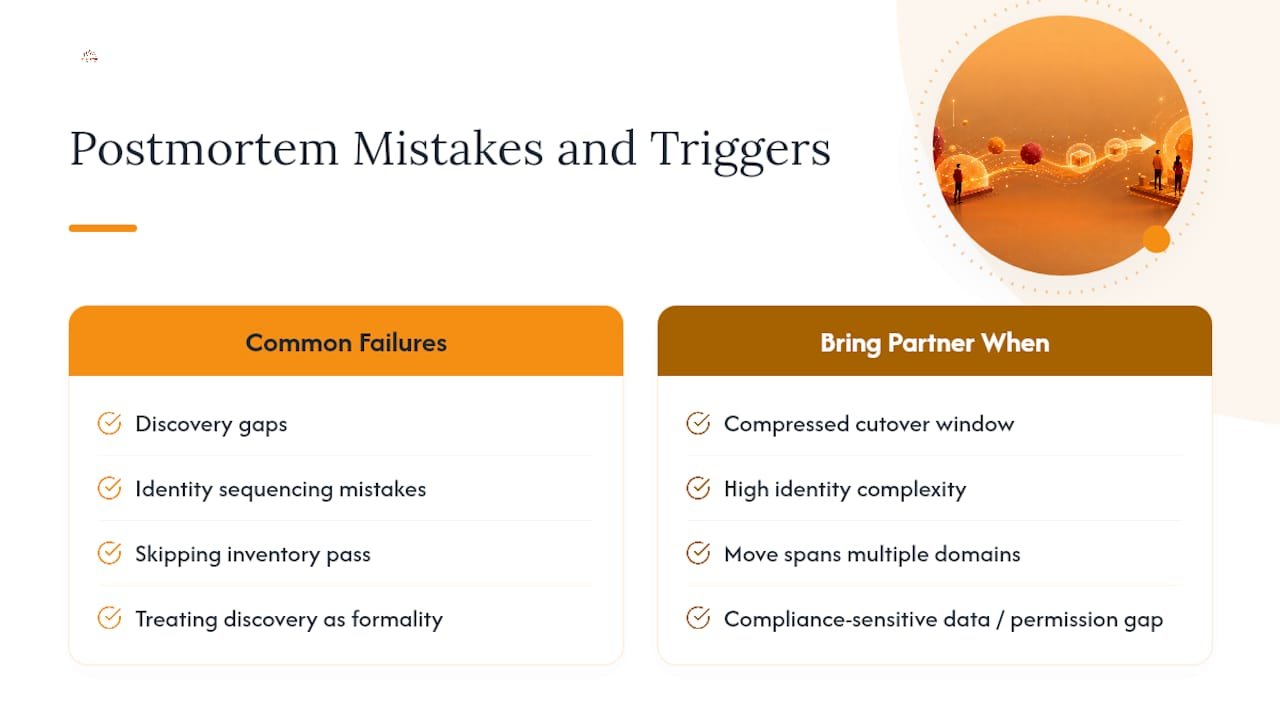
The failures that repeat across engagement after engagement are rarely exotic. They’re discovery gaps and identity sequencing mistakes that were entirely avoidable with a proper inventory pass up front. Teams that treat discovery as a formality pay for it during cutover weekend, every time.
Bring in a managed migration partner when your cutover window is compressed, identity complexity is high across multiple domains, or the move touches compliance-sensitive data where a permission gap becomes a reportable incident.
— Alden
Get a Managed Tenant to Tenant Migration Team on Your Side
Running an identity-first migration internally is doable, but it demands discovery discipline, ExchangeGuid sequencing precision, and cutover-weekend staffing most IT teams can’t spare on top of daily operations. Managed migration engagements should be built around exactly that discipline: full discovery and identity mapping, a tested cutover runbook, and hypercare coverage after go-live so defects get closed instead of ignored.

Choose a managed engagement when your timeline is compressed, your identity map spans multiple domains or guest accounts, or the migration touches regulated data where a dropped permission becomes a compliance problem. Total Cyber’s managed services model covers exactly that kind of compressed, high-stakes project alongside ongoing managed cybersecurity services once your tenants are consolidated.
If you’re planning a merger, divestiture, or consolidation and want a discovery call before you commit to a cutover date, start with the intake form and Total Cyber will scope the identity work first.
Sources
- Plan a Microsoft 365 tenant-to-tenant migration
- M&A Microsoft 365 Migration: 5-Phase Playbook | EPC Group
- Cross-tenant mailbox migration guidance