

A mature patch management strategy is a documented, risk-based operating model that leadership, business owners, security, and technology teams own together, not a tool alone. The immediate priorities are an accurate inventory, prioritization driven by known exploited vulnerabilities rather than CVSS scores alone, and a test ring with staged rollout before anything reaches production.
TL;DR:
- Prioritize patches based on active exploitation, especially for vulnerabilities listed in the KEV catalog, rather than relying solely on severity scores like CVSS.
- Maintain an accurate inventory that covers all asset types, including IoT and OT devices, and assign ownership and criticality tags to streamline prioritization.
- Implement staged deployment with testing on representative devices, a small canary group, and thorough change control before full production rollout.
- Use capability-focused tools that support discovery, orchestration, verification, and compliance reporting, with strong security measures for the patching platform itself.
- Document all patch actions, exceptions, and decision rationales to ensure audit readiness and support regulatory compliance efforts.
Table of Contents
- Build an accurate inventory and define maintenance groups
- Prioritize patches with threat-informed inputs, not just severity scores
- Set patch cadence, test rings, and staged deployment practices
- Choose tools based on capability, not brand
- Know when to stop patching and start preserving evidence
- Assign ownership, set SLAs, and manage exceptions
- Measure what actually reduces risk, not just a percentage patched
- Follow a phased roadmap instead of trying to fix everything at once
- How we operationalize patch management for clients
- Account for compatibility and dependency conflicts before they cause an outage
- Communicate changes to end users before they open a ticket
- Connect patching to your broader vulnerability management program
- Meet compliance and regulatory patching requirements
- Keep documentation ready for the audit that will eventually come
- Three priorities for leadership this quarter
- Get hands-on help building or maturing your patch program
- FAQ
- Sources
Build an accurate inventory and define maintenance groups
You cannot patch what you cannot see. Every patch program starts with an inventory that covers more than laptops and servers: operating systems, firmware, installed applications, cloud resources, containers, and the IoT or OT devices that often get forgotten until something breaks.
Once you know what you have, sort it into maintenance groups instead of treating every asset the same way. A canary group gets patches first and absorbs any early problems. A standard group follows once the canary group looks clean. A critical group, covering systems where downtime carries real business cost, moves last and only after validation.
- Canary group: low-risk, non-production or less critical devices that surface problems early.
- Standard group: typical business endpoints and servers that follow once canary results look clean.
- Critical group: revenue-generating or compliance-sensitive systems that patch last, with extra validation.
- Exception group: appliances, legacy systems, and anything that cannot run an agent.
Discovery gets harder with appliances, unsupported operating systems, and devices that cannot host an agent. For those, agentless scanning fills the gap, even though it typically delivers less detail than an agent would. NIST SP 1800-31 walks through example implementations that blend both approaches depending on what each asset can support.
Pro Tip: Tag every asset with an owner and a business-criticality rating during discovery. It turns a six-month prioritization argument into a five-minute lookup later.
Prioritize patches with threat-informed inputs, not just severity scores
CVSS tells you how bad a vulnerability could be in theory. It does not tell you whether anyone is actively exploiting it. That is why CISA’s Known Exploited Vulnerabilities catalog exists: a downloadable, regularly updated list of vulnerabilities confirmed to be under active attack, meant to be used as a direct operational input to your patch queue rather than a reference you check occasionally.
CISA’s BOD 26-04 warns against relying on CVSS severity labels alone and instead ties remediation urgency to exploitability, exposure, and environmental context. That single shift, from “how severe does this look” to “is this being exploited and can an attacker reach it,” changes which patches get applied first on a Tuesday afternoon.
Build your triage around four questions for every vulnerability that crosses your desk:
- Is it listed in the KEV catalog or flagged by exploitation telemetry?
- Is the affected asset reachable from the internet?
- How critical is the asset to the business if it goes down or gets compromised?
- Is there a compensating control available if the patch cannot deploy immediately?
When the answers point to active exploitation on an exposed, high-value asset, that patch skips the normal queue and goes through an expedited or emergency path. Document the reason for every expedited decision and every delay. If a patch cannot go out on schedule, write down the constraint and the interim mitigation. That record is what turns “we meant to patch it” into an actual audit trail when regulators or auditors ask.
Set patch cadence, test rings, and staged deployment practices
A fixed cadence keeps patching from becoming a fire drill every time something urgent shows up. A common baseline follows a prioritized approach to reviewing and applying critical, actively exploited patches promptly, following CISA’s prioritization guidance.
2. Deploy routine high and medium severity patches on a monthly cycle, after passing through the test ring.
3. Reserve a weekly maintenance window for smaller updates and driver or firmware patches that rarely cause issues.
4. Hold an expedited path open at all times for anything that lands in the KEV catalog mid-cycle.
Before anything reaches production, it passes through a test ring: a small, representative slice of devices running real workloads, not a lab environment nobody uses. Canary deployments extend that idea into production itself, pushing the patch to a limited group first so regressions surface before the whole fleet is affected.
Staged rollout only works with change control behind it. That means a documented approval step, a communication plan so help desk staff know what changed before the tickets start coming in, and a rollback plan ready before deployment begins, not improvised after something breaks.
Pro Tip: Keep your canary group small but genuinely representative, mixing hardware models, operating system versions, and at least one business-critical application, or you will miss the regressions that matter.
Choose tools based on capability, not brand
Picking a patch management tool starts with a capability checklist, not a vendor pitch. At minimum, the platform needs to handle:
- Discovery and inventory that stays current without manual updates.
- Patch orchestration across maintenance groups with staged, scheduled rollout.
- Verification that a patch actually installed and the service restarted correctly.
- Reporting that slices compliance by severity and asset criticality, not just an overall percentage.
- API integrations with your vulnerability management and ticketing systems.
Agent-based management generally works better for laptops and remote hosts that are not reliably on the corporate network, since the agent can apply patches whenever the device connects. Agentless scanning has a place where installing an agent is not practical, such as on certain appliances, though it usually trades off some visibility and control, a distinction NIST lays out in its guidance on patch management technologies.
Whatever platform you run, treat it as a security-critical system in its own right. That means integrity checks on every downloaded patch, tightly controlled credentials for deployment accounts, and encrypted communication between the management server and every endpoint it touches.
Know when to stop patching and start preserving evidence
Not every vulnerability calls for an immediate patch. If an internet-exposed system shows signs of compromise, patching it first can destroy the forensic evidence you need to understand what happened. CISA’s guidance on the Citrix NetScaler zero-days makes this point directly: collect forensic artifacts before applying updates when compromise is suspected, because the update process itself can overwrite the traces attackers left behind.
When that situation comes up, follow a sequence instead of reacting on instinct:
- Isolate the system from the network without powering it down, so volatile evidence survives.
- Capture memory, logs, and relevant artifacts before any patch or update touches the system.
- Apply containment measures and any available compensating controls while triage continues.
- Patch and restore service only once evidence collection is complete, documenting every step taken.
For routine cases where a patch simply is not available yet, rely on snapshots, tested restore procedures, and compensating controls like network segmentation or disabling a vulnerable feature until a fix ships.
Assign ownership, set SLAs, and manage exceptions
A patch policy needs to spell out scope, maintenance group definitions, remediation timelines by severity, and the exception process, in writing, not as institutional memory held by one engineer.
Ownership has to span roles, not sit on one desk:
- An executive sponsor who backs the policy when a patch window conflicts with a business deadline.
- A patch owner who runs the day-to-day process and tracks exceptions.
- A business owner for each critical system who signs off on deployment windows.
- A change authority who approves deviations from standard cadence.
Exceptions deserve the same rigor as approvals. Unsupported or end-of-life assets that cannot be patched need a documented decision: replace the asset, isolate it, or formally accept the risk with a compensating control and a review date attached.
Measure what actually reduces risk, not just a percentage patched
A single “percent patched” number hides more than it reveals. A fleet that is 95% patched overall can still carry critical exposure if the unpatched 5% happens to be your internet-facing servers.
NIST SP 800-40 Rev. 4 recommends tracking mean and median time-to-patch segmented by severity and asset importance, rather than relying on a single aggregate figure. That slicing is what turns a dashboard into a decision tool.
Track these instead of one blended number:
- Percent of assets patched within SLA, broken out by severity tier.
- Median time-to-patch for critical, high, and routine vulnerabilities separately.
- Time-to-patch for high-value assets versus the general fleet.
- Open exceptions, with age and documented justification for each.
Build two versions of the dashboard: a detailed one for your technical team and a short, plain-language summary for executives that connects the numbers to business risk.
Follow a phased roadmap instead of trying to fix everything at once
Patch programs mature in stages, and trying to build the whole thing at once usually stalls before it starts.
- Phase 0 to 1, quick wins: complete the asset inventory, flag high-value assets, subscribe to the KEV catalog feed, and stand up a basic test ring.
- Phase 2, pilot: automate patching for one maintenance group, formalize maintenance group definitions and SLAs, and run canary deployments on real production traffic.
- Phase 3, scale: integrate patch data with your broader vulnerability management program, automate reporting across both technical and executive dashboards, and build a regular cadence for reviewing and improving the process itself.
Each phase produces something usable on its own. A team that only completes Phase 1 already has better visibility and a faster path to triage than a team working from spreadsheets and guesswork. Phase 2 is where automation starts paying off in hours saved per week. Phase 3 is where patching stops being a standalone task and becomes one input among several in how you manage risk across the environment, including the compliance frameworks discussed in our role of cybersecurity maturity models piece.
How we operationalize patch management for clients
We build patch programs around the same model: documented ownership, KEV-driven prioritization, and staged rollout, backed by managed cybersecurity services, vulnerability analysis, and policy compliance work. Managed services tend to make the most sense once an internal team is stretched across too many maintenance groups or a compliance deadline is closing in faster than staffing can keep up.
Account for compatibility and dependency conflicts before they cause an outage
Patches rarely exist in isolation. A security update to an operating system can break a line-of-business application that depends on a specific library version, and a database patch can conflict with middleware that has not been updated in step. This is exactly why the test ring matters so much: it is the stage where those conflicts surface on a handful of machines instead of across the whole organization.
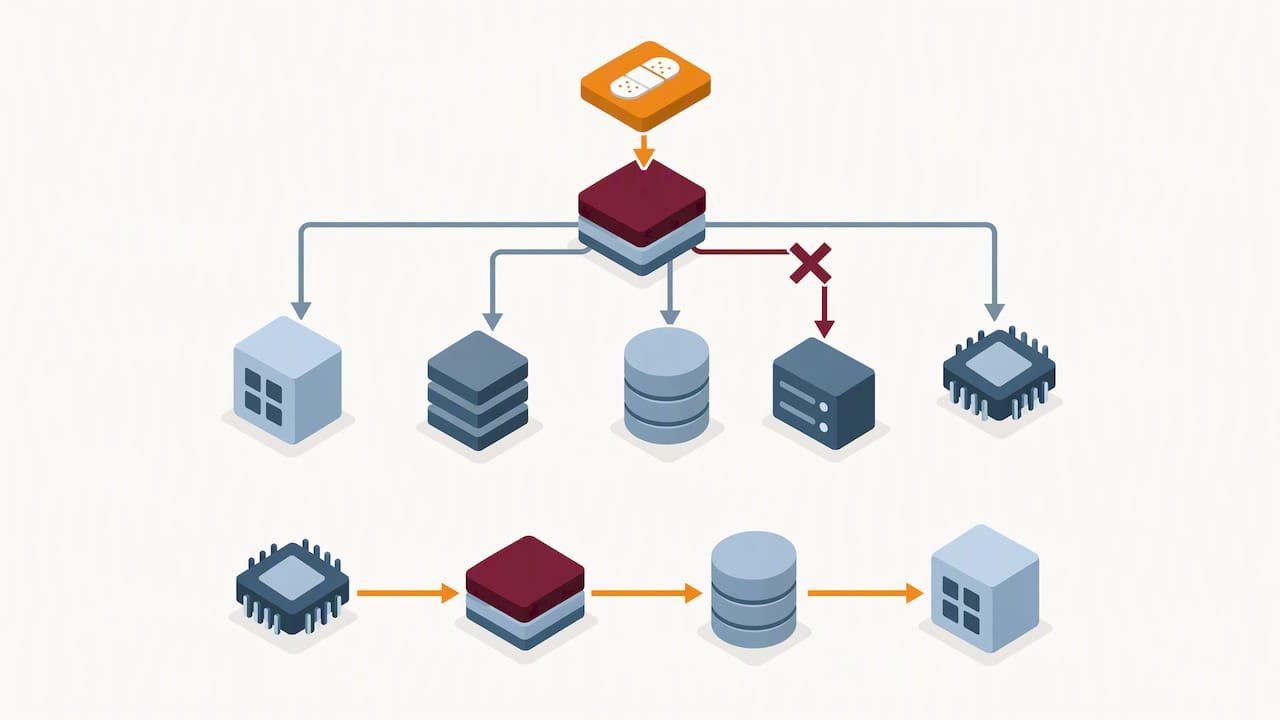
Before scheduling a patch for standard or critical groups, check it against a short dependency list: what applications run on the affected systems, which ones have known compatibility issues with the update, and whether any vendor has published guidance on sequencing. Some patches need to be applied in a specific order, for example a firmware update before an OS patch, or a database engine patch before an application layer update that depends on it.
Keep a running record of past compatibility issues tied to specific applications or system configurations. Over a few patch cycles, that record becomes a reliable early warning system, flagging the combinations most likely to need extra testing time before they ever reach the test ring. For environments running a mix of on-premises and cloud workloads, our guide to cloud security benefits covers some of the additional dependency considerations that come with hybrid infrastructure.
Communicate changes to end users before they open a ticket
Most patch-related help desk tickets trace back to one thing: nobody told the end user what was about to happen. A forced reboot in the middle of a workday, a browser extension that stops working, or a login screen that suddenly looks different all generate confusion and complaints that are entirely avoidable with a short heads-up.
Build communication into the cadence itself rather than treating it as an afterthought. A brief notice before a scheduled maintenance window, naming the systems affected and the expected downtime, saves far more support time than it costs to send. For critical or emergency patches that cannot wait for advance notice, a short explanation after the fact, in plain language, keeps trust intact even when the disruption could not be avoided.
Training matters just as much as notification. End users who understand why patches matter, in terms of real risk rather than abstract policy, are more likely to report a slow or odd-behaving device instead of ignoring it. A short annual refresher on recognizing phishing attempts and reporting unusual system behavior pairs naturally with patch communication, since both rely on the same habit: speaking up early rather than assuming someone else will notice.
Connect patching to your broader vulnerability management program
Patch management and vulnerability management are two halves of the same job, and treating them as separate workflows creates blind spots. Vulnerability scanning tells you what is exposed; patching is one of the ways you close that exposure. When the two run on separate schedules with separate owners, vulnerabilities get identified and then sit unaddressed because nobody connected the finding to an action.
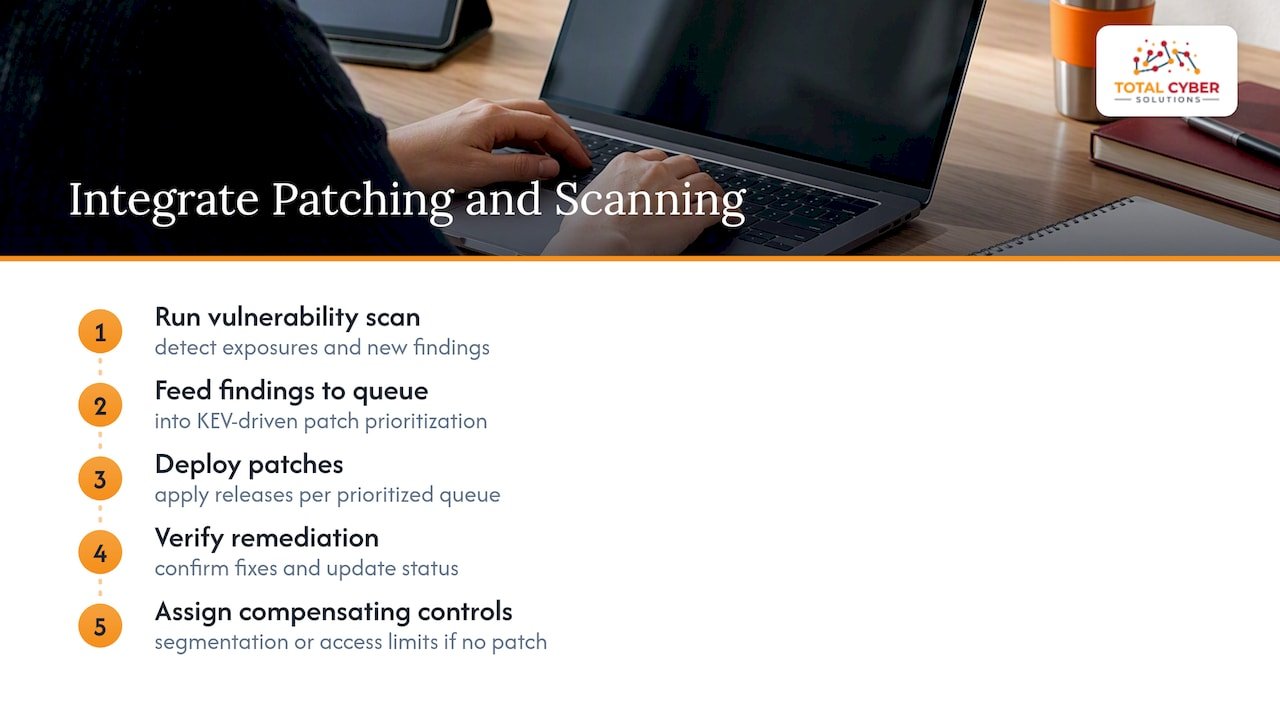
The fix is structural: feed scan results directly into your patch prioritization queue, using the same KEV-driven triage described earlier in this guide, so a new finding from a vulnerability scan lands in the same decision process as a routine patch release. Our overview of vulnerability scanning’s role in risk management covers how scanning cadence and exposure detection should align with patch windows rather than run on a separate clock.
This integration also closes a gap that pure patch management misses: not every vulnerability has a patch available yet. A mature vulnerability management program tracks those gaps and assigns compensating controls, like network segmentation or access restrictions, until a fix ships. That tracking belongs in the same system that tracks patch status, not in a separate spreadsheet that nobody remembers to update.
Meet compliance and regulatory patching requirements
Several regulatory frameworks treat timely patching as a baseline control, not an optional best practice. HIPAA’s security rule expects covered entities to address known vulnerabilities in a reasonable timeframe as part of risk management. CMMC and other government contracting frameworks require documented patch and vulnerability management processes as part of the broader control set an organization has to demonstrate. Our CMMC overview covers how these requirements fit into a broader compliance posture for contractors.
The common thread across these frameworks is documentation. It is rarely enough to patch systems; you need to show when a vulnerability was identified, when it was remediated, and why any delay happened. For organizations handling protected health information, our HIPAA risk assessment guide explains what regulators expect to see when they review a risk management program, and patch timelines are typically part of that review.
Rather than building a separate compliance checklist, map your existing patch SLAs and exception process directly to whatever framework applies to your organization. A patch policy that already documents timelines, ownership, and exceptions is most of the way toward satisfying a compliance audit without extra work layered on top.
Keep documentation ready for the audit that will eventually come
Every patch decision needs a paper trail, not because an auditor demands it on a specific day, but because institutional memory fades fast and the person who made a call six months ago may not remember the reasoning. That paper trail includes what was patched, when, by whom, and under what approval.
Exceptions need even more detail than successful patches, since they are what an auditor or regulator will scrutinize first. For every system that missed its SLA, document the reason, the compensating control in place, and the date the exception gets reviewed again. A spreadsheet works for a small environment; most teams eventually move this into whatever platform already tracks patch orchestration, so the record lives next to the action rather than in a separate file nobody checks.
Firmware and third-party application patches deserve their own line in that documentation, since they often come from vendors outside your usual patch management tooling and get missed in standard reporting. Keeping a current inventory, as outlined earlier, is what makes it possible to even know these patches exist, let alone track whether they were applied.
Three priorities for leadership this quarter
Cross-functional ownership beats another tool purchase every time. Invest in inventory accuracy and automation before expanding scope. Set SLAs that match mission impact, not a generic industry number. This quarter, assign a named patch owner, subscribe to the KEV feed, and stand up one test ring.
— Alden
Get hands-on help building or maturing your patch program
If reading this list made the gaps in your current process obvious, that is normal, and it is exactly what managed IT services exist to close. We bring senior cybersecurity professionals, not generalists, into the patch management work itself, paired with vulnerability analysis and policy compliance support when a regulatory deadline is part of the picture.

What that looks like in practice:
- A documented, risk-based patch policy built around your actual asset inventory and maintenance groups.
- KEV-driven prioritization and staged rollout handled on your behalf, with reporting your leadership can actually read.
- Compliance mapping for frameworks like HIPAA or CMMC folded into the same process instead of bolted on separately.
Request a discovery call through our MSP discovery form and we will walk through where your current process stands and what closing the gaps would look like.
FAQ
What is the best patch management strategy?
The strongest approach is a documented, risk-based operating model that combines accurate inventory, prioritization using known exploited vulnerabilities data rather than severity scores alone, and staged rollout through a test ring. NIST SP 800-40 Rev. 4 frames this as shared ownership across leadership, security, and IT, not a tool running on autopilot.
What are the top 5 patch management tools?
Tool selection should follow capability needs rather than a fixed vendor list, since requirements vary by environment and asset mix. Look for discovery, orchestration, staged rollout, verification, and reporting that slices compliance by severity and asset criticality, along with API integrations into your vulnerability management stack.
What is a patch management process?
A patch management process is the repeatable sequence an organization follows to identify, prioritize, test, deploy, and verify software and firmware updates. It typically moves from inventory and risk-based prioritization through a test ring, staged rollout across defined maintenance groups, and documented verification and reporting.
What are the NIST patch management guidelines?
NIST’s primary guidance is SP 800-40 Rev. 4, which treats patch management as preventive maintenance requiring a documented, risk-based strategy owned jointly across business and technical teams. SP 1800-31 complements it with example implementations showing how existing tools can support both routine and emergency patching.
Sources
- Known Exploited Vulnerabilities (KEV) catalog — CISA
- SP 1800-31, Improving Enterprise Patching for General IT Systems