

Don’t click, don’t reply, and don’t call back. If a text message asks you to verify an account, track a package, or claim a prize, forward it to 7726 (SPAM), report it at Reportfraud, and switch any account still using SMS codes to an authenticator app or a passkey.
TL;DR:
- Text messages can reach 98% open rates, and consumers lost $470 million to text scams in 2024, underscoring why urgent messages merit verification.
- A request for an unsolicited one time code is the clearest warning sign; legitimate companies do not ask you to read verification codes back.
- Verify alerts through the official app or the number on your card; never scan an unexpected QR code or call a number in the text.
- Organizations should replace SMS MFA on privileged and high risk accounts first, then pair mobile training with easy reporting and monitoring for suspicious link activity.
- If you lose money or expose account data, contact your bank, change passwords, revoke sessions, preserve evidence, and report financial losses to IC3.
Table of Contents
- What Smishing Is and How It Works
- Common Smishing Types and Real Examples
- Smishing Red Flags: A Quick Checklist to Spot a Scam
- Practical Prevention Steps Individuals Can Take Today
- Prevention Program Elements for Organizations
- How to Report Smishing and Recover if You or Your Organization Were Affected
- Total Cyber Solutions’ SOC-Backed Recommendations and How We Operationalize Prevention
- Legal and Regulatory Considerations for Organizations in Handling Smishing Incidents
- Role of Advanced Threat Detection Technologies and Tools for SMS-Based Threats
- Why Smishing Is Getting Harder to Spot
- Get Help Putting These Smishing Defenses in Place
- FAQ
- Sources
What Smishing Is and How It Works
Smishing is phishing delivered by text message instead of email. The goal is the same: get you to click a link, hand over a password, or read back a one-time code so an attacker can take over an account or steal money directly.
The mechanics lean on urgency. A message claims your package is stuck, your bank account is locked, or your boss needs a quick favor. You feel the pressure, you tap the link, and you land on a page built to harvest your login or your card number.
Not every smishing attempt uses a link. Some ask you to scan a QR code, move the conversation to a different messaging app, or wait for a follow-up phone call, a tactic known as vishing, that adds a human voice to make the story more convincing.
Text messages work well for scammers because they skip the defenses built around email.
- Open rates for text messages run far higher than email, which the FTC reports can reach up to 98 percent.
- Most phones have no spam filter comparable to an email inbox’s junk folder.
- A text feels personal and immediate in a way a marketing email rarely does.
Common Smishing Types and Real Examples
Scammers recycle a handful of formats because they work. Recognizing the pattern matters more than memorizing every variation.
- Fake delivery alerts. A text claims a package is delayed or needs a small fee to release, with a link to a lookalike carrier site that collects your card details.
- Bank and payment alerts. The message warns of suspicious activity and asks you to log in or read back a one-time code, which is often the exact code protecting your real account.
- Gift card and investment lures. These promise a reward, a refund, or a too-good return, and push you toward a form that captures personal or financial information.
- Government and toll-service impersonation. In March 2025, the FBI’s Atlanta field office warned of a smishing campaign impersonating the Peach Pass toll service, which generated over a thousand complaints to the Internet Crime Complaint Center in a single month.
- Job offer scams. A recruiter texts out of nowhere with a remote job and asks for banking details to “set up direct deposit” before any interview happens.
- QR-code shipment tricks. Instead of a link, the text includes a QR code tied to a delivery or payment, counting on the fact that fewer people inspect where a scanned code actually leads.
The Peach Pass case is worth remembering because it shows how a single convincing impersonation, built around a service millions of people already use, can scale into thousands of reports in a matter of weeks.
Smishing Red Flags: A Quick Checklist to Spot a Scam
Most smishing attempts share a few tells once you know what to look for.
- Urgent or threatening language that pushes you to act in the next few minutes.
- A request for money, gift cards, or a one-time code you didn’t ask for.
- A shortened or oddly formatted link, or a sender ID that doesn’t match the company’s real number.
- Noticeable spelling or grammar mistakes in a message claiming to be from a major bank or carrier.
- A request to continue the conversation in a different messaging app.
- An unsolicited QR code or a prompt to download an app you’ve never heard of.
Pro Tip: If any text asks for a code you didn’t request, treat that as the clearest signal of all: legitimate companies never ask you to read a verification code back to them.
Practical Prevention Steps Individuals Can Take Today
A few habits close most of the gap smishing relies on.
- Don’t click, don’t reply, don’t call back. Any of those actions confirms your number is active and worth targeting again.
- Forward the text to 7726 (SPAM) and file a report at ReportFraud.ftc.gov, which also lets you use your messaging app’s built-in report junk feature.
- Keep your phone’s defenses current. Update your operating system and apps, enable built-in spam filtering, block unknown senders, and review which apps can actually read your texts.
- Protect the accounts behind the message. Use unique passwords with a password manager, and move multifactor authentication from text codes to an authenticator app or a FIDO2 passkey wherever that option exists.
- Verify independently. Call the bank or company using the number on your card or their official site, never the number in the text, and never scan a QR code you weren’t expecting.
Consumers lost $470 million to text scams in 2024, a figure that tracks closely with how routinely people open and trust a text the moment it lands. A little friction before you tap goes a long way.
For a deeper look at hardening the device itself, our guide on small business mobile device security walks through settings that reduce exposure beyond smishing alone.
Prevention Program Elements for Organizations
Individual habits only go so far once a company has dozens or thousands of phones in the field. A real prevention program needs training, technical controls, and an authentication policy that assumes text messages will eventually be spoofed.
- Build smishing into regular, mobile-first awareness training rather than a once-a-year slide deck, and run simulated texts that mirror real attacks so staff recognize the pattern before it costs anything.
- Give employees an easy, low-friction way to report a suspicious text internally instead of just deleting it and moving on.
- Deploy enterprise mobile device management, carrier-level spam blocking, and secure DNS to catch malicious links before a tap turns into a breach.
- Restrict which apps employees can install on managed devices, cutting off one more path attackers use to move a victim off the original text thread.
The most important shift is on the authentication side. CISA’s mobile communications best practices guidance recommends migrating away from SMS-based MFA toward phishing-resistant options like FIDO2 hardware keys or passkeys, along with encrypted messaging apps and general device hardening. SMS codes can be intercepted or socially engineered out of an employee in a way a hardware key simply can’t be handed over; setting a Telco PIN before you fly adds an important security layer to your mobile experience with an eSIM for travelers.
When an incident does happen, speed matters. A clear internal reporting flow, SOC monitoring for unusual link clicks, and a documented playbook for exposed accounts turn a potential breach into a contained one. Our guide to building a phishing training program covers how to structure simulations and reinforcement so the habit sticks past the first quarter.
Pro Tip: Treat SMS MFA like a password you’re planning to retire, not a permanent fixture: inventory which accounts still rely on it and move the highest-risk ones first.
How to Report Smishing and Recover if You or Your Organization Were Affected
Acting fast after a suspected smishing hit limits the damage, whether it’s a single employee’s phone or a company-wide exposure.
- Report the message. Forward it to 7726 (SPAM), use your messaging app’s report junk option, and file at ReportFraud.ftc.gov; if money or data was actually lost, also file with the IC3.
- Act on your accounts immediately. Contact your bank, freeze accounts if needed, change passwords, revoke active sessions, and switch to phishing-resistant MFA on anything touched by the scam.
- Save the evidence. Keep the original message, screenshots, and any transaction records; carriers and investigators both rely on this to trace the campaign.
- Escalate internally. If this happened on a work device or account, notify IT or your SOC right away and follow your organization’s incident response playbook rather than handling it quietly on your own.
Total Cyber Solutions’ SOC-Backed Recommendations and How We Operationalize Prevention
We build smishing defense into the same operational playbook we use for every client, combining device-level controls with authentication policy and continuous monitoring rather than treating text-based scams as a one-off awareness topic.
- We help enforce phishing-resistant MFA on privileged and high-risk accounts first, since those are the ones attackers target hardest.
- We monitor for suspicious link activity and account anomalies that often follow a successful smishing click.
- We run realistic smishing simulations and feed the results directly into each client’s incident response plan.
- We support device policy enforcement across managed fleets to reduce the risk of a single compromised phone becoming a foothold into the wider network.
Engagement typically starts with a brief assessment, moves to a prioritized roadmap, and ends with managed implementation, so the controls above actually get deployed rather than just recommended. You can read more on authentication specifically in our piece on two-factor authentication options.
Legal and Regulatory Considerations for Organizations in Handling Smishing Incidents
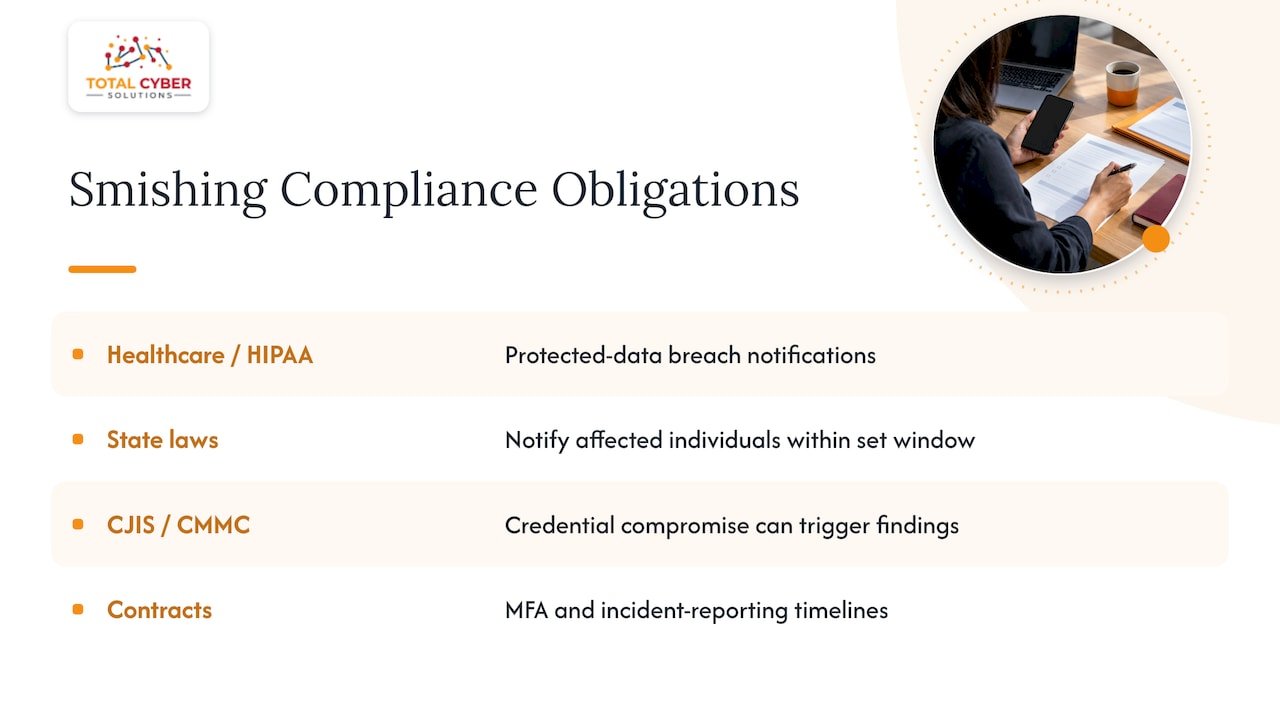
Smishing incidents rarely stay a pure IT problem once customer data, employee credentials, or financial accounts are involved. Depending on your industry, a successful smishing attack that exposes protected data can trigger breach notification obligations under frameworks like HIPAA for healthcare organizations or state-level data breach laws that require notifying affected individuals within a set window.
Organizations handling criminal justice information or working with government contracts face additional scrutiny under frameworks like CJIS or CMMC, where a smishing-driven credential compromise can become a compliance finding, not just a security incident. Documentation matters here: when and how the incident was detected, what accounts or data were touched, and what remediation steps followed all become part of the record regulators or auditors may ask for.
Contractual obligations add another layer. Many vendor and client agreements now include security requirements around multifactor authentication and incident reporting timelines, which means a smishing-related compromise can have downstream effects on business relationships, not only on the compromised account itself. Building an incident response plan that already accounts for these notification and documentation requirements, rather than improvising after the fact, keeps a bad day from becoming a bad quarter. Our policy compliance services are built around exactly this kind of readiness.
Role of Advanced Threat Detection Technologies and Tools for SMS-Based Threats
Spam filtering alone misses a lot of smishing, since attackers constantly rotate sender numbers and link domains to stay ahead of basic blocklists. Modern mobile threat detection layers in behavioral signals, flagging a text that asks for a code or redirects to a newly registered domain even when the exact sender hasn’t been reported yet.
Secure DNS filtering at the network level catches malicious links before a tap resolves into a credential-harvesting page, which matters because a phone’s built-in protections vary widely by carrier and device. CISA’s multifactor authentication guidance notes that SMS-based MFA itself is not phishing-resistant, which is part of why detection tools increasingly focus on flagging anomalous authentication attempts rather than trusting the channel the code arrived through.
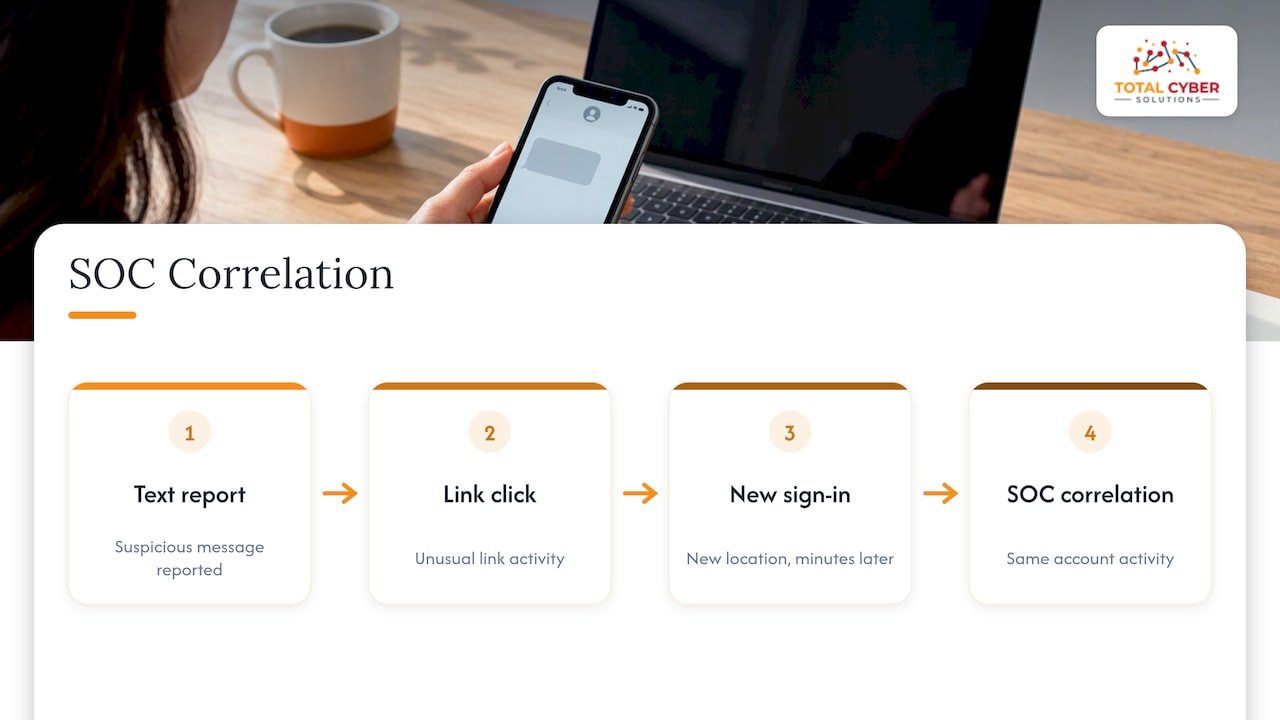
For organizations, SOC-level monitoring that correlates a suspicious text report with subsequent login activity on the same account closes a gap that neither spam filtering nor employee vigilance covers alone. A click that looked harmless in isolation can look very different once it’s matched against an unusual sign-in from a new location minutes later. That correlation is where a managed detection capability earns its keep, and it’s a core reason we build SOC monitoring into our managed cybersecurity services rather than treating detection as a standalone tool purchase.
Why Smishing Is Getting Harder to Spot
Smishing used to be sloppy: bad grammar, obvious fake numbers, easy to dismiss. That’s changing fast. The IC3’s 2025 advisory on messaging threats points to attackers using AI-generated text and voice to build credibility, then moving victims to a different app once trust is established, which makes the old advice of “look for typos” far less reliable than it used to be.
What hasn’t changed is that reporting fast and killing SMS MFA still work. If your organization hasn’t inventoried which accounts still rely on text codes, that’s worth fixing this quarter, not next year. A short assessment often reveals more exposure than expected.
— Alden
Get Help Putting These Smishing Defenses in Place
Knowing the warning signs is one thing. Rolling out phishing-resistant MFA across every privileged account, training a distributed team to report instead of click, and keeping a SOC watching for the fallout takes ongoing effort most internal IT teams don’t have the bandwidth for.

We offer managed cybersecurity services, cyber awareness training, vulnerability analysis, penetration testing, and vCSO guidance built around exactly the controls this guide covers: authentication migration, mobile device policy, and incident response that’s ready before an attack happens rather than after. A typical engagement starts with a short discovery conversation about where your current exposure sits, followed by a prioritized plan and managed implementation.
Request an MSP discovery call to talk through an assessment or a training rollout for your team.
FAQ
What should you never open in spam emails?
Never open a link or attachment in an unexpected email or text, especially one tied to a delivery, payment, or account alert you weren’t expecting. The safest move is to go directly to the company’s official site or app instead of tapping anything in the message itself.
What are signs of smishing?
Common signs include urgent or threatening wording, a request for a one-time code or payment, a mismatched sender number, and shortened or unfamiliar links. A push to continue the conversation in another app or an unsolicited QR code are also strong indicators.
Why is smishing called smishing?
The name combines SMS, the text messaging standard, with phishing, the broader practice of tricking someone into giving up information or access. It specifically describes phishing attempts delivered through text or MMS messages rather than email.
Why am I getting smishing texts?
Your number may have been included in a data breach, scraped from a public source, or simply dialed as part of a mass campaign, since attackers often text large blocks of numbers without any specific targeting. Forwarding the message to 7726 and reporting it helps carriers and regulators track and block the campaign.
Sources
- CISA: Mobile communications best practices (v2)
- FBI Atlanta warns of Peach Pass smishing scam
- IC3 PSA: 2025 messaging threats