

An IT asset inventory is an organized, regularly updated list of every hardware, software, cloud, and supplier-supported asset your organization relies on. If you’re starting from scratch, your first move is simple: scope your critical services, then assign an owner to each asset tied to them. Standards from CISA, CIS, and NIST all point the same direction, and none of them work without regular review.
TL;DR:
- Regularly updating the inventory to include all physical, virtual, cloud, and supplier-managed assets helps identify blind spots, especially in IoT and remote endpoints.
- Collecting comprehensive attributes such as network identifiers, ownership, criticality, and lifecycle status ensures the inventory supports incident response and compliance efforts.
- Implementing a six-step process—scoping, defining taxonomy, multi-source discovery, reconciliation, lifecycle management, and system integration—maintains an accurate and actionable asset record.
- Monthly verification of network-connected assets and biannual comprehensive reviews are essential for tracking changes and preventing stale data.
- Using continuous governance habits, like weekly duplicate reconciliation and tracking key metrics, improves overall inventory quality and reliability for security decision-making.
Table of Contents
- What an IT asset inventory covers and why it matters
- Essential attributes to capture for each record
- How to build an IT asset inventory: a six-step repeatable sequence
- Data quality and governance: reconciliation, ownership, and metrics
- Operational uses: vulnerability management, incident response, segmentation, and audits
- Practical lessons and starter checklist from Total Cyber Solutions
- Why inventory work deserves priority over urgency
- How Total Cyber Solutions can help with your IT asset inventory
- Authoritative standards and resources to consult
- Sources
- FAQ
What an IT asset inventory covers and why it matters
Your inventory needs to stretch further than the laptops sitting on desks. It should cover physical hardware, licensed software, cloud services, IoT and OT devices, remote endpoints, and anything a supplier manages on your behalf. Leave one category out and you’ve left a blind spot for whoever finds it first, and it’s rarely your team.
CIS Control 1 frames this clearly: you can’t defend what you don’t know you have. NIST’s CSF 2.0 guidance pushes the same point further, recommending that you prioritize by criticality rather than trying to catalog everything with equal depth on day one. Start with what keeps the business running, then expand outward.
The payoff shows up in a few concrete places:
- Faster incident response, because you already know what a compromised device connects to and who owns it.
- Smarter patch prioritization, since you can rank vulnerabilities by what actually matters to the business.
- Cleaner compliance audits, with a defensible record instead of a scramble.
- Lower software spend, once shadow licenses and duplicate subscriptions surface.
None of this requires perfection. It requires a starting scope and the discipline to keep updating it.
Essential attributes to capture for each record
A record with just a device name and an IP address won’t help you during an incident or an audit. CIS Safeguards 1.1 through 1.5 spell out a baseline field set, and it’s worth adopting close to verbatim.
For hardware, capture:
- Network identifiers (IP and MAC address)
- Hardware ID or serial number and machine name
- Owner, department, and physical or logical location
- Criticality or data classification
- Approval-to-connect status
Software records need a different lens. CIS Control 2 calls for title, publisher, version, install date, business purpose, deployment method, and decommission date. That last field matters more than people expect: an inventory that only tracks what’s installed, never what’s been retired, quietly fills up with stale entries nobody trusts.
For cloud and supplier-managed assets, add metadata that reflects who actually controls the resource: account or subscription owner, service tier, contract renewal date, and authorization status. Every record, regardless of type, should also carry a lifecycle state (active, in transition, decommissioned) so you can tell a living asset from a ghost one at a glance.
How to build an IT asset inventory: a six-step repeatable sequence
CISA’s 2025 guidance lays out a sequence that works whether you’re running a five-person IT shop or a mid-market environment with a dozen locations. It’s not a one-time project. Treat it as a loop you run continuously.
- Define scope and success criteria. Identify your critical services first, then work backward to the assets that support them. Set a target for coverage percentage before you start counting devices.
- Pick a taxonomy and minimum attribute set. Decide what fields every asset type must carry before discovery begins, so you’re not retrofitting data later.
- Run discovery across multiple feeds. Combine active scans, passive network monitoring, cloud provider APIs, and supplier-supplied lists. No single method sees everything.
- Reconcile duplicates and assign durable IDs. Merge records that point to the same physical or virtual asset, and confirm every one has a named owner.
- Implement lifecycle rules. Define what triggers a status change, an update, or a decommission, and document who’s responsible for making it.
- Integrate with vulnerability management, your CMDB or ITSM platform, and audit workflows. An inventory that lives in isolation stops being useful the moment it goes stale.
Pro Tip: Build your taxonomy before you run a single scan. Discovery tools will hand you thousands of data points, and without a schema to sort them into, you’ll spend more time cleaning data than using it.
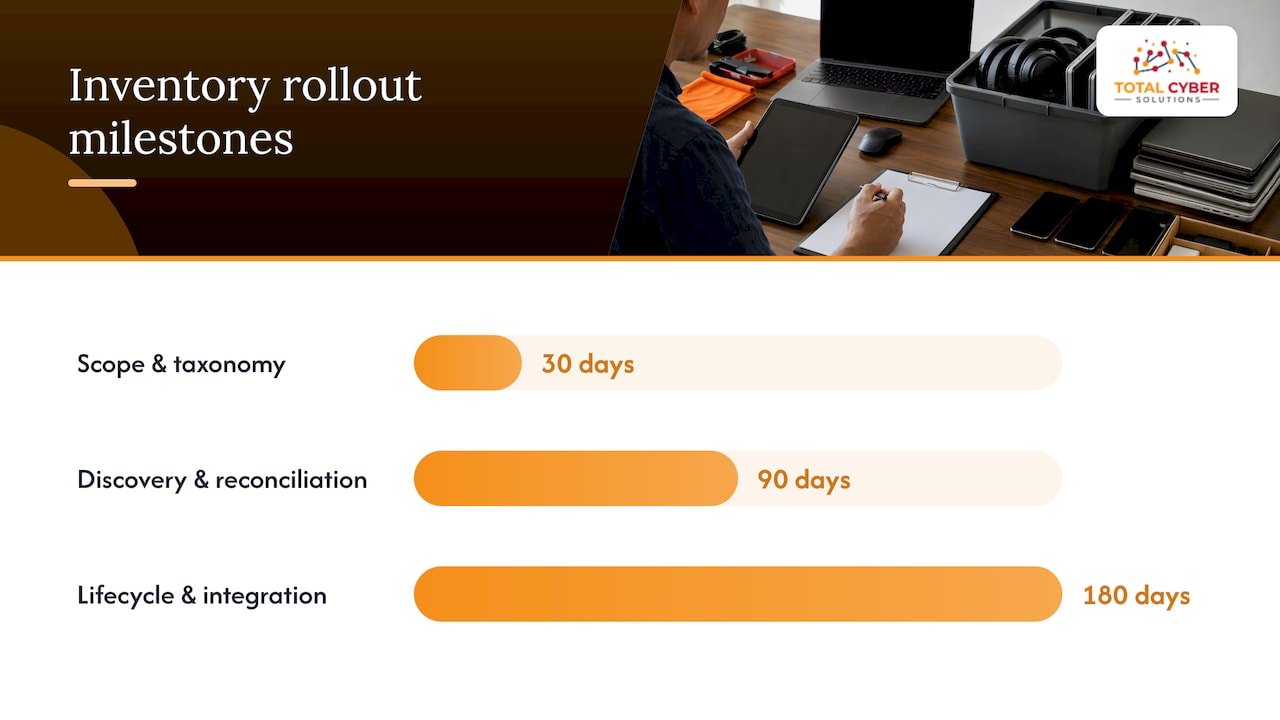
A realistic starter plan spreads this across 30, 90, and 180 days: scope and taxonomy in the first month, full discovery and reconciliation by day 90, and lifecycle rules plus system integration by day 180. Rushing the first step tends to cost you later, since a weak taxonomy means redoing the attribute work twice.
Data quality and governance: reconciliation, ownership, and metrics
An inventory is only as good as its data quality, and duplicate or missing identifiers are the most common failure point. A GAO audit found that in one agency’s environment, tooling produced at least two identifiers for close to 40% of network hardware, creating duplicate counts that made the inventory unreliable for risk decisions.
Fix this with a few governance habits:
- Assign a durable, unique identifier to every asset the moment it’s discovered, before it gets a name or an owner.
- Reconcile weekly: merge duplicates, validate network IDs, and close out records for assets no longer in service.
- Track coverage percentage, duplicate rate, and time-since-last-verify as standing metrics, not one-off audit numbers.
Pro Tip: A spreadsheet is a fine place to start, but define your schema and ownership rules before you outgrow it. Once you’re past a handful of assets, move the reconciliation work into an automated register rather than a manually maintained sheet.
Operational uses: vulnerability management, incident response, segmentation, and audits
An inventory that just sits there answers no questions. Its value shows up the moment something goes wrong or a decision needs to get made fast.
- Vulnerability triage improves when you can rank a new CVE against asset criticality instead of patching in the order tickets arrive.
- Incident response speeds up because you already know which owner to call and what else depends on the affected system.
- Zero trust and segmentation design rely on knowing exactly what talks to what, which an accurate inventory makes possible.
- License audits and decommissioning get cleaner when software records include install dates and business purpose, not just a name and a version number.
A security posture assessment leans on this same data to rank risk across the environment, and a vulnerability scanning program is only as sharp as the inventory feeding it. Skip the inventory step and both tools end up guessing at priority instead of calculating it.
Practical lessons and starter checklist from Total Cyber Solutions
Some managed service providers build their offerings around a security-first approach rather than treating security as a bolt-on. The pattern we see most often in newer environments: shadow IT that nobody scoped, duplicate records from overlapping tools, and asset lists that were accurate six months ago and haven’t been touched since.
A workable starter checklist looks like this: scope critical services and assign owners in the first 30 days, run multi-source discovery and reconcile duplicates by day 90, and have lifecycle rules and system integration live by day 180. Shadow IT tends to surface hardest during the discovery phase, which is exactly why multiple discovery feeds matter more than any single scanning tool.
Why inventory work deserves priority over urgency
Most security programs chase the urgent problem instead of the foundational one, and an asset inventory is about as unglamorous as foundational work gets. But you can’t do risk-based prioritization, patch management, or a defensible audit trail without knowing what you’re protecting first.
The teams that get this right treat inventory as a governance function, not a project with an end date. Accountability and repeatability matter more than any single tool you buy. If you’re not sure how healthy your current inventory is, that’s worth finding out before your next audit does it for you.
— Alden
How Total Cyber Solutions can help with your IT asset inventory
Building and maintaining an inventory takes ongoing attention that many internal teams don’t have the bandwidth for between everything else on their plate. Total Cyber Solutions runs discovery, reconciliation, and continuous inventory operations as part of its Managed IT Services, pairing that work with compliance support so your records hold up under an audit, not just a casual glance.

If your current inventory is scattered across spreadsheets, half-updated, or missing whole categories of cloud and supplier assets, managed support gets you to a reliable baseline faster than building it alone. Request your consultation and find out what a fully reconciled inventory looks like for your environment.
Authoritative standards and resources to consult
The guidance behind this article comes from a small set of primary sources worth bookmarking if you’re building an inventory program from the ground up.
- CISA’s 2025 asset inventory guidance lays out the scope, discovery, taxonomy, and lifecycle sequence.
- NIST SP 1299 explains how CSF 2.0 frames asset prioritization by criticality.
- CIS Controls Navigator details the specific fields and discovery cadence for Control 1.
- GAO’s 2020 audit documents the reconciliation and duplicate-identifier problems that undermine inventory accuracy.
- CISA’s Cross-Sector Cybersecurity Performance Goals set the monthly and biannual review cadence referenced throughout this piece.
Sources
Different discovery methods catch different blind spots, which is why relying on one alone always leaves gaps. Active discovery, tools that ping and scan the network, works well for devices that are on and reachable, and it’s worth running on a daily or weekly schedule depending on your network size. Passive discovery, which listens to network traffic without probing it, catches devices that active scans miss, including ones that only connect briefly.
DHCP and IPAM logs deserve a weekly review of their own. They reveal short-lived leases and unmanaged devices that never show up in a scheduled scan. For cloud assets, pull directly from provider APIs, billing exports, and resource tags rather than trusting a manually maintained list, since cloud environments change faster than most teams can track by hand. Supplier-managed assets need their own feed too: request an asset list as part of every vendor contract.
- CISA and partners release asset inventory guidance for operational technology owners and operators
- CIS Controls Navigator — Control 1: Inventory and Control of Enterprise Assets
- NIST Cybersecurity Framework 2.0: Resource & Overview Guide (SP 1299)
- Cybersecurity: DHS and Selected Agencies Need to Address Shortcomings in Implementation of Network Monitoring Program
- Cross-Sector Cybersecurity Performance Goals (CPGs) Common Baseline: Controls List
CISA’s Cross-Sector Cybersecurity Performance Goals specify monthly verification for any asset with an IP address, with a full enterprise review on a biannual cycle. That cadence gives you a floor. Networked assets change fast enough that a monthly check catches most drift before it compounds.
Unmanaged or unmanageable devices, think building sensors or legacy OT equipment, need an exception process rather than being quietly dropped from scope. Log them, note why they can’t be scanned normally, and revisit that decision on the same biannual schedule.
FAQ
What is an IT asset inventory?
An IT asset inventory is an organized, regularly updated list of the hardware, software, cloud services, and supplier-managed assets an organization depends on. It’s the foundation for risk-based decisions like patch prioritization, incident response, and compliance reporting.
What needs to be included in an IT asset inventory?
A complete inventory covers physical hardware, licensed software, cloud services, IoT and OT devices, and supplier-provided assets, each with attributes like owner, network identifiers, criticality, and lifecycle status. CIS Control 1 specifies fields such as network address, hardware address, machine name, and department for every hardware record.
How do you manage an IT asset inventory?
You manage it by defining scope and taxonomy first, running discovery across multiple feeds, reconciling duplicates with durable unique identifiers, and setting lifecycle rules for updates and decommissioning. CISA’s guidance recommends verifying network-connected assets monthly and conducting a full enterprise review on a biannual cycle, per its Cross-Sector Cybersecurity Performance Goals.
What are some examples of IT assets?
IT assets include laptops, servers, and network switches, along with licensed software titles, cloud subscriptions, and IoT sensors. Supplier-managed services and remote endpoints count too, since they carry the same risk exposure as anything owned outright.
How often should an IT asset inventory be reviewed?
Networked assets with IP addresses should be verified at least monthly, while passive discovery sources like DHCP logs are best reviewed weekly. A full enterprise-wide review is recommended twice a year, aligned with CISA’s baseline guidance.