

SaaS security is the practice of protecting cloud-hosted applications, the data inside them, user identities, and third-party integrations under a shared responsibility model where the vendor secures the infrastructure and you secure everything else.
Three things to keep front of mind:
- Inventory first. You cannot protect what you cannot see. Start with a full list of every SaaS app and integration in use, including the ones IT did not approve.
- Control identity and integrations. Most breaches trace back to stolen credentials, over-permissive OAuth tokens, or accounts that were never properly closed.
- Back up your data independently. Your SaaS vendor keeps the platform running. Recovering your specific data after accidental deletion or ransomware is your responsibility.
The sections below walk through why this matters, who owns what, the core controls to implement, the most common failure modes, and how tools like SaaS Security Posture Management (SSPM) fit into a practical defense strategy.
Table of Contents
- Why SaaS security failures cost organizations more than they expect
- The shared responsibility model: what your vendor covers and what you own
- The core control areas every SaaS environment needs
- Where SaaS security controls actually sit
- What SSPM is and why it changes how you manage SaaS security
- The top SaaS security risks and misconfigurations that cause real breaches
- SaaS security best practices: a prioritized checklist
- Real control failures and the fixes that actually work
- What a realistic SaaS security implementation looks like in terms of time and cost
- Which solution categories address SaaS security and where each one fits
- Key Takeaways
- Why most organizations end up choosing managed services for SaaS security
- Totalcyber’s managed SaaS security services close the gap between policy and practice
- Useful sources and further reading
Why SaaS security failures cost organizations more than they expect
The consequences of weak SaaS security are not abstract. Data loss, compliance violations, business interruption, and reputational damage are the four outcomes that show up repeatedly in incident reports. And the root causes are almost never exotic. They are mundane: a shared link left open to anyone, an employee who left six months ago whose account still has admin rights, a third-party app that was granted read access to your entire Google Drive and never revoked.

Shadow IT compounds the problem fast. Research from BetterCloud found that a majority of apps employees use fall outside formal IT procurement, meaning most of your SaaS footprint may be invisible to your security team. Every unmanaged app is a potential entry point with no monitoring, no policy enforcement, and no offboarding process.
Two scenarios illustrate the business impact clearly. First: a marketing team shares a folder of customer contracts in Google Drive using an “anyone with the link” setting to make collaboration easier. That link gets forwarded, indexed, or discovered. The data is now exposed with no audit trail. Second: a developer connects a productivity app to Slack via OAuth, granting it the ability to read all messages. The developer leaves the company. The account is disabled, but the OAuth token persists and the app retains access. Neither scenario requires a sophisticated attacker.
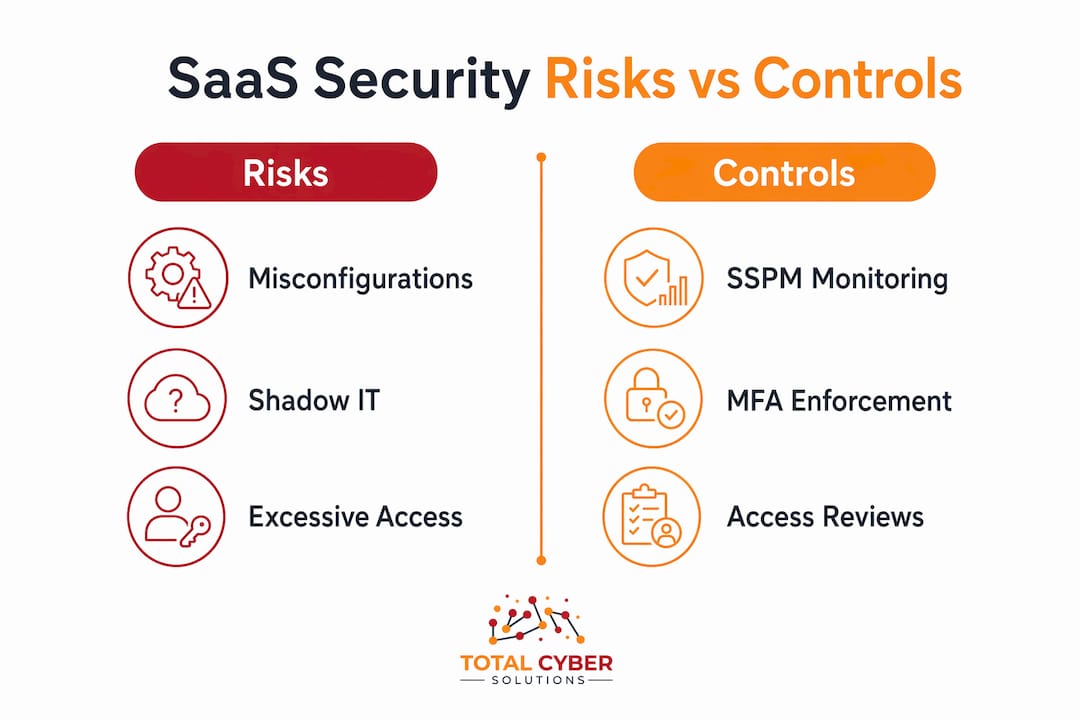
| Risk Category | Example Incident | Potential Impact |
|---|---|---|
| Exposed sharing links | Customer contracts shared publicly via “anyone with link” | Regulatory fine, customer notification requirement |
| Orphaned OAuth tokens | Departed employee’s app integration still active | Unauthorized data access, insider-threat vector |
| Shadow IT | Unapproved AI tool processing sensitive HR data | Data sovereignty violation, compliance breach |
| Weak offboarding | Former admin account reused by attacker | Full account takeover, data exfiltration |
Compliance risk runs parallel to operational risk. Frameworks like SOC 2, HIPAA, and NIST CSF all require demonstrable controls over data access and configuration. A misconfigured SaaS environment can trigger a finding that delays a contract, fails an audit, or triggers a breach notification obligation under state data protection laws.
The shared responsibility model: what your vendor covers and what you own
The shared responsibility model is a division of risk, not a security guarantee. The Cloud Security Alliance is direct about this: assuming “cloud-native” equals “secure” is one of the most common and costly mistakes organizations make.
Here is how the split actually works:
Your SaaS vendor is responsible for:
- Physical data center security and hardware
- Application uptime, availability, and patching
- Network infrastructure and encryption in transit
- Platform-level redundancy and disaster recovery
You are responsible for:
- Data classification and access controls
- User lifecycle management (onboarding, role changes, offboarding)
- Third-party integration governance and OAuth token management
- Configuration of sharing, permissions, and security settings within the app
- Independent data backups for granular recovery
- Compliance with regulations that govern your data
The practical implication: if an employee misconfigures a sharing setting, grants excessive permissions to a third-party app, or leaves the company with their account still active, the vendor is not going to catch it. That is your side of the line.
Pro Tip: Before signing a SaaS contract, check the vendor’s terms of service for three things: what data recovery they guarantee (most guarantee platform availability, not your data), how long they retain deleted data, and whether they provide audit logs you can export. If the answers are vague, budget for an independent backup solution before you go live.

The core control areas every SaaS environment needs
SaaS security is not a single product. It is a set of control areas that work together. Miss one and you leave a gap that attackers or accidents will find.
-
Data protection. Classify data by sensitivity, apply data loss prevention (DLP) policies to block unauthorized sharing, and verify encryption settings within each app. Start by auditing what data lives in your highest-risk apps (CRM, HR platforms, cloud storage) and whether sharing defaults are set to internal-only.
-
Identity and access management (IAM). Enforce multi-factor authentication across every SaaS app, ideally through a single sign-on (SSO) provider like Okta, Microsoft Entra ID, or Ping Identity. Apply least-privilege access so users only have the permissions their role requires. Review privileged accounts quarterly. Two-factor authentication is the single fastest control to reduce credential-based breach risk.
-
Configuration management. SaaS apps ship with default settings that prioritize usability over security. SSPM tools assess your configurations against security baselines and flag drift. Without tooling, this means manual audits of each app’s admin console, which most teams do not have time to do consistently.
-
API and integration security (OAuth governance). Every third-party app connected via OAuth is a non-human identity with its own permissions. Audit what each integration can access, revoke anything unused, and set token expiration policies where the platform allows.
-
Monitoring and threat detection. Enable activity logging in every SaaS app that supports it. Feed those logs into a SIEM (Security Information and Event Management) platform for correlation and alerting. User and Entity Behavior Analytics (UEBA) can surface anomalies like a user downloading unusual volumes of data before their last day.
-
Incident response and independent backups. SaaS providers do not guarantee granular data recovery. If a user accidentally deletes a year of records, or ransomware encrypts a synced folder, you need a third-party backup solution with point-in-time recovery. Test your recovery process at least twice a year.
These controls map directly to everyday operations. Onboarding a new employee means provisioning the right roles, not admin access by default. Offboarding means revoking accounts, tokens, and integration permissions on the same day. Approving a new app means reviewing its OAuth scopes before anyone connects it.
Where SaaS security controls actually sit
Understanding the layers helps you prioritize where to spend time and budget. SaaS security operates across four distinct layers, and each one has a different owner and a different set of controls.
-
User and identity layer. This is where most breaches start. Controls here include MFA, SSO, role-based access control (RBAC), and session management. A realistic failure: an employee uses a weak, reused password on a SaaS app that does not enforce MFA. The credential gets compromised in an unrelated breach, and the attacker logs in. The fix is SSO with MFA enforced at the identity provider level, so no app can be accessed without passing through your IdP.
-
Application configuration layer. Every SaaS app has settings that determine who can share data, what external access is allowed, and what security features are enabled. A realistic failure: a new Salesforce admin enables a guest portal with default permissions, exposing customer records to unauthenticated users. The fix is a configuration baseline audit using SSPM or a manual checklist against the vendor’s security hardening guide.
-
Integration and API layer. Third-party apps connected via OAuth or API keys operate as non-human identities. Controls here are limited to configuration, identity, and integrations since you cannot touch the underlying infrastructure or application code. A realistic failure: a project management tool is granted write access to a cloud storage bucket. The tool is abandoned but the API key remains valid. The fix is a quarterly integration audit with automated token expiration where supported.
-
Provider infrastructure layer. This layer is entirely the vendor’s responsibility. You have no direct controls here. Visibility is limited to what the vendor publishes in their security documentation, SOC 2 reports, and incident communications. The practical implication: do not rely on this layer for anything your compliance framework requires you to control directly.
API-based tooling matters because you cannot put a network sensor in front of a SaaS app. SSPM tools connect via the app’s native API to read configuration state, user permissions, and integration data. That is the only way to get continuous visibility at scale.
What SSPM is and why it changes how you manage SaaS security
SaaS Security Posture Management (SSPM) is a category of tooling that gives you continuous, API-based visibility into the security configuration of your SaaS applications. Think of it as a configuration scanner that runs constantly across every connected app, flags deviations from your security baseline, and in many cases can remediate them automatically.
SSPM tools use API-based visibility because there is no other way to inspect SaaS configuration at scale. You cannot deploy an agent on a vendor’s infrastructure. The API is the control plane. Palo Alto Networks’ Prisma SaaS, Obsidian Security, and Zscaler’s SSPM capabilities all operate on this model, connecting to your SaaS apps via OAuth or API keys and continuously reading configuration state.
SSPM differs from related tools in important ways:
- SSPM vs. CASB (Cloud Access Security Broker). CASB tools sit in the network path and monitor traffic to cloud apps. They are strong for data-in-motion controls and shadow IT discovery via proxy logs. SSPM focuses on configuration state inside the app, not traffic. You often need both.
- SSPM vs. IDaaS (Identity as a Service). IDaaS platforms like Okta or Microsoft Entra ID manage authentication and SSO. SSPM monitors what happens after authentication: are the app’s own permission settings configured correctly? Are integrations over-permissioned?
- SSPM vs. traditional CSPM. Cloud Security Posture Management (CSPM) tools focus on IaaS and PaaS environments (AWS, Azure, GCP). SSPM is purpose-built for SaaS apps where you have no infrastructure access.
Core SSPM capabilities to look for:
- App discovery and inventory (including shadow apps detected via API or SSO logs)
- Configuration assessment against CIS benchmarks or vendor security baselines
- OAuth and integration visibility with permission mapping
- Automated remediation workflows for common misconfigurations
- Compliance reporting mapped to SOC 2, ISO 27001, HIPAA, or NIST CSF
For smaller teams, cloud security posture guidance can help frame what to evaluate before committing to a full SSPM platform.
The top SaaS security risks and misconfigurations that cause real breaches
Most SaaS incidents do not start with a zero-day exploit. Industry analysis consistently shows that misconfigurations and process failures are the dominant root causes. Here are the failure modes that show up most often.
-
Stolen credentials and phishing. An attacker sends a convincing login page for Microsoft 365 or Google Workspace. The user enters credentials. Without MFA, the attacker is in. Remediation: enforce MFA at the IdP level and run phishing simulation training regularly.
-
Over-permissive file sharing. A user shares a sensitive document using “anyone with the link” because it is faster than managing individual permissions. The link gets forwarded or indexed. Remediation: set organizational defaults to internal-only sharing and require approval for external sharing of sensitive files.
-
OAuth and integration abuse. A third-party app requests broad OAuth scopes (read all email, access all files) and the user approves without reading the permissions. Remediation: require IT approval for OAuth connections to core business apps and audit existing integrations quarterly.
-
Orphaned accounts and tokens. An employee leaves. HR notifies IT two weeks later. The account sits active in Salesforce, Slack, and GitHub. Remediation: automate offboarding through your IdP so that disabling the SSO account cascades to connected apps immediately.
-
Misconfigured app settings. A new admin enables a feature without reviewing its security implications, such as allowing external users to join internal channels or disabling login audit logs. Remediation: use SSPM to detect configuration drift against a defined baseline and alert on changes.
-
Shadow IT and Shadow AI. Employees sign up for productivity tools, AI writing assistants, or data analysis platforms using their work email. The apps process sensitive data with no security review. Shadow IT now accounts for a majority of apps in use at most organizations, making discovery a prerequisite for any other control. Remediation: use SSPM or CASB discovery features to surface unmanaged apps and establish an app approval workflow.
Identity hygiene and configuration discipline together address the majority of these risks. Drift happens fast. An app that was configured correctly at deployment can be misconfigured by a well-meaning admin within days.
SaaS security best practices: a prioritized checklist
Start with the controls that close the most risk the fastest. For most organizations, that means identity first, then configuration, then monitoring.
-
Enforce MFA on every SaaS app. If you use SSO, enforce MFA at the identity provider. If an app does not support SSO, enable its native MFA. No exceptions for admin accounts. Enforcing MFA is the single control that most consistently prevents credential-based account takeover.
-
Centralize authentication with SSO. Route all SaaS logins through a single IdP. This gives you one place to enforce policy, one place to revoke access, and one audit log for all authentication events.
-
Inventory every app and integration. You cannot govern what you do not know exists. Use SSPM discovery, CASB proxy logs, or SSO login data to build a complete list of apps and OAuth integrations in use.
-
Restrict sharing defaults. Change organizational defaults in Google Workspace, Microsoft 365, and any cloud storage platform so that new files and folders are internal-only by default. Require explicit approval for external sharing of sensitive data.
-
Apply least privilege. Audit user roles in your highest-risk apps. Remove admin rights from anyone who does not need them. Set a review cadence (quarterly works for most teams).
-
Automate offboarding. Build an offboarding workflow that triggers on the employee’s last day: disable the SSO account, revoke OAuth tokens, transfer file ownership, and archive the account. Manual processes fail under time pressure.
-
Deploy SSPM and independent backups. SSPM gives you continuous configuration visibility. Independent backups give you granular recovery. Both are necessary; neither replaces the other.
-
Log everything and alert on anomalies. Enable audit logging in every SaaS app that supports it. Feed logs into a SIEM. Set alerts for high-risk events: admin privilege grants, external sharing of sensitive files, bulk downloads, and login from unusual locations.
Pro Tip: Measure progress with two metrics: configuration drift rate (how often SSPM flags a new deviation from your baseline) and mean time to offboard (how long it takes from an employee’s last day to full access revocation). Both numbers should trend toward zero over time. Run a recovery drill twice a year to confirm your backup solution actually works before you need it.
Small teams should prioritize MFA, SSO, and offboarding automation first since those three controls address the majority of credential and identity risk with relatively low implementation effort. Enterprise teams can layer in SSPM, UEBA, and DLP once the identity foundation is solid.
Real control failures and the fixes that actually work
These are the failure patterns that appear repeatedly in SaaS incident analysis, along with the specific remediation steps that prevent recurrence.
-
OAuth token persistence after offboarding. A user connects a third-party analytics tool to Google Workspace via OAuth. The user leaves the company. IT disables the Google account, but the OAuth token was issued to the third-party app directly. The app retains access to Google Drive data for weeks. OAuth tokens and integration permissions often remain active until manually revoked or their configured expiration. Fix: audit all OAuth grants in your Google Workspace or Microsoft 365 admin console before and after every offboarding. Use SSPM to flag active tokens belonging to disabled accounts. Set token expiration policies where the platform allows.
-
“Anyone with the link” file exposure. A sales team shares a proposal template folder in Google Drive using a public link for convenience. The link is forwarded to a prospect, who shares it further. The folder contains pricing models and customer data. Fix: set the organizational default for new shares to “restricted” (internal only). Require manager approval for any external share of files tagged as confidential. Run a quarterly audit of existing public links using Google Workspace’s sharing report or an SSPM integration.
-
Dormant admin accounts. A contractor is granted temporary admin access to Salesforce to complete a configuration project. The project ends. The contractor’s account is not revoked. Six months later, the account is still active with full admin rights. Fix: tie all privileged access grants to a defined expiration date. Use your IdP’s access review features or an SSPM tool to surface accounts with elevated permissions that have not logged in within 30 days.
-
Shadow AI processing sensitive data. A team member signs up for an AI writing tool using their work email and pastes customer support tickets into it to draft responses. The tool’s terms of service allow training on submitted data. Fix: establish an approved AI tool list. Block unapproved AI services at the network or IdP level. Train employees on what data categories are off-limits for any external tool.
-
Misconfigured guest access. A Slack workspace is configured to allow external guests to join channels without an invitation review process. A former partner’s guest account remains active in a channel that discusses internal product roadmap. Fix: audit guest accounts in collaboration tools quarterly. Require IT approval for all new guest invitations. Set guest account expiration dates at the time of provisioning.
What a realistic SaaS security implementation looks like in terms of time and cost
Getting from “we know we have a problem” to “we have continuous visibility and tested controls” takes time. Here is a realistic timeline for most organizations.
| Action | Typical Timeframe | Who Owns It |
|---|---|---|
| App and integration inventory | 1–2 weeks | IT / Security team |
| MFA and SSO enforcement | 2–4 weeks | IT / IdP admin |
| Sharing defaults and DLP policies | 2–3 weeks | IT / App admins |
| SSPM deployment and baseline | 4 weeks | Security team / MSP |
| Independent backup deployment | 1–2 weeks | IT / Cloud admin |
| Offboarding automation | 2–4 weeks | IT / HR collaboration |
| Continuous monitoring and alerting | Ongoing after SIEM integration | Security operations |
Cost drivers vary significantly by organization. The main factors are the number of SaaS apps in your environment (SSPM licensing often scales per app), the number of identities including non-human service accounts and OAuth integrations, integration complexity, and whether you have in-house security staff or need a managed service provider.
Regulatory requirements add cost too. SOC 2 Type II, HIPAA, and FedRAMP each impose specific logging, access control, and audit requirements that may require additional tooling or configuration work beyond a baseline SSPM deployment.
The ROI case is straightforward: incidents avoided, compliance findings prevented, and recovery time reduced. A single data breach notification process under state laws like California’s CCPA can cost far more than a year of SSPM licensing and managed monitoring. Recovery time from a ransomware event without independent backups is measured in days to weeks; with tested backups, it is measured in hours.
Which solution categories address SaaS security and where each one fits
No single tool covers everything. SaaS security is built from a stack of complementary categories, each solving a different part of the problem.
-
SSPM (SaaS Security Posture Management). Continuously monitors SaaS app configurations against security baselines, surfaces misconfigurations, maps OAuth integrations, and automates remediation. This is the foundational visibility layer for SaaS-specific security. Vendors in this space include Palo Alto Networks (Prisma SaaS), Obsidian Security, and Zscaler.
-
CASB (Cloud Access Security Broker). Sits between users and cloud apps to monitor traffic, enforce data policies, and discover shadow IT through proxy or API mode. Strong for data-in-motion controls and blocking unapproved apps. Complements SSPM rather than replacing it.
-
IDaaS (Identity as a Service). Platforms like Okta, Microsoft Entra ID, and Ping Identity provide SSO, MFA, and lifecycle management. The identity layer is the foundation everything else builds on. Without a solid IdP, SSPM and CASB controls are harder to enforce consistently.
-
DLP (Data Loss Prevention). Inspects data in motion and at rest to prevent unauthorized sharing or exfiltration. In a SaaS context, DLP policies can block users from emailing sensitive files externally or sharing them via public links. Microsoft Purview and Google Workspace DLP are common starting points for Microsoft 365 and Google environments.
-
Independent SaaS backup. Tools like Veeam, Spanning, or Druva provide point-in-time backups of SaaS data (email, files, CRM records) that are stored separately from the SaaS platform. Required for granular recovery from accidental deletion, insider threats, or ransomware.
-
SIEM and UEBA (Security Information and Event Management / User and Entity Behavior Analytics). Aggregates logs from SaaS apps, IdP, and network sources. UEBA adds behavioral baselines so anomalies like unusual bulk downloads or logins from new geographies trigger alerts. Platforms like Microsoft Sentinel, Splunk, and IBM QRadar are common in enterprise environments.
A practical starting stack for most organizations: IdP with SSO and MFA enforced, SSPM for configuration visibility, independent backup for recovery, and SIEM ingestion of authentication and activity logs. CASB and DLP layer in as data sensitivity and regulatory requirements increase.
When evaluating any tool in these categories, ask four questions: Does it cover the SaaS apps you actually use via native API? Can it automate remediation, or only alert? Does it provide visibility into non-human identities and OAuth integrations? Does it produce compliance-ready reports for your specific framework?
Key Takeaways
SaaS security requires identity-first controls, continuous configuration monitoring via SSPM, and independent data backups because the vendor secures the platform while you own everything else.
| Point | Details |
|---|---|
| Shared responsibility is your starting point | Vendors secure infrastructure; you own data, identities, configurations, and integrations. |
| Shadow IT is a majority problem | A majority of apps employees use fall outside formal IT procurement, making discovery the first required step. |
| OAuth tokens outlive user accounts | Disabling an account does not revoke OAuth tokens; manual revocation or SSPM tooling is required. |
| Independent backups are not optional | SaaS providers maintain platform availability, not granular customer data recovery. |
| Totalcyber accelerates the path | Totalcyber’s managed services cover SSPM deployment, identity hygiene, integration governance, and continuous monitoring for organizations that need to move faster than in-house teams allow. |
Why most organizations end up choosing managed services for SaaS security
The gap between knowing what to do and having the staff to do it consistently is where most SaaS security programs stall. Teams understand that they need to audit OAuth integrations, enforce offboarding workflows, and monitor configuration drift. The problem is that these tasks require sustained attention across dozens of apps, and most IT teams are already stretched.
The organizations that reach out to Totalcyber typically share a few common situations. They have grown their SaaS footprint faster than their security processes kept up. They have had a near-miss (an exposed file, a former employee’s account still active months later) and want to close the gaps before something worse happens. Or they are facing a compliance audit and need documented controls quickly.
What a managed security provider delivers in this context is not just tooling. It is the continuous execution: running the quarterly OAuth audits, responding to SSPM alerts at 2 AM, building the offboarding runbook that HR and IT both actually follow, and producing the compliance evidence when the auditor asks. Rapid offboarding, automated remediation, and 24/7 monitoring are outcomes that require both the right tools and the people to act on them.
If your team is managing more than 20 SaaS apps with fewer than two dedicated security staff, the math on managed services usually works in your favor. Reach out to Totalcyber via the MSP contact form to talk through where your gaps are and what a practical remediation path looks like for your environment.
Totalcyber’s managed SaaS security services close the gap between policy and practice
The hardest part of SaaS security is not knowing what to do. It is doing it consistently, across every app, every quarter, with a team that has other priorities. Totalcyber’s managed cybersecurity services are built for exactly that gap.
Totalcyber handles the execution so your team does not have to choose between daily operations and security hygiene. The managed service covers:
- App and integration inventory so you know your full SaaS footprint, including shadow apps
- SSPM deployment and baseline management with continuous drift monitoring and remediation
- Identity hygiene and offboarding automation tied to your HR and IdP workflows
- Independent backup deployment and recovery testing for your highest-risk SaaS platforms
- 24/7 monitoring and incident response with SIEM integration and alert triage
Totalcyber is a veteran-owned cybersecurity and IT services company serving organizations across the United States. Whether you are starting from scratch or hardening an existing environment, the team can scope a managed service that fits your apps, your compliance requirements, and your budget.
Start the conversation with Totalcyber’s MSP team and get a clear picture of where your SaaS security stands today.
Useful sources and further reading
The sources below informed this article and are worth bookmarking for deeper reading on specific topics.
-
Cloud Security Alliance: Understanding the Shared Responsibility Model in SaaS — The authoritative explanation of how risk is divided between SaaS providers and customers, and why “cloud-native” does not mean “secure by default.”
-
Cloud Security Alliance: State of SaaS Security Report 2025 — Annual industry report covering SaaS security posture, adoption trends, and the most common control gaps organizations face.
-
Palo Alto Networks: What Is SaaS Security? — Vendor-authored explainer covering SSPM capabilities, API-based visibility, and how SSPM complements SaaS Management Platforms.
-
BetterCloud: The Hidden Risks of SaaS in 2026 — Research on shadow IT prevalence, identity risk, OAuth integration sprawl, and shadow AI as emerging SaaS attack surfaces.
-
SaaSAssure: Understanding SaaS Data Ownership — Explains what SaaS providers actually guarantee for data recovery and why independent backups are required for granular restoration.
-
OWASP Session Management Cheat Sheet — Practical guidance on session token security, expiration policies, and controls relevant to OAuth and SaaS authentication.
-
MITRE ATT&CK Framework — The industry-standard taxonomy of adversary tactics and techniques, useful for mapping SaaS-specific attack vectors to detection and response controls.
-
Totalcyber: Dangers of Shadow IT — Practical overview of shadow IT risks and discovery approaches for organizations building a SaaS governance program.
-
Totalcyber: Cloud Services — Overview of Totalcyber’s cloud service offerings, including secure SaaS onboarding and configuration assistance.
Ready to assess your SaaS security posture? Contact Totalcyber through the MSP form for a no-pressure conversation about where to start.