

A security incident is any occurrence that actually or imminently jeopardizes the confidentiality, integrity, or availability of an information system, or constitutes a violation or imminent threat of violation of law, security policies, or acceptable use policies. That definition comes directly from NIST SP 800-61r3 and is grounded in 44 U.S.C. § 3552, the federal statutory source most U.S. agencies and compliance frameworks trace back to.
Three things follow directly from that definition:
- A security incident does not require confirmed damage. Potential or imminent jeopardy is enough to trigger a response.
- Every incident demands a coordinated response: containment, eradication, recovery, and communication.
- The definition covers both technical events and policy violations, so legal and compliance teams are in scope, not just IT.
Table of Contents
- What does the definition of a security incident actually mean?
- How is a security incident different from an event or alert?
- What are the most common types of security incidents?
- When does an event actually become an incident?
- How do you respond to a security incident step by step?
- What U.S. laws and regulations define security incidents?
- Who do you need to notify after a security incident?
- How long do security incidents typically take, and what do they cost?
- Why is identifying and managing security incidents so hard?
- How should you classify and prioritize security incidents?
- Which tools help you detect and manage security incidents?
- What happens after the incident is over?
- Key Takeaways
- What most organizations get wrong about incident response
- Totalcyber helps you build incident readiness before you need it
- Authoritative sources and further reading
What does the definition of a security incident actually mean?
The definition rests on three properties, collectively called the CIA triad. Confidentiality means keeping information accessible only to authorized people. A breach here looks like an employee emailing a customer list to a personal account. Integrity means data is accurate and unaltered. Ransomware that encrypts files or malware that silently modifies records attacks integrity. Availability means systems and data are accessible when needed. A denial-of-service attack that takes your website offline is an availability incident.
The phrase “actually or potentially jeopardizes” carries real weight. You do not need to wait for a breach to be confirmed. If a threat actor has valid credentials and is actively probing your network, that is already an incident under NIST’s glossary. Early classification protects you legally and operationally.
Pro Tip: Document potential incidents the moment you suspect them. A timestamped log entry noting “possible unauthorized access detected, investigation started” is far more defensible in a regulatory review than reconstructed notes written after the fact.
How is a security incident different from an event or alert?
Not every blip on your dashboard is an incident. Treating everything as one is how security teams burn out. Labeling everything an incident causes alert fatigue and reduces your ability to respond to real threats.
| Dimension | Security event | Alert | Security incident |
|---|---|---|---|
| What it is | Any observable system occurrence | Automated notification of a potential issue | An event analyzed and confirmed to require coordinated response |
| Analysis needed | Minimal or none | Triage to determine relevance | Full investigation and impact assessment |
| Response posture | Log and monitor | Investigate and prioritize | Contain, eradicate, recover, communicate |
| Example | Failed login attempt | SIEM flags 50 failed logins in 60 seconds | Confirmed credential stuffing attack accessing sensitive accounts |
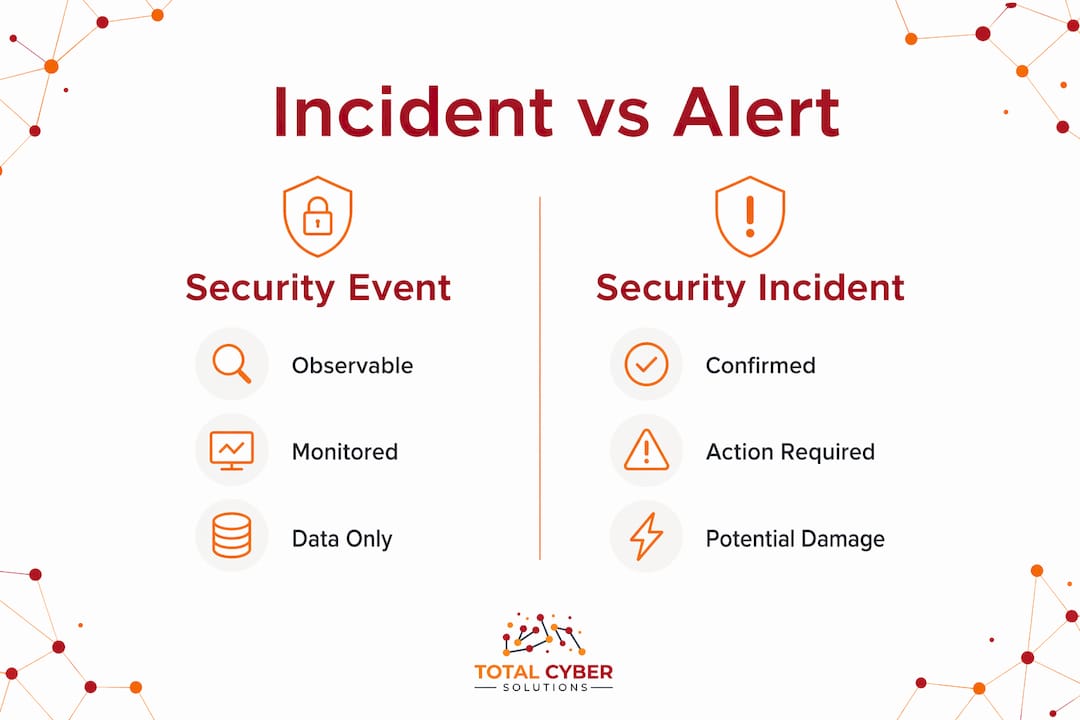
The operational consequence is straightforward. An event might need monitoring. An alert needs a human to look at it. An incident triggers your full response process, pulls in legal and leadership, and may require external notification.
What are the most common types of security incidents?
Knowing the incident types your organization is most likely to face helps you build better detection rules and response playbooks. NIST SP 800-61r3 highlights several categories that show up repeatedly across industries:
- Data breach: Unauthorized access to sensitive data, customer records, or protected health information. The immediate sign is unexpected outbound data transfers or access from unusual locations.
- Ransomware: Malware encrypts files and demands payment. You typically notice it when users suddenly cannot open files or see ransom notes on their screens.
- Unauthorized access: A user, insider, or external attacker accesses systems or data beyond their permissions. Watch for logins at odd hours or from unfamiliar IP addresses.
- Insider misuse: An employee or contractor intentionally or accidentally misuses their access. Shadow IT creates blind spots that make this harder to detect.
- Distributed denial-of-service (DDoS): Attackers flood a service with traffic until it goes offline. The sign is sudden, unexplained service degradation.
- Supply-chain compromise: Malicious code enters your environment through a trusted vendor or software update, as seen in several high-profile federal incidents.
- Phishing-driven account takeover: A user clicks a malicious link, hands over credentials, and an attacker gains access to email, cloud apps, or internal systems.
When does an event actually become an incident?
This is the question most explainers skip. Here is a practical checklist. Treat an event as an incident when you observe any of the following:
- Evidence of a policy or acceptable-use violation, even without confirmed data loss
- Credible likelihood of harm to customers, partners, or operations
- Access to sensitive, regulated, or confidential data by an unauthorized party
- Signs of lateral movement: an attacker moving from one system to another
- Privilege escalation: a standard account suddenly gaining admin rights
- Persistence mechanisms: malware or scripts designed to survive a reboot
- Public-impacting service disruption, even if the cause is not yet confirmed
NIST explicitly advises organizations not to wait for confirmed damage before starting incident procedures. Potential jeopardy is the threshold. Begin containment steps while the investigation is still running.
Pro Tip: Set your incident thresholds in writing, tied to your risk assessment, before an incident happens. HHS intentionally keeps HIPAA’s Security Rule technology-neutral so organizations can calibrate thresholds to their own risk context. Document the rationale for each threshold. That documentation is what regulators ask for.
How do you respond to a security incident step by step?
The standard incident response lifecycle, drawn from NIST SP 800-61r3, has six phases. Each one has a clear owner.
- Prepare. Build your playbooks, train your team, and test your tools before anything happens. Owner: security leadership and IT.
- Detect and analyze. Identify the incident, scope it, and classify its severity. Owner: security operations (SecOps) and IT.
- Contain. Stop the bleeding. Isolate affected systems, revoke compromised credentials, block malicious traffic. Owner: SecOps and IT, with legal notified.
- Eradicate. Remove the root cause: malware, backdoors, unauthorized accounts. Owner: IT and SecOps.
- Recover. Restore systems from clean backups, verify integrity, and return to normal operations. Owner: IT, with leadership sign-off.
- Post-incident review. Document what happened, what worked, what did not, and update your playbooks. Owner: all teams, led by security leadership.
Roles matter as much as steps. Legal and compliance need to be looped in at containment, not after recovery. Communications and PR engage when customer or public notification is likely. Leadership signs off on recovery and external disclosure decisions.
Pro Tip: Pre-defined playbooks reduce critical errors during high-pressure responses. Map each playbook step to a named role, not just a team. When an incident hits at 2 AM, “the security team” is not specific enough.

What U.S. laws and regulations define security incidents?
Several U.S. frameworks give security incidents legal weight, and knowing which ones apply to your organization shapes your documentation and notification obligations.
Federal statutory definition: 44 U.S.C. § 3552 defines an incident as an occurrence that actually or imminently jeopardizes an information system’s confidentiality, integrity, or availability, or constitutes a violation or imminent threat of violation. NIST SP 800-61r3 and FISMA-aligned frameworks all trace back to this language.
HIPAA: Under 45 CFR § 164.304, a security incident is “the attempted or successful unauthorized access, use, disclosure, modification, or destruction of information or interference with system operations.” The implementation specification at 45 CFR § 164.308(a)(6)(ii) requires covered entities to identify, respond to, mitigate, and document security incidents and their outcomes.
Sector-specific obligations vary widely:
- Healthcare covered entities and business associates must document every incident and its outcome, even low-impact ones.
- Financial institutions face FTC Safeguards Rule requirements for incident response programs.
- Federal contractors and agencies follow FISMA and agency-specific incident reporting timelines.
- Organizations subject to state breach notification laws (all 50 states have them) must notify affected individuals and regulators within defined windows after a breach is confirmed.
Strong compliance practices reduce both incident frequency and the regulatory exposure when incidents do occur.
Who do you need to notify after a security incident?
Notification is where many organizations stumble. Here is a practical checklist, roughly in order of priority:
- Internal leadership: CEO, COO, and board (if material) as soon as the incident is confirmed
- IT and SecOps: Already engaged, but formally document their involvement
- Legal and compliance: Loop in at containment; they govern what you can say and to whom
- HR: Required for insider incidents or when employee accounts are involved
- Public relations: Engage early if customer or media notification is likely
- Customers and affected individuals: Required under breach notification laws once scope is confirmed
- Regulators: HHS for HIPAA breaches, SEC for public companies, state attorneys general under state laws
- Law enforcement: FBI’s Internet Crime Complaint Center (IC3) for significant incidents; local law enforcement for insider crimes
- Cyber insurers: Notify promptly; late notification can affect coverage. Review your cybersecurity insurance requirements before an incident, not during one.
- Vendors and business associates: Any third party whose systems or data may be affected
For immediate internal notification, include: what systems are affected, the suspected nature of the incident, what containment steps are already underway, and who is leading the response.
How long do security incidents typically take, and what do they cost?
Detection is usually the longest phase. Many organizations do not identify a breach until weeks or months after initial compromise, giving attackers extended time to move laterally and exfiltrate data. Containment, once an incident is confirmed, typically takes hours to days depending on scope. Full eradication and recovery can stretch from days to weeks for complex ransomware or supply-chain events.
The cost drivers are dwell time, scope of affected systems, and whether backups were current and tested. Organizations that detect and contain incidents faster consistently face lower recovery costs and smaller regulatory penalties.
Pro Tip: Vulnerability scanning and network segmentation are two of the most effective ways to reduce dwell time and limit lateral movement. Segmentation means an attacker who compromises one system cannot automatically reach everything else.
Why is identifying and managing security incidents so hard?
Even well-resourced teams struggle with incident management. The most common challenges:
- Alert volume: Modern environments generate thousands of events daily. Without tuned detection rules, real incidents hide in the noise.
- Skill gaps: Incident response requires specialized expertise that many organizations lack in-house.
- Incomplete visibility: Cloud workloads, remote endpoints, and unmanaged devices create blind spots where incidents start undetected.
- Coordination failures: When legal, IT, and communications are not aligned before an incident, response slows and mistakes multiply.
- Scope uncertainty: Early in an incident, you rarely know how far it has spread. Decisions made on incomplete information can make containment harder.
How should you classify and prioritize security incidents?
Not all incidents are equal. Classification lets you allocate resources where they matter most. Most organizations use a severity scale with three to five levels, typically mapped to impact and urgency:
- Critical (P1): Active exfiltration, ransomware spreading, or a public-facing service down. Immediate all-hands response.
- High (P2): Confirmed unauthorized access to sensitive data, privilege escalation in progress. Response within hours.
- Medium (P3): Suspicious activity under investigation, policy violation with limited scope. Response within 24 hours.
- Low (P4): Minor policy violations, low-confidence alerts. Investigate and document within standard SLAs.
Impact assessment should consider data sensitivity, number of affected users, regulatory exposure, and operational disruption. Security benchmarks give you a reference point for calibrating severity levels against industry norms.
Which tools help you detect and manage security incidents?
A few categories of technology do most of the heavy lifting in incident detection and management:
SIEM (Security Information and Event Management): Platforms like Splunk, Microsoft Sentinel, and IBM QRadar aggregate logs from across your environment, correlate events, and surface alerts. A SIEM is typically the first tool to flag a potential incident.

IDS/IPS (Intrusion Detection and Prevention Systems): These monitor network traffic for known attack patterns. An IDS alerts; an IPS can block automatically. Snort and Suricata are widely used open-source options.
EDR (Endpoint Detection and Response): Tools like CrowdStrike Falcon and Microsoft Defender for Endpoint monitor endpoint behavior, detect malicious activity, and support forensic investigation.
Forensics tools: Volatility (memory forensics), Autopsy (disk forensics), and Wireshark (network packet analysis) help analysts understand what happened and how far an attacker got.
SOAR (Security Orchestration, Automation, and Response): Platforms like Palo Alto XSOAR automate repetitive response tasks and coordinate workflows across tools, reducing response time. Cyber-physical environments add another layer of complexity; IT and OT security teams increasingly need shared visibility across both domains.
What happens after the incident is over?
The post-incident phase goes well beyond a lessons-learned meeting. Organizations that handle this phase well come out measurably more resilient.
Regulatory reporting: HIPAA breaches affecting 500 or more individuals must be reported to HHS within 60 days of discovery. State breach notification laws impose their own timelines, often 30–72 hours for certain categories.
Legal action: Depending on the incident, organizations may pursue civil litigation against attackers, face class-action suits from affected customers, or cooperate with federal prosecution through the DOJ or FBI.
Public relations: A prepared communications plan limits reputational damage. Organizations that communicate proactively and clearly tend to recover customer trust faster than those that go silent.
Insurance claims: Document everything. Insurers require detailed incident timelines, evidence of containment steps, and proof of pre-existing controls.
Control improvements: Root-cause findings should feed directly into updated policies, new detection rules, and revised playbooks. This is where NIST’s post-incident guidance pays off: lessons learned only matter if they change something.
Key Takeaways
A security incident is any occurrence that actually or potentially jeopardizes confidentiality, integrity, or availability, or violates policy, and it demands a coordinated response even before damage is confirmed.
| Point | Details |
|---|---|
| Authoritative definition | NIST SP 800-61r3 and 44 U.S.C. § 3552 both define incidents as actual or imminent jeopardy to CIA or a policy violation. |
| Event vs. incident | Not every event is an incident; escalate only when analysis shows real or likely adverse consequences requiring coordinated response. |
| When to escalate | Lateral movement, privilege escalation, access to sensitive data, or any policy violation justifies treating an event as an incident. |
| Response lifecycle | Six phases: prepare, detect and analyze, contain, eradicate, recover, and post-incident review — each with defined role ownership. |
| Totalcyber support | Totalcyber provides managed incident readiness, playbook development, and compliance support for organizations that need expert backup. |
What most organizations get wrong about incident response
The gap between organizations that handle incidents well and those that spiral into chaos usually comes down to one thing: preparation done before anything goes wrong.
Most teams understand the lifecycle on paper. Prepare, detect, contain, eradicate, recover. But when an actual incident hits, the playbook is either missing, untested, or written so generically that no one knows which step they own. The result is improvised decision-making under pressure, and that is where the most expensive mistakes happen.
Tabletop exercises are underused. Running a simulated ransomware scenario with your IT, legal, and communications teams once a year does more for your actual response capability than any tool purchase. You find out who freezes, who escalates too slowly, and where your notification process breaks down, all without real stakes.
The other thing organizations consistently underestimate is documentation during the incident itself. Not after. During. Every containment decision, every system isolated, every credential revoked needs a timestamp and a name attached. That record is what protects you in a regulatory review, an insurance claim, or a courtroom.
Totalcyber helps you build incident readiness before you need it
When a security incident hits, the organizations that respond well are the ones that prepared months earlier. Totalcyber, a veteran-owned cybersecurity and IT services company, helps businesses build that readiness through managed cybersecurity services that include incident detection, response playbooks, compliance support, and ongoing risk management.

You do not have to figure out incident thresholds, notification timelines, or playbook structure on your own. Totalcyber’s team works with your IT, legal, and compliance stakeholders to align your response program with NIST, HIPAA, and applicable U.S. regulations. Ready to find out where your incident readiness stands? Request an incident-readiness review and get a clear picture of your gaps before an attacker finds them first.
This article is general information, not legal or compliance advice. Confirm current regulatory requirements with a qualified professional or the relevant primary source for your specific situation.
Authoritative sources and further reading
- NIST SP 800-61r3: The primary federal guide for incident response recommendations, lifecycle phases, and incident definitions. Start here for operational guidance.
- NIST CSRC Glossary: Security Incident: Concise authoritative definition aligned with FISMA and multiple NIST publications. Useful for policy and compliance language.
- 44 U.S.C. § 3552: The federal statutory definition of “incident” that underpins NIST and agency frameworks.
- HHS HIPAA Security Incidents FAQ: HHS guidance on what covered entities must do to comply with the Security Incidents Procedures standard under 45 CFR § 164.308(a)(6)(ii).
- 45 CFR § 164.304 via Cornell LII: The regulatory text defining “security incident” under HIPAA, including the attempted or successful unauthorized access standard.