

A pentest scope is the written agreement on what a tester may attack, what they may not touch, and how far they can go. Get it right and you get findings you can act on. Get it wrong and you pay for a test that skips your riskiest systems, or one that knocks over a server on a Tuesday afternoon.
This guide walks you through it. What goes in scope, what stays out, how scope differs from rules of engagement, and what to confirm before anyone sends a single packet.
TL;DR
- Scope is the boundary: which systems, accounts, and attack paths are in. Rules of engagement (ROE) are the operating terms: methods, timing, contacts, and safety limits.
- List every target precisely (URLs, IP ranges, cloud tenants, domains) and write each exclusion next to the thing it protects.
- Pick the test approach (black, gray, or white box) based on the question you need answered, not the lowest quote.
- Confirm written authorization, including from third parties like cloud and hosting providers, before testing starts.
- Review the scope document with your IT lead, your compliance owner, and the tester. Then sign it.
Table of Contents
- What pentest scope actually means
- Start with the question the test must answer
- What to define inside the scope
- What to put out of scope, and how to write it down
- Rules of engagement: the operating terms
- Confirm permissions before testing starts
- Common scoping mistakes
- How to document and review the scope
- Our perspective: scope is where trust gets built
- Scoping a test with Total Cyber
- FAQ
- Sources
What pentest scope actually means
Think of scope as the fence around the yard. Inside the fence, the tester can probe. Outside it, they leave things alone.
FedRAMP’s penetration testing guidance is a clear example. It says the test plan must identify the components being assessed and explain any exclusions, while the ROE covers the operational side: methods, techniques, constraints, schedule, contacts, notifications, and disclosures (FedRAMP penetration test guidance). Same idea, two documents, two jobs.
You don’t need to be a federal cloud provider for this to apply. A 40-person accounting firm in Richmond has the same basic questions. What exactly are we testing? What are we protecting while we test it? Who gets called if something breaks?
Scope versus rules of engagement
People mix these up all the time. Here is the plain version.
| Scope | Rules of engagement | |
|---|---|---|
| Answers | What is being tested? | How may it be tested? |
| Examples | Web app, office network, Microsoft 365 tenant, a list of IP addresses | Allowed hours, banned techniques, who to call, how data is handled |
| Changes when | Your environment or goals change | Your risk tolerance or operations change |
| Who signs | Business owner and tester | Business owner and tester |
NIST defines rules of engagement as detailed guidelines and constraints for executing security testing, set before testing begins, which give the test team authority to carry out the defined activities without asking for more permission (NIST CSRC glossary). That last part matters. The ROE is what makes the test authorized.
CISA describes the same pairing in its own work: the parties draft and sign an ROE that describes the engagement’s scope, and testing happens only at agreed times and on predetermined systems (CISA penetration testing). In practice, many providers fold both into one statement of work. That’s fine. Just make sure both halves are really in there.
Start with the question the test must answer
Before you list a single system, ask why you are testing. The answer shapes everything else.
Common reasons:
- A customer or insurer asked for proof.
- A compliance framework requires it.
- You launched a new web app and want to know if it holds up.
- You’ve had a scare, such as a phishing incident, and want to know how far an attacker could get.
- You’re about to migrate to the cloud and want a baseline.
Each reason points to a different scope. A customer questionnaire might only need your external-facing systems. An app launch needs deep testing of that one app, including every user role. A phishing scare might call for an internal test that starts from a compromised workstation.
Write the goal at the top of the scope document in one or two sentences. When a scoping debate stalls later, that sentence settles it.
What to define inside the scope
Vague scope causes most scoping pain. “Test our network” is not a scope. It’s a wish.
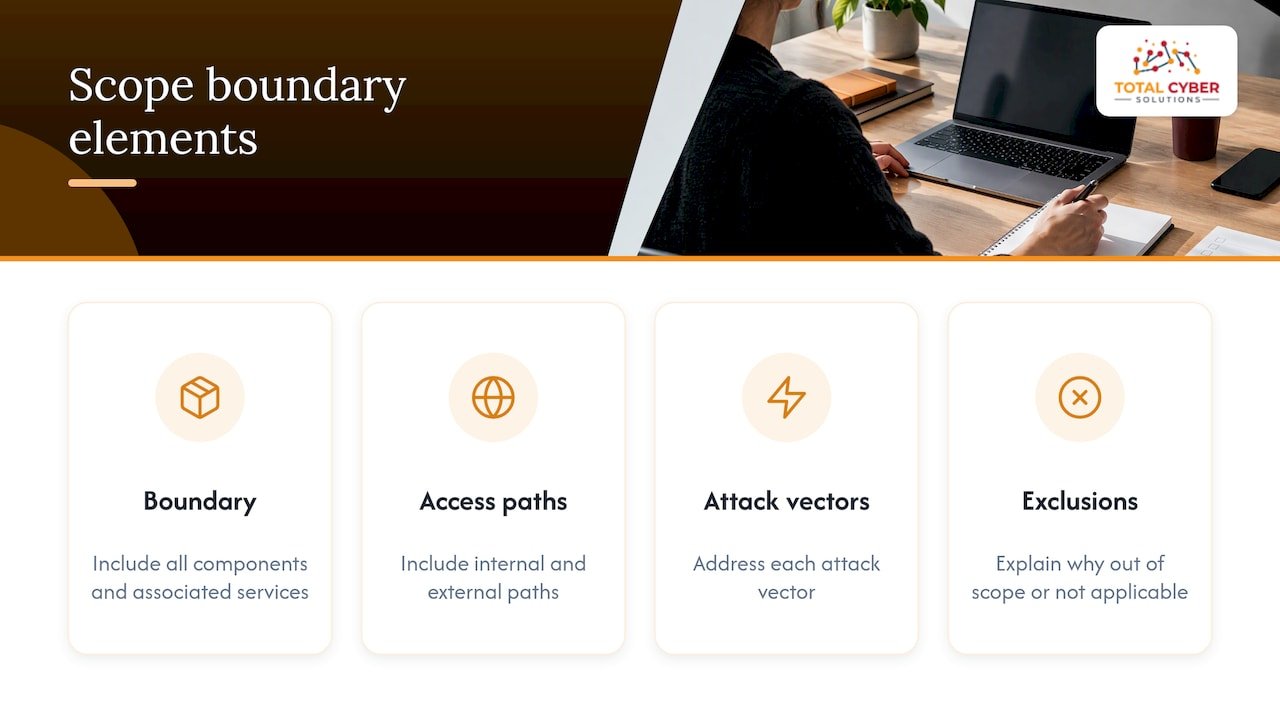
FedRAMP’s guidance says to include all components, associated services, and internal and external access paths within the boundary, and to address each attack vector or explain why it is out of scope or not applicable (FedRAMP). That habit of explaining every omission is worth copying at any size.
Identify each target precisely
A practitioner scoping guide suggests naming targets down to the identifier: URLs and paths, IP ranges, API deployments and versions, mobile app build identifiers, cloud account or tenant IDs, and Active Directory domains (Scoping and Requirements Gathering). That is one person’s guide, so treat it as a working checklist rather than a standard. It’s a good checklist.
Here is what that looks like for a small business:
- External network: the public IP addresses and domain names you own.
- Web applications: each app’s URL, its environments, and every user role to test (customer, staff, admin).
- Internal network: which subnets, which office locations, and whether Wi-Fi is included.
- Cloud and email: your Microsoft 365 tenant, Azure or AWS accounts, by identifier.
- Identity: your Active Directory or Entra ID domain.
- People: whether phishing or phone-based social engineering is included, and which staff.
- Physical: whether the tester may try to walk into an office or server room.
If you’re building the web app part of the scope, our web app pentest checklist covers what a business-logic-focused test should touch.
Choose the approach: black, gray, or white box
This is the amount of insider knowledge the tester starts with.
- Black box: no information. Mimics an outsider, but burns hours on discovery.
- Gray box: some information, like a standard user account. A practical middle.
- White box: full documentation and access. Deepest coverage per dollar.
The PCI Security Standards Council, speaking to cardholder-data environments, suggests considering white- or gray-box testing, testing all application roles, and providing relevant documentation (PCI SSC guidance). The same document says testing is not “one size fits all” and should be customized to the size and complexity of the organization.
For most small and mid-sized businesses, gray box is the sweet spot. You skip the guessing game and spend the tester’s time finding real problems.
Pick the perspective: external, internal, or both
External testing asks what an attacker on the internet can reach. Internal testing asks what happens once someone is already inside, say through a stolen password or a malicious attachment.
CISA notes that testing may use an external perspective, an internal one, or both (CISA). Its 2023 risk and vulnerability assessment of a healthcare organization ran two weeks: one week external, one week internal (CISA advisory AA23-349A). That’s a federal assessment of a large organization, not a quote for your business. But it shows the pattern: outside first, then inside.
NIST also reminds us that no single technique gives a complete picture, and recommends combining technical and non-technical methods (NIST SP 800-115). So a pentest and a vulnerability scan do different jobs. Our overview of vulnerability scanning in cyber risk management explains where each fits.
What to put out of scope, and how to write it down
Exclusions are normal. Some systems are too fragile. Some belong to someone else. Some aren’t worth the budget this round.
Common exclusions:
- Production systems that can’t tolerate downtime, like a legacy manufacturing controller or an old medical device.
- Third-party platforms you don’t own, such as a payment processor or a hosted SaaS app.
- Denial-of-service attacks.
- Specific staff, such as executives on leave.
- Systems already scheduled for retirement.
The practitioner guide mentioned earlier makes a smart point: record each exclusion beside the resource or operation it affects (guide). Don’t bury exclusions in a paragraph on page nine. Put “no automated scanning of the billing server” in the same row as the billing server.
And be honest about why. An exclusion for a fragile system is a real risk you’re accepting. Note it, so it gets tested another way, or at another time.
Rules of engagement: the operating terms
Scope says where. The ROE says how, when, and what happens if something goes sideways.
The PCI guidance says the ROE should document testing conditions, permitted exploitation, time windows, safeguards for legacy systems, communications and updates, and how sensitive data is handled and retained (PCI SSC). NIST SP 800-115 even includes an Appendix B template for rules of engagement, a handy starting point (NIST SP 800-115).
A practical ROE checklist
| Item | Questions to settle |
|---|---|
| Authorization | Who signed for the business? Do they have authority over every system listed? |
| Permitted techniques | May the tester exploit a flaw, or only report it? May they move laterally? Install tools? |
| Time windows | Business hours, nights, weekends? Any blackout dates, like payroll or month-end close? |
| Fragile systems | Which ones need extra care or testing only under supervision? |
| Communication | Who is the technical contact? How often are updates sent? How are urgent findings flagged? |
| Stop conditions | What makes the tester pause: an outage, a critical finding, unexpected data exposure? |
| Sensitive data | What if the tester reaches customer records or passwords? Is anything kept? Is it disclosed? |
| Social engineering | Which pretexts are allowed? Which staff are in or out? |
| Third parties | Do your cloud or hosting providers need to approve or be notified? |
Several of these come straight from official guidance. The PCI document says the ROE should specify whether compromised sensitive data is retained and whether passwords or other sensitive data must be disclosed. FedRAMP expects its ROE to be approved by the authorizing official before testing and to cover incident-response requirements, physical constraints, social-engineering pretexts, and affected third-party agreements (FedRAMP).
CISA’s stated practice is a good model for the human side. It coordinates potentially damaging tests with the customer, keeps in touch with the technical point of contact, and verifies after a successful penetration (CISA). Ask your tester how they handle the same moments.
Confirm permissions before testing starts
This is the step small businesses skip most often. Authorization isn’t just your signature.
Your own authority. Make sure the person signing owns or controls every asset in the scope. A franchise location, a leased office network, or a system run by a vendor may not be yours to authorize.
Third parties. Cloud platforms, hosting providers, managed service vendors, and SaaS apps each have their own terms. Some require notice. Some prohibit certain tests. Check before the test, not after an alarm trips.
Contracts. Look at customer agreements and cyber insurance terms. Some restrict testing of shared environments or require notice.
The law. Virginia’s computer crimes statutes, Va. Code §§ 18.2-152.3 and 18.2-152.4, address computer fraud and certain acts committed without authority, including causing a computer to malfunction or making unauthorized copies (Code of Virginia, Article 7.1). Section 18.2-152.5 carves out an exception for collecting information “reasonably needed to protect the security of a computer” and for diagnostics and repairs. Don’t lean on that exception as your permission slip. The clean path is a signed, specific, written authorization that covers every system in scope. For anything unusual, such as multi-state systems, ask your attorney. This article isn’t legal advice.
If a test does touch personal data, know your obligations too. Our Virginia data breach notification checklist explains what happens if exposure turns real.

Common scoping mistakes
These are patterns we see described again and again in scoping guidance. None are exotic.
- Scoping by budget alone. You trim the list until the quote fits, and the riskiest system falls off. Better to test fewer things deeply, on purpose, than to shave everything thin. Tie each item to a risk.
- Forgetting forgotten assets. An old test site, a marketing microsite, a subdomain from a former vendor. Attackers find these. Start from a full inventory of domains and IP ranges.
- Missing user roles. A web app tested only as a guest misses what an authenticated customer or a rogue admin can do.
- Fuzzy exclusions. “Don’t break anything” isn’t a rule. Name the system, the technique, and the window.
- No plan for fragile systems. If a legacy box matters, decide up front how it will be treated.
- Skipping the contact tree. When the tester finds something critical at 9 p.m., who answers the phone?
- One-and-done thinking. The environment changes. A new office, a new app, a Microsoft 365 change. Rescope each cycle.
- Ignoring retesting. Decide whether fixes get verified, and whether that’s in the price.
On cost, the scope is the biggest lever. Our guide to vulnerability assessment cost bands shows how the size and depth of the work move the budget.
How to document and review the scope
A good scope document is short, specific, and signed. Here is a simple process.
- Write the goal. One or two sentences on what the test must answer.
- Build the asset list. Pull from your IT inventory, DNS records, cloud consoles, and your IT provider. Ask staff what you’ve forgotten.
- Rank by risk. Which systems hold customer data, money, or the keys to everything else? Test those most deeply.
- Choose approach and perspective. Black, gray, or white. External, internal, or both.
- Draft inclusions and exclusions. Exclusions beside the thing they protect.
- Fill in the ROE. Use the checklist above or NIST’s template.
- Get third-party approvals. Cloud, hosting, and any vendor-run systems.
- Review as a group. Business owner, IT lead, compliance owner, and the tester walk through it together.
- Define the deliverables. Report format, a readout meeting, remediation guidance, and retest terms.
- Sign and file it. Keep a dated copy. If scope changes mid-test, change it in writing.
During review, ask the tester to explain, in plain words, what they will do on day one and what they will do if they get in. If they can’t, the scope isn’t done.
One more tip: apply least privilege to the test itself. Give testers the accounts and access they need and no more. Our least privilege playbook shows how to do that well.
Our perspective: scope is where trust gets built
We’ve sat on both sides of this conversation, and the best engagements share a trait. The client and the tester talk openly about what could go wrong before anything starts.
At Total Cyber, we build security into every managed service, with a team of senior cybersecurity professionals rather than IT generalists. That shapes how we think about scoping. A pentest scope shouldn’t be a sales document. It should reflect your real risks, your real operations, and your real compliance obligations, whether that’s HIPAA, NIST, CJIS, or CMMC.
So we push for clear communication and transparent operations. We’d rather spend an extra hour on rules of engagement than spend a night explaining an outage. And we think a pentest works best as part of a longer relationship, where findings turn into fixes and the next scope gets smarter.
If a provider hands you a one-line scope and a price, ask questions. A short scope isn’t a simple one. It’s often an unfinished one.
— Alden
Scoping a test with Total Cyber
If you’d rather not build this from scratch, that’s what we do. Our penetration testing service starts with a scoping conversation: your goals, your systems, your constraints, and the rules we’ll follow. If compliance is driving the work, our policy compliance team can align the scope with the framework you answer to. Pricing is not published, so we quote based on your actual scope.
Ready to talk it through? Request a discovery call and we’ll help you define a scope that fits your business.
FAQ
What is the difference between pentest scope and rules of engagement?
Scope defines what is being tested: systems, applications, networks, and the paths to reach them. Rules of engagement define how the test is run: techniques, timing, contacts, and safety limits. Many providers combine both in one signed document, which is fine if both halves are covered.
What should be left out of a pentest scope?
Commonly excluded items include fragile production systems, platforms owned by third parties you can’t authorize, and denial-of-service testing. Write each exclusion next to the resource it affects and note why. An exclusion is an accepted risk, so plan to cover it another way.
Who needs to approve a pentest?
Someone with authority over every system in scope must sign. That may include your cloud or hosting providers, and any vendor who manages part of your environment. Check customer contracts and insurance terms too, and ask an attorney about anything unusual.
How often should we revisit the scope?
Each time you test, and whenever your environment changes in a big way: a new app, a migration, a new office, or a merger. Treat the scope as a living document tied to your inventory, not a file you reuse unchanged.
Is a vulnerability scan the same as a pentest?
No. A scan finds known weaknesses automatically. A pentest has a human tester try to chain weaknesses together and see how far an attacker could get. NIST advises combining multiple methods because no single technique shows the whole picture.
Sources
- FedRAMP penetration test guidance
- NIST CSRC glossary: Rules of Engagement
- CISA penetration testing
- PCI SSC Penetration Testing Guidance
- NIST SP 800-115
- CISA advisory AA23-349A
- Code of Virginia, Article 7.1 Computer Crimes
- Scoping and Requirements Gathering guide