

Ransomware protection for a small business comes down to a short list of habits: lock down logins, patch fast, train your people, keep backups you have actually tested, and write down what you will do on the worst day. None of it needs an enterprise budget. All of it needs someone to own it.
You are busy. Someone on your team is juggling three tasks, a phone call and an inbox. The click happens in a second. This guide shows you how to put guardrails in place before that second arrives, and what to do if it already has.
TL;DR
- Ransomware locks your data and demands payment. It usually gets in through a phishing email, an unpatched system or exposed remote access.
- The core defenses are multi-factor authentication, fast patching, least-privilege access, email filtering and staff training.
- A backup you have never restored is a hope, not a plan. Test it.
- If you are hit, isolate the machines, protect your offline backups and report to the FBI, CISA or the Secret Service.
- Paying does not guarantee you get your data back.
Table of Contents
- What ransomware is, and how it gets in
- The ransomware protection checklist
- Lock the front door: MFA and access
- Patch what attackers are already using
- Stop the phishing click
- Backups: the part that saves you
- Write the plan before you need it
- If it happens: the first hour
- Our perspective
- How we can help
- Questions to ask any IT provider
- FAQ
- Sources
What ransomware is, and how it gets in
Ransomware is a malicious attack in which criminals encrypt your data and demand payment to restore access. NIST describes one common example: a user clicks a malicious link, a file downloads, and the malware uses weaknesses in your systems to spread.
NIST also notes that cybercriminals want their malware to spread as widely as possible, hitting people and businesses of every size. Being small does not make you invisible. It often means fewer layers between the attacker and your files.
According to the Federal Trade Commission, attackers commonly get in through:
- Phishing emails with malicious links or attachments
- Vulnerabilities in servers
- Infected websites
- Malicious online ads
- Remote access tools such as RDP or VNC that were left exposed
Notice what these have in common. Most are ordinary workday moments: an email, a website, a login. That is why the fixes are mostly ordinary too.
It is not only about locked files
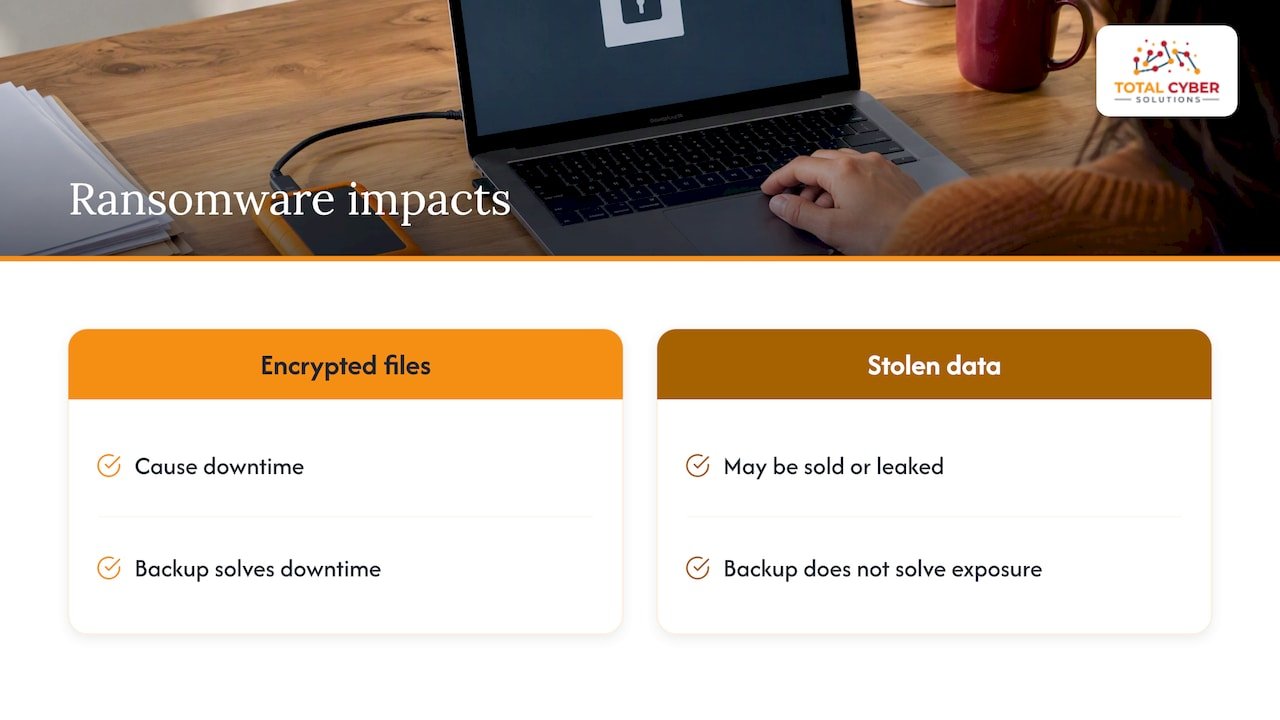
Modern attacks often involve theft first. CISA says ransomware actors often threaten to sell or leak stolen data if you do not pay. In some cases, the threat of leaking is the only extortion they use. So restoring from backup solves the downtime problem. It does not solve the data-exposure problem. Plan for both.
The ransomware protection checklist
Here is the working list. It follows the guidance CISA publishes for small businesses, in the order we would tackle it. Work down it, one item per week if you have to.
| Control | What “done” looks like |
|---|---|
| Multi-factor authentication (MFA) | Enforced by system settings, not by asking nicely. Admin accounts and email first. |
| Patching | Automatic updates on where possible. Known exploited vulnerabilities fixed first. |
| Admin rights | No administrator privileges on everyday user laptops. |
| Email filtering | Spam filtering on, plus SPF, DKIM and DMARC for your domain. |
| Backups | Regular, kept offline or separate, and restores tested. |
| Disk encryption | Laptops encrypted so a lost device is not a data breach. |
| Training | Everyone trained, repeatedly, not once at onboarding. |
| Incident plan | Written, printed, approved by leadership, and practiced. |
That table maps directly to CISA’s guidance for small businesses, which calls for MFA through technical controls, prioritized patching of known exploited vulnerabilities, removing admin rights from user laptops, testing backups and encrypting laptop disks. If you want a broader starting point beyond ransomware, our seven-first-steps cybersecurity checklist is aligned to NIST and CIS.
Now the detail on each.
Lock the front door: MFA and access
A stolen password is the cheapest way in. MFA makes it much less useful on its own. The key word in the guidance is enforce. If MFA is optional, the person you worry about most will be the one who skipped it.
Start with:
- Email and Microsoft 365 or Google accounts
- Anyone with administrator rights
- Remote access and VPN logins
- Banking and payroll portals
Then think about who can reach what. The FBI’s guidance recommends managing access on the principle of least privilege, so employees can reach only the systems they need. Your receptionist does not need access to the finance share. If their account gets phished, it should not matter much.
Also close the doors you forgot you opened. Remote desktop exposed to the internet is a classic. If you do not know whether you have any, that is worth finding out this week. Cutting down who and what can be reached shrinks the target, a point that applies just as much to cybersecurity for e-commerce shops as to offices.
Patch what attackers are already using
You cannot patch everything on the same day. You can patch the right things first. CISA recommends prioritizing the vulnerabilities in its Known Exploited Vulnerabilities (KEV) catalog, meaning flaws attackers are using in real attacks right now, and turning on automatic updates wherever possible.
In practice:
- Keep an inventory of what you run: laptops, servers, firewalls, routers, software.
- Turn on automatic updates for operating systems and common apps.
- Do not forget the boring devices. Firewalls and VPN appliances are targets.
- Set a deadline for “critical and exploited” fixes, measured in days, not months.
We lay out a full approach in our KEV-first patch management strategy. If you are not sure what is exposed on your network, a vulnerability analysis finds it before someone else does. The FBI also recommends annual penetration tests and vulnerability assessments. Our penetration testing service plays the attacker so you do not meet the real one first.
Stop the phishing click
Phishing is still the most relatable way in. The email looks like an invoice. It lands during a busy afternoon. The click happens.
Two layers help:
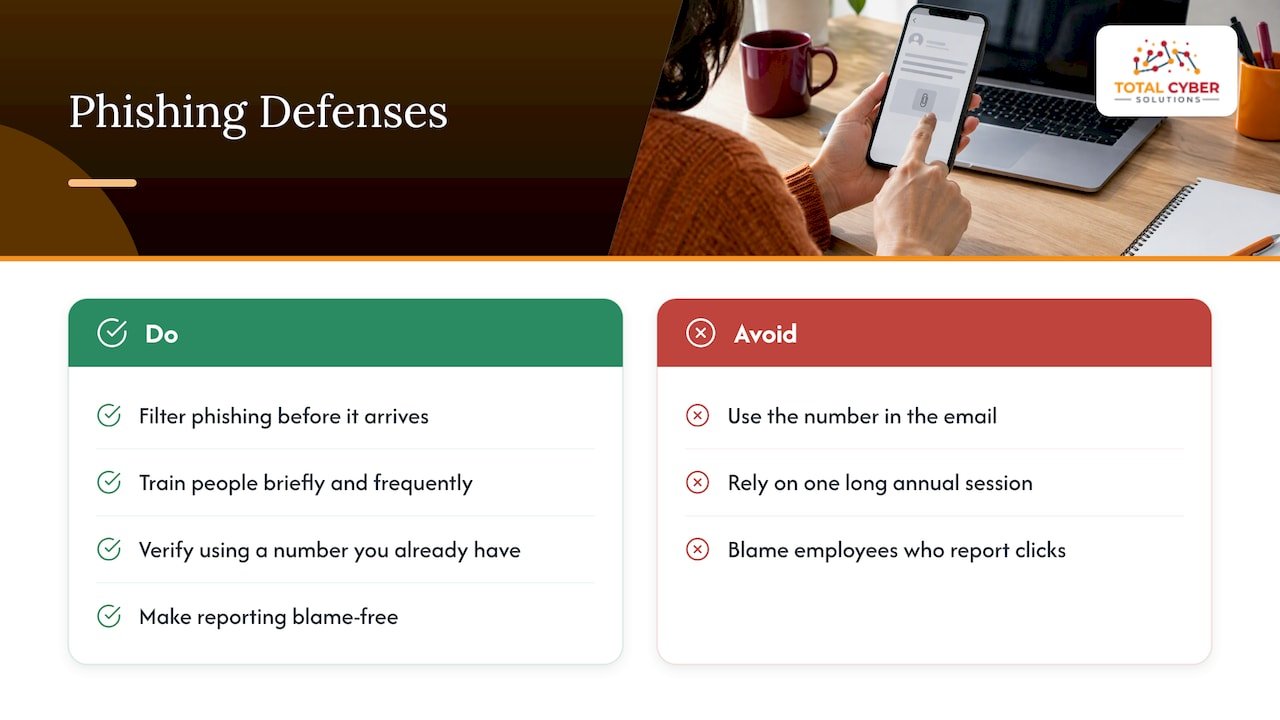
Filter it before it arrives. The FBI notes that strong spam filters can keep phishing emails from reaching your staff, and that SPF, DKIM and DMARC can help prevent spoofing of your domain.
Train people to pause. The FTC advises regular employee training that includes how to spot phishing and keep up good security practices. Make it short and frequent. A few minutes a month beats one long session a year that everyone forgets.
A simple rule for your team: if a message is urgent, unexpected or just feels off, stop. Verify by phone or in person, using a number you already have, not the one in the email. And make reporting easy and blame-free. The employee who says “I think I clicked something” in the first five minutes is worth more than any tool.
Want to build a program? See our phishing training blueprint and our primer on how phishing works.
Backups: the part that saves you
Backups are your way out. But there is a catch most small businesses learn too late.
CISA’s advice is to back up important systems regularly, test partial and full restores, and write a restoration plan that includes how often you back up. It warns that a scheduled backup alone is not enough. Businesses that never test the actual restore can still suffer serious disruption when it matters.
Ask yourself:
- When did we last restore a file? A whole server?
- How long did it take? Could we live with that downtime?
- Is at least one copy offline or otherwise out of reach of a compromised admin account?
- Do we know who does what during a restore?
The FBI’s guidance also says to secure backup data offline during an incident. Attackers know where backups live. They go there early.
Our 3-2-1 backup guide explains a practical setup and how to aim for a 24-hour recovery point. If your files live in the cloud, read our notes on secure cloud storage for small business too. Cloud sync is not the same thing as backup.
Write the plan before you need it
When ransomware hits, nobody thinks clearly. That is why you write the plan on a calm day.
CISA’s #StopRansomware Guide says incident response plans should be maintained, regularly exercised, kept in hard copy and offline, and reviewed and approved in writing by the CEO. Printing it matters. If your systems are encrypted, a plan stored on your file server is a plan you cannot read.
Your one-page plan should name:
- Who makes decisions, and their backup
- Phone numbers for your IT provider, your lawyer and your insurer
- Where the offline backups are, and who can reach them
- Who talks to staff, customers and regulators
- Which systems come back first
If you are in Virginia, our breach response planning steps cover the local angle.
If it happens: the first hour
Stay calm. Move in this order, based on the FBI’s ransomware guidance:
- Isolate. Disconnect infected computers from the network. For devices that are not yet fully corrupted, isolate them or power them off.
- Protect backups. Secure backup data offline so it cannot be encrypted too.
- Call for help. Contact your IT or security provider and your insurer if you have a policy.
- Report. The FBI strongly encourages victims to contact a local FBI field office or the U.S. Secret Service right away. CISA’s reporting page says you only need to report once to the FBI, CISA or the Secret Service, and the others are notified.
- Investigate. The FTC advises bringing in experienced IT or cybersecurity staff, or a third-party firm, to work out how the attacker got in, what they touched and how to contain it.
Do not skip step five. If you restore without finding the way in, the attacker can walk back through the same door.
Should you pay?
The FBI says the U.S. government does not encourage paying ransoms. Payment does not guarantee you get your data back, and it may invite repeat attacks. Before any decision, weigh the cost, the feasibility and the time to recover from backups. This is the moment your tested backups pay for themselves. It is also a good time to talk with legal counsel and your insurer.
Our perspective
We see the same pattern again and again. Small businesses rarely lose to a brilliant hacker. They lose to a missed update, a shared password, a backup that was never tested, or a plan nobody wrote down.
So we build security into managed IT from day one. It is not an add-on you buy after a scare. Our team is senior cybersecurity people, not just IT generalists, and the goal is to bring enterprise and government-grade practice to businesses your size, with clear communication and U.S.-based 24/7 support.
Our advice if you only have a few hours this month: turn on enforced MFA, test one restore, and print your incident plan. Those three moves cut more risk than most tools you could buy.
Compliance matters here too. If you handle health data, criminal justice information or defense contracts, ransomware is also a regulatory event, with frameworks like HIPAA, CJIS and CMMC in play. Readiness is part of the work, not paperwork after the fact.
— Alden
How we can help
You do not have to run all of this alone. Total Cyber Solutions is a veteran-owned company that provides managed cybersecurity services and managed IT services for small and mid-sized businesses. That covers monitoring, incident response, Microsoft 365 management, vulnerability and penetration testing, compliance consulting, vCSO leadership and staff training.

If you want a second set of eyes on your ransomware readiness, tell us about your business. We will tell you where you stand in plain English.
Questions to ask any IT provider
Whether you work with us or someone else, ask these:
- Is MFA enforced on every account, and who checks?
- How fast do you patch known exploited vulnerabilities?
- When did you last test a full restore for us, and how long did it take?
- Where are our backups, and can an admin account delete them?
- Who do we call at 2 a.m., and do they pick up?
- Do you help with training and with the written incident plan?
Vague answers are an answer too.
FAQ
What is the best ransomware protection for a small business?
There is no single product. The strongest setup layers enforced MFA, fast patching, email filtering, least-privilege access, tested offline backups and staff training. A managed provider can run these for you and watch for trouble around the clock.
Is antivirus enough to stop ransomware?
No. Antivirus helps, but ransomware often arrives through stolen logins, unpatched systems or exposed remote access, and antivirus alone does not close those doors. Treat it as one layer in the checklist above, not the whole plan.
Should a small business pay the ransom?
The FBI does not encourage it, since payment does not guarantee recovery and may invite repeat attacks. Check whether you can restore from backups first, and speak with legal counsel and your insurer before deciding.
Who do I report ransomware to?
Report to the FBI (through a local field office or IC3), CISA or the U.S. Secret Service. Reporting once to any of them notifies the others, according to CISA.
Sources
- Ransomware, NIST
- Cybersecurity for Small Business, Federal Trade Commission
- Ransomware FAQs, CISA
- Cyber Guidance for Small Businesses, CISA
- #StopRansomware Guide, CISA
- Report Ransomware, CISA
- Ransomware Prevention and Response for CISOs, FBI